ENGLISH
OSD (On-Screen Display) 1
1
84
If a TV is connected to this unit, you can use the OSD (on-
screen display) to set up the unit.
Make sure your TV is connected to the receiver and turned on.
<
Any on-screen display shown on the TV will not be recorded
onto VIDEO 1.
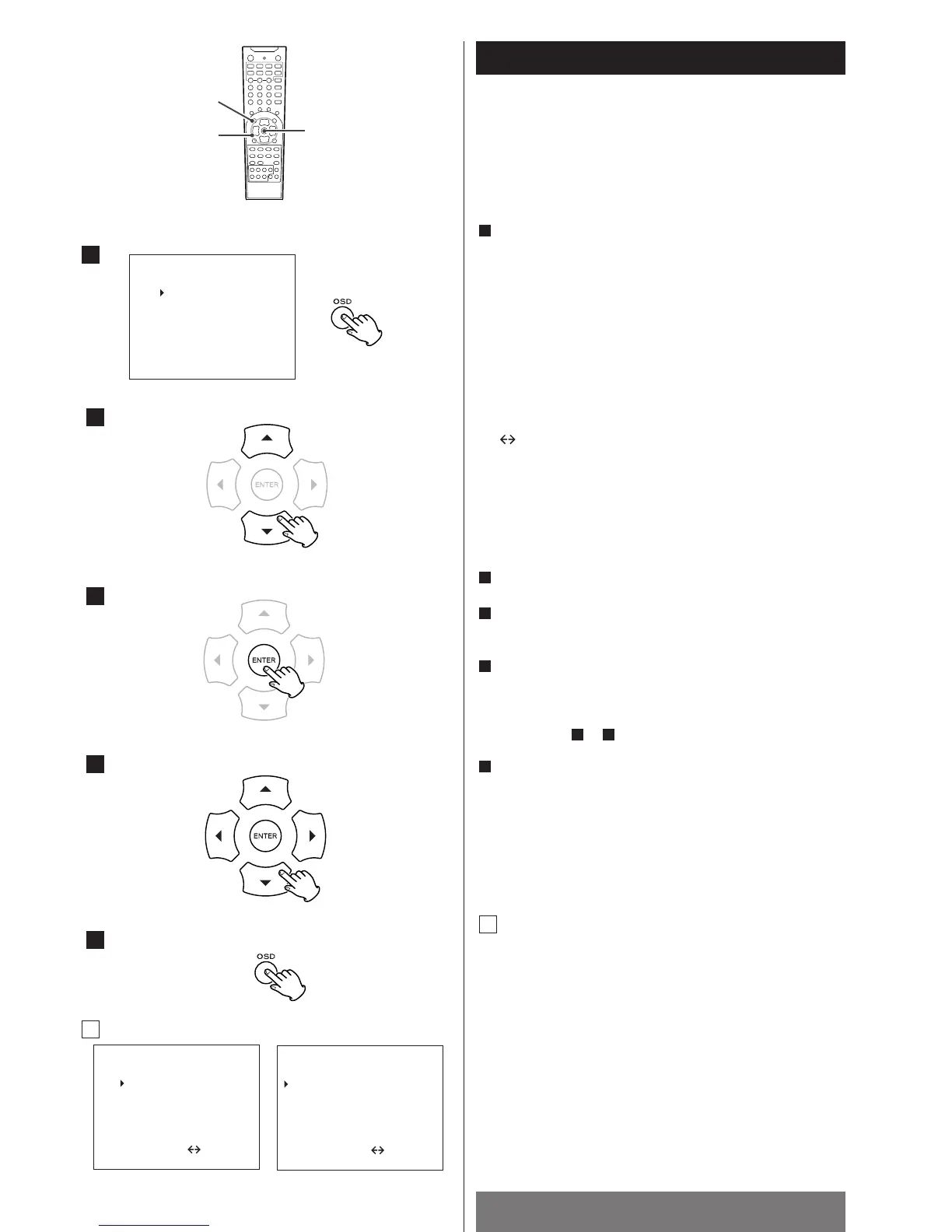
Press the OSD button.
The main menu appears on the TV screen.
<
If a normal TV (4:3) is connected and you press the OSD button
during playback of DVD, the screen might be distorted for a
short while. It is not a malfunction.
<
Use the OSD button to display or exit the Setup menu.
<
Buttons which can be used in the menu are shown at the
bottom of the screen.
Example:
1
Speaker Setup
Speaker size setting (1/2 page)
Select the speaker you want to change using the up/down
buttons, and press the ENTER buttons to change the setting.
Distance, Virtual Surround Angle (2/2 page)
Select an item you want to change using the up/down
buttons, and press the left/right buttons to change the
setting.
Press the OSD button to go back to the main menu.
A
2
3
4
5
A
up/down : Press the Up or Down button to move the cursor.
: Press the Left or Right button to change the
setting.
OSD : Press the OSD button to end and exit the main
menu.
ENTER : Press the ENTER button to select the setting.
1/2 PAGE : To advance to the next page, press the Up or
Down button repeatedly.
Select a menu using the up/down buttons (5/b).
Press the ENTER button.
The selected menu appears on the screen.
Change the setting using the up/down/left/right buttons
(5bgt
) and the ENTER button. Press the OSD button to go
back to the main menu (or the previous page).
See page 84~86 for details.
Repeat steps to to select and set other items.
When all the settings have been finished, press the OSD
button to exit the main menu.
<
Depending on your selections for the input source, input
signal, decoding mode, surround mode, speaker settings, etc.,
the conditions of each menu may differ.
5
42
4
3
2



 To Next Page