EasyManua.ls Logo

Teac AG-550 - Basic Operation and Tuning Procedures; Simplified Setup Procedure; Radio Tuning Methods; Listening to Radio Broadcasts

Teac AG-550
14 pages
Print Icon
To Next Page IconTo Next Page
To Previous Page IconTo Previous Page
Loading...
hn
10mm
__|
5mm
som|
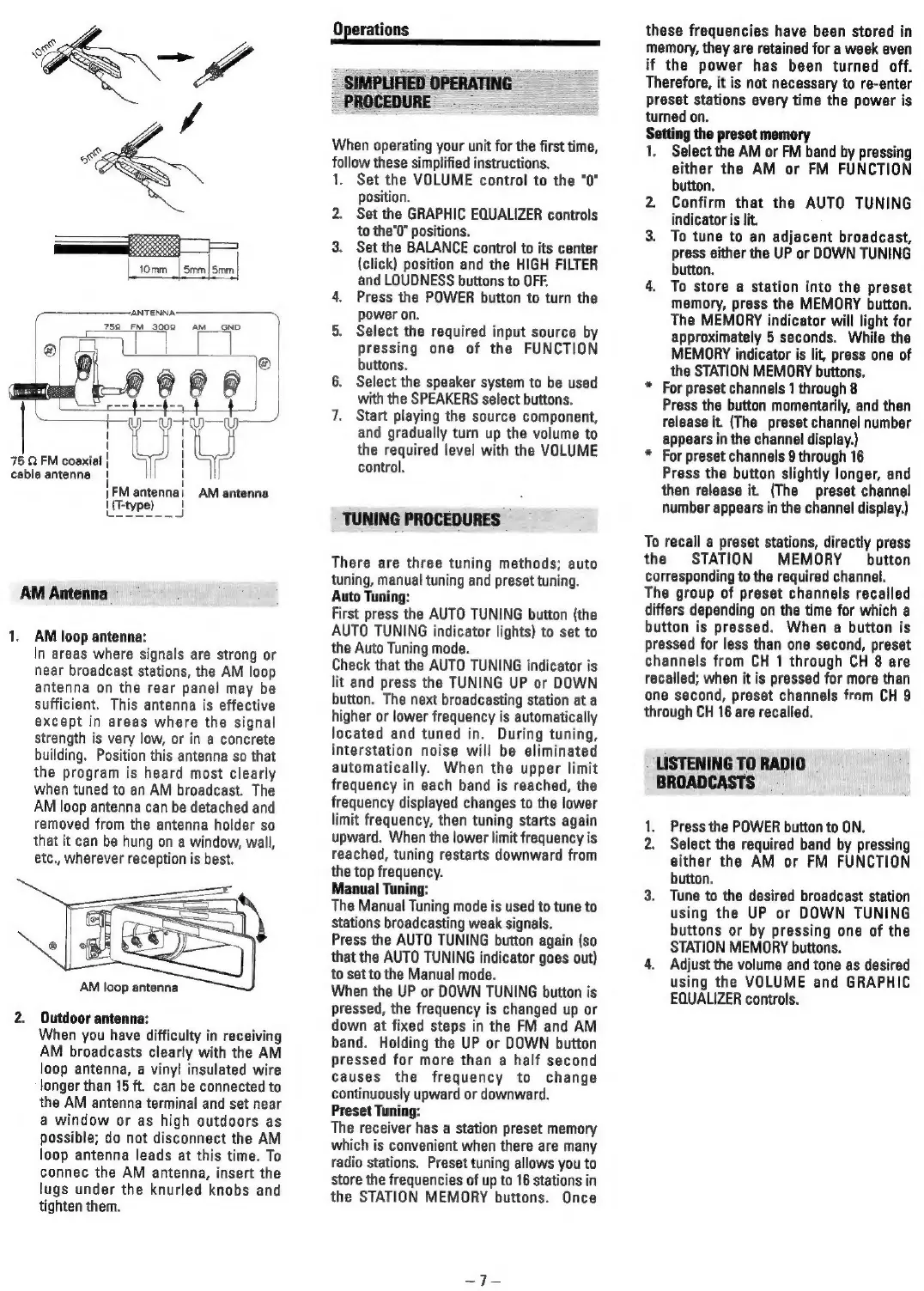
ANTENNA:
752
FM
3002
AM
__GND
=|
.
a
F
1
T
I
|
75
Q
FM
coaxial
|
I
cable
antenna
{
}
|FM
antenna!
AM
antenna
|
(T-type)
!
[ese
La
AM
Antenna
1.
AM
loop
antenna:
In
areas
where
signals
are
strong
or
near
broadcast
stations,
the
AM
loop
antenna
on
the
rear
panel
may
be
sufficient.
This
antenna
is
effective
except
in
areas
where
the
signal
strength
is
very
low,
or
in
a
concrete
building.
Position
this
antenna
so
that
the
program
is
heard
most
clearly
when
tuned
to
an
AM
broadcast.
The
AM
loop
antenna
can
be
detached
and
removed
from
the
antenna
holder
so
that
it
can
be
hung
on
a
window,
wall,
etc.,
wherever
reception
is
best.
AM
loop
antenna
2.
Outdoor
antenna:
When
you
have
difficulty
in
receiving
AM
broadcasts
clearly
with
the
AM
loop
antenna,
a
vinyl
insulated
wire
longer
than
15
ft.
can
be
connected
to
the
AM
antenna
terminal
and
set
near
a
window
or
as
high
outdoors
as
possible;
do
not
disconnect
the
AM
loop
antenna
leads
at
this
time.
To
connec
the
AM
antenna,
insert
the
lugs
under
the
knurled
knobs
and
tighten
them.
Operations
SIMPLIFIED
OPERATING
PROCEDURE
|
-
When
operating
your
unit
for
the
first
time,
follow
these
simplified
instructions.
1.
Set
the
VOLUME
control
to
the
"0"
position.
2.
Set
the
GRAPHIC
EQUALIZER
controls
to
the’0"
positions.
3.
Set
the
BALANCE
control
to
its
center
(click)
position
and
the
HIGH
FILTER
and
LOUDNESS
buttons
to
OFF.
4.
Press
the
POWER
button
to
turn
the
power
on.
5.
Select
the
required
input
source
by
pressing
one
of
the
FUNCTION
buttons.
6.
Select
the
speaker
system
to
be
used
with
the
SPEAKERS
select
buttons.
7.
Start
playing
the
source
component,
and
gradually
turn
up
the
volume
to
the
required
level
with
the
VOLUME
control.
TUNING
PROCEDURES
There
are
three
tuning
methods;
auto
tuning,
manual
tuning
and
preset
tuning.
Auto
Tuning:
First
press
the
AUTO
TUNING
button
(the
AUTO
TUNING
indicator
lights)
to
set
to
the
Auto
Tuning
mode.
Check
that
the
AUTO
TUNING
indicator
is
lit
and
press
the
TUNING
UP
or
DOWN
button.
The
next
broadcasting
station
at
a
higher
or
lower
frequency
is
automatically
located
and
tuned
in.
During
tuning,
interstation
noise
will
be
eliminated
automatically.
When
the
upper
limit
frequency
in
each
band
is
reached,
the
frequency
displayed
changes
to
the
lower
limit
frequency,
then
tuning
starts
again
upward.
When
the
lower
limit
frequency
is
reached,
tuning
restarts
downward
from
the
top
frequency.
Manual
Tuning:
The
Manual
Tuning
mode
is
used
to
tune
to
Stations
broadcasting
weak
signals.
Press
the
AUTO
TUNING
button
again
(so
that
the
AUTO
TUNING
indicator
goes
out)
to
set
to
the
Manual
mode.
When
the
UP
or
DOWN
TUNING
button
is
pressed,
the
frequency
is
changed
up
or
down
at
fixed
steps
in
the
FM
and
AM
band.
Holding
the
UP
or
DOWN
button
pressed
for
more
than
a
half
second
causes
the
frequency
to
change
continuously
upward
or
downward.
Preset
Tuning:
The
receiver
has
a
station
preset
memory
which
is
convenient
when
there
are
many
radio
stations.
Preset
tuning
allows
you
to
store
the
frequencies
of
up
to
16
stations
in
the
STATION
MEMORY
buttons.
Once
these
frequencies
have
been
stored
in
memory,
they
are
retained
for
a
week
even
if
the
power
has
been
turned
off.
Therefore,
it
is
not
necessary
to
re-enter
preset
stations
every
time
the
power
is
turned
on.
gr
the
preset
memory
Select
the
AM
or
FM
band
by
pressing
either
the
AM
or
FM
FUNCTION
button.
2.
Confirm
that
the
AUTO
TUNING
indicator
is
lit.
3.
To
tune
to
an
adjacent
broadcast,
press
either
the
UP
or
DOWN
TUNING
button.
4.
To
store
a
station
into
the
preset
memory,
press
the
MEMORY
button.
The
MEMORY
indicator
will
light
for
approximately
5
seconds.
While
the
MEMORY
indicator
is
lit,
press
one
of
the
STATION
MEMORY
buttons.
*
For
preset
channels
1
through
8
Press
the
button
momentarily,
and
then
release
it.
(The
preset
channel
number
appears
in
the
channel
display.)
*
For
preset
channels
9
through
16
Press
the
button
slightly
longer,
and
then
release
it.
(The
preset
channel
number
appears
in
the
channel
display.)
To
recall
a
preset
stations,
directly
press
the
STATION
MEMORY
button
corresponding
to
the
required
channel.
The
group
of
preset
channels
recalled
differs
depending
on
the
time
for
which
a
button
is
pressed.
When
a
button
is
pressed
for
less
than
one
second,
preset
channels
from
CH
1
through
CH
8
are
recalled;
when
it
is
pressed
for
more
than
one
second,
preset
channels
from
CH
9
through
CH
16
are
recalled.
LISTENING
TO
RADIO
BROADCASTS
1,
Press
the
POWER
button
to
ON.
2.
Select
the
required
band
by
pressing
either
the
AM
or
FM
FUNCTION
button.
3.
Tune
to
the
desired
broadcast
station
using
the
UP
or
DOWN
TUNING
buttons
or
by
pressing
one
of
the
STATION
MEMORY
buttons.
4.
Adjust
the
volume
and
tone
as
desired
using
the
VOLUME
and
GRAPHIC
EQUALIZER
controls.

Related product manuals