EasyManua.ls Logo

Teac AG-550 - Playback, Recording, and System Control; Playing Records and CDs; Tape Playback and Recording; Memory Backup Functionality

Teac AG-550
14 pages
Print Icon
To Next Page IconTo Next Page
To Previous Page IconTo Previous Page
Loading...
_
LISTENING
TO
RECORDS
OR
‘COMPACT
DISCS
_
1.
Press
the
POWER
button
to
ON.
2.
Press
the
PHONO
or
CD/VCR
FUNCTION
button.
3.
Operate
the
turntable
or
CD
player
to
start
playback.
4.
Adjust
the
volume
and
tone
as
desired
using
the
VOLUME
and
GRAPHIC
EQUALIZER
controls.
“TAPE
PLAYBACK
1,
Press
the
TAPE/DAT
MONITOR
button.
2.
Operate
your
tape
deck
according
to
the
procedure
in
its
manual.
TAPE
RECORDING
1.
Set
the
source
to
be
recorded:
AM,
FM,
PHONO,
or
CD/VCR.
Play
back
the
program
source.
Operate
your
tape
deck
according
to
the
procedure
in
its
manual.
Note:
When
the
TAPE/DAT
MONITOR
button
is
set
to
ON,
only
the
tape
deck
can
be
selected
and
it
is
impossible
to
listen
to
other
sources
or
record
them.
Set
the
TAPE/DAT
MONITOR
button
to
the
ON
position
only
when
you
wish
to
listen
to
tape.
Otherwise,
leave
the
button
in
the
OFF
position.
ra
3.
Memory
Backup
Function
The
contents
of
the
preset
station
memories,
the
channel
which
was
received
last
and
mono/stereo
setting
are
maintained
as
long
as
power
is
supplied
to
the
unit.
If
the
power
plug
of
the
receiver
is
disconnected
from
the
wall
outlet
or
the
POWER
button
on
the
front
panel
is
switched
OFF,
the
memory
will
be
cleared
in
about
one
week.
Remote
Control
Unit
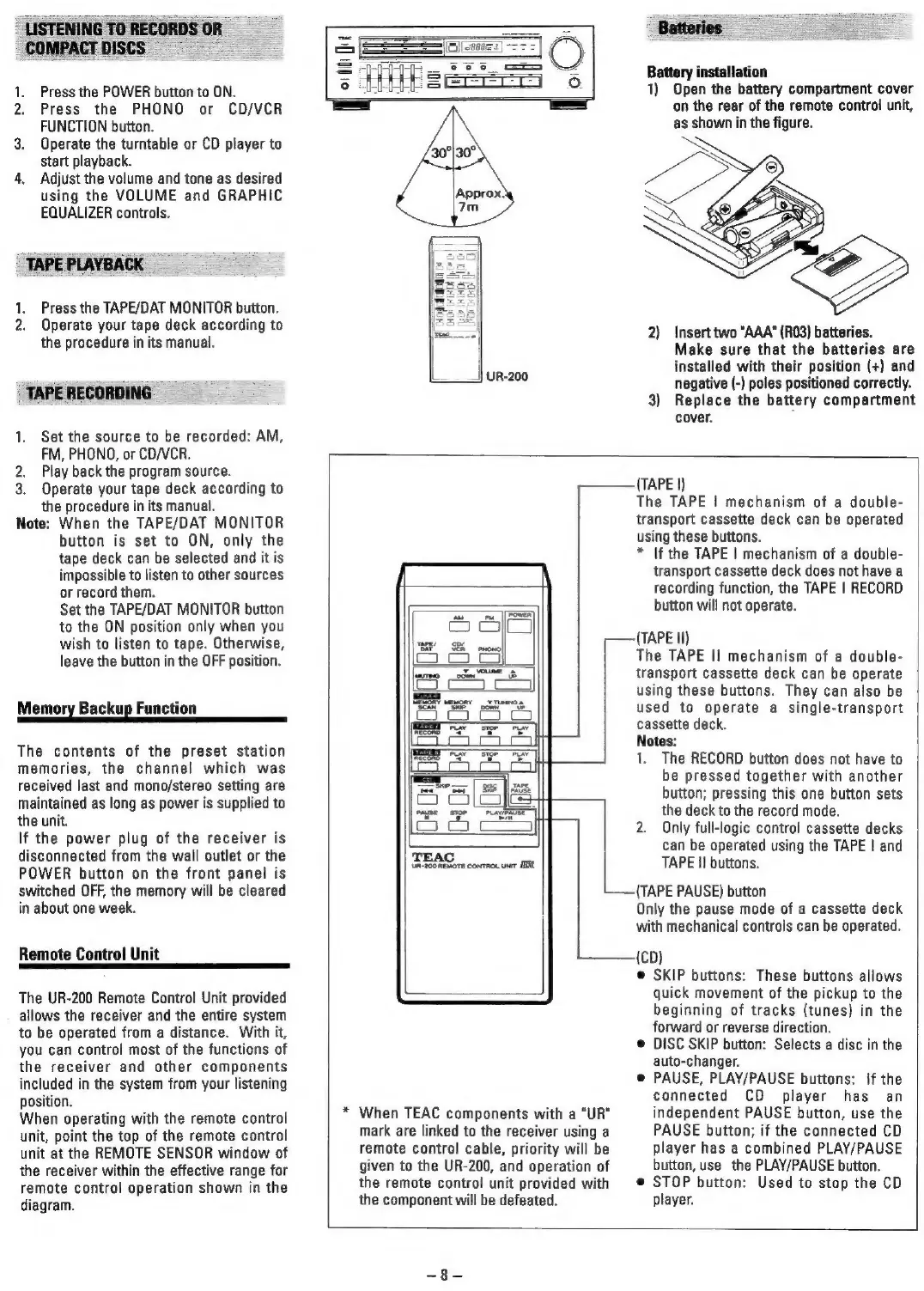
The
UR-200
Remote
Control
Unit
provided
allows
the
receiver
and
the
entire
system
to
be
operated
from
a
distance.
With
it,
you
can
control
most
of
the
functions
of
the
receiver
and
other
components
included
in
the
system
from
your
listening
position.
When
operating
with
the
remote
control
unit,
point
the
top
of
the
remote
control
unit
at
the
REMOTE SENSOR
window
of
the
receiver
within
the
effective
range
for
remote
control
operation
shown
in
the
diagram.
Approx.
7m
)
UR-200
Batteries
Battery
installation
1)
Open
the
battery
compartment
cover
on
the
rear
of
the
remote
control
unit,
as
shown
in
the
figure.
2)
Insert
two
"AAA"
(R03)
batteries.
Make
sure
that
the
batteries
are
installed
with
their
position
(+)
and
negative
(-)
poles
positioned
correctly.
3)
Replace
the
battery
compartment
cover.
TEAC
Un-200
REMOTE
ConTRoL
UNrT
HER
*
When
TEAC
components
with
a
“UR”
mark
are
linked
to
the
receiver
using
a
remote
control
cable,
priority
will
be
given
to
the
UR-200,
and
operation
of
the
remote
control
unit
provided
with
the
component
will
be
defeated.
-—-(TAPE
II)
—(TAPE
PAUSE)
button
(TAPE
|)
The
TAPE
|
mechanism
of
a
double-
transport
cassette
deck
can
be
operated
using
these
buttons.
*
|f
the
TAPE
|
mechanism
of
a
double-
transport
cassette
deck
does
not
have
a
recording
function,
the
TAPE
|
RECORD
button
will
not
operate.
The
TAPE
II
mechanism
of
a
double-
transport
cassette
deck
can
be
operate
using
these
buttons.
They
can
also
be
used
to
operate
a
single-transport
cassette
deck.
Notes:
1.
The
RECORD
button
does
not
have
to
be
pressed
together
with
another
button;
pressing
this
one
button
sets
the
deck
to
the
record
mode.
2.
Only
full-logic
control
cassette
decks
can
be
operated
using
the
TAPE
|
and
TAPE
II
buttons.
Only
the
pause
mode
of
a
cassette
deck
with
mechanical
controls
can
be
operated.
(CD)
©
SKIP
buttons:
These
buttons
allows
quick
movement
of
the
pickup
to
the
beginning
of
tracks
(tunes)
in
the
forward
or
reverse
direction.
©
DISC
SKIP
button:
Selects
a
disc
in
the
auto-changer.
@
PAUSE,
PLAY/PAUSE
buttons:
If
the
connected
CD
player
has
an
independent
PAUSE
button,
use
the
PAUSE
button;
if
the
connected
CD
player
has
a
combined
PLAY/PAUSE
button,
use
the
PLAY/PAUSE
button.
©
STOP
button:
Used
to
stop
the
CD
player.

Related product manuals