18
Playback
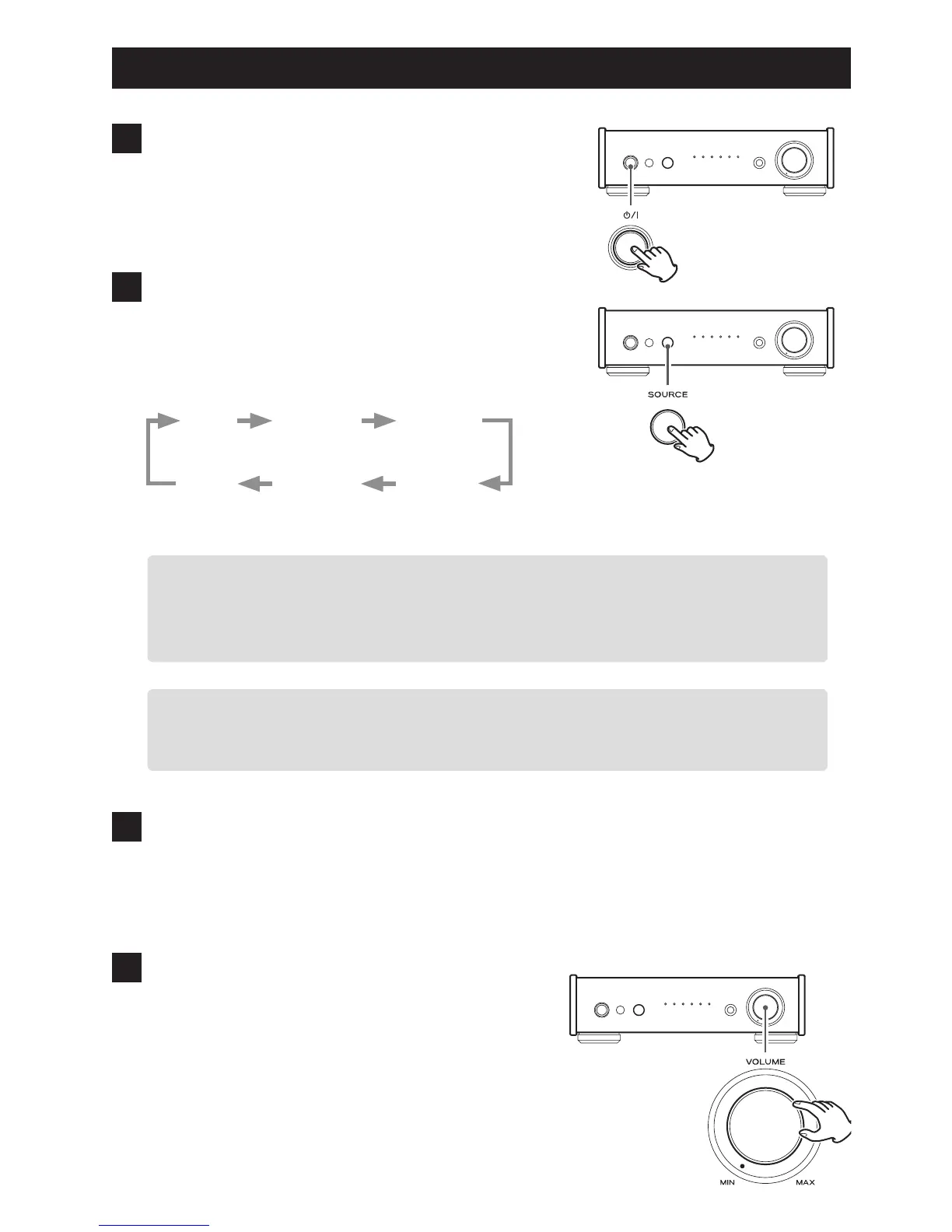
1 Press the standby/on (¤) button to turn
the unit ON.
2 Press the SOURCE button repeatedly to
select a source.
Each time the SOURCE button is pressed, the source
changes as follows:
Bluetooth
LINE1
USB
LINE2
COAXIAL
OPTICAL
The indicator lights for the selected source.
o The input source indicators blink when the input signal is a digital audio signal in a for-
mat other than PCM or DSD (such as Dolby Digital, dts or AAC). If this is the case, check
to see if the connected digital audio output device has a “PCM” setting for the digital
output format. Refer to the operation manual for that device to make this setting.
o When using this unit with a Windows computer, before setting this unit to USB and
playing back audio files on the computer, you must install the dedicated driver on that
computer (see page 23).
3 Start playback on the connected source
device.
Refer to the operation manual of the playback device
that you are using.
4 Adjust the volume.
Turn the VOLUME knob or use the VOLUME buttons
on the remote control to adjust the volume to the
appropriate level.



 To Next Page