Listening to CD/MP3
1
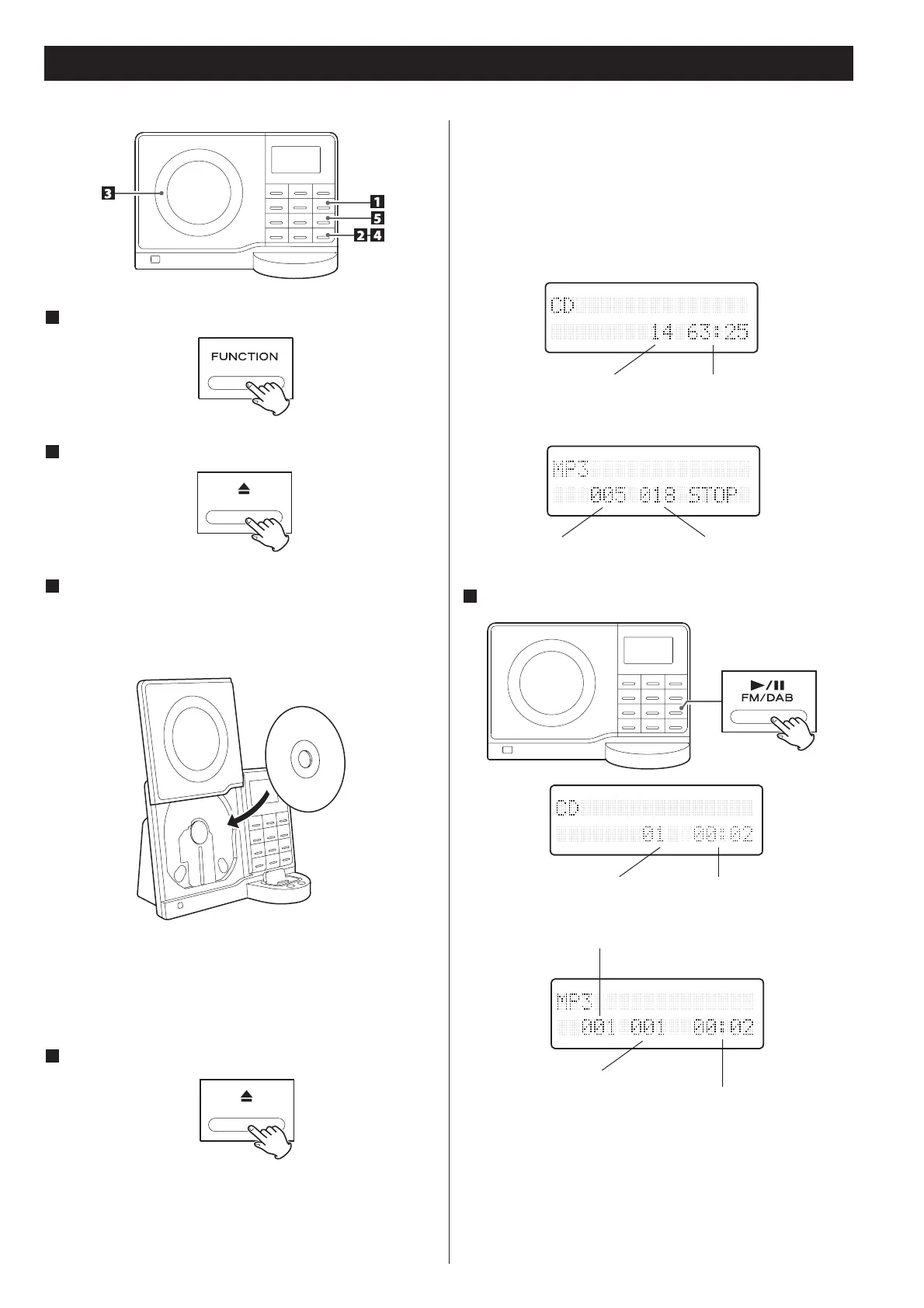
Press the FUNCTION button to select “CD”.
2
Press the OPEN/CLOSE button.
3
Put a disc onto the center spindle of the player with the
label side facing you.
Press the disc onto the spindle until a slight “click” is heard
indicating the disc is mounted correctly.
This unit can not play 8cm discs..
Never put more than one disc in the mechanism at a time.
Ensure that the disc is correctly mounted on the spindle and
locked in place.
4
Press the OPEN/CLOSE button (+) to close the CD door.
It takes a few seconds for the unit to load the disc. No
buttons will work during loading. Wait until the total number
of the files and the total play time of the disc are displayed.
When no disc is loaded in the CD player, “NO DISC” is
displayed.
When a CD is loaded
When a MP3 disc is loaded
5
Press the Play/Pause button (X/)) to start playback.
Playback starts from the first track/file of the disc.
MP3 files recorded out of folders are automatically put in the
“ROOT” folder, and playback starts from the first file of the
ROOT folder.
When the playback of all the tracks/files has finished, the unit
stops automatically.
total playing timetotal tracks
total tracks
total number of
folders
elapsed time of
current track
current track number
current folder number
elapsed time of current track
current track number


 To Next Page