1. General Information 2. Control and Functions
1.1 Important Safety Instructions
Warnings and Precautions
To prevent any injuries, the following safety precautions should be observed in the installation, use,
servicing and maintenance of this device. Please read this manual carefully and keep it for future
reference.
1. Read these instructions.
2. Keep these instructions.
3. Heed all warnings.
4. Follow all instructions.
5. Clean only with a dry cloth.
6. Do not block any of the ventilation openings. Install in accordance with the manufacturer's
instructions.
7. Do not install near any heat sources such as radiators, heat registers, stoves or other devices
(including amplifiers) that produce heat.
8. Do not defeat the purpose of the polarized or grounding type plug. A polarized plug has two
blades with one wider than the other. A grounding type plug has two blades and a third grounding
prong. The wide blade or the third prong is provided for your safety. If the provided plug does not fit
into your power outlet, consult an electrician to replace the power socket.
9. Do not bend the power cord excessively. Prevent the cord from being walked on or pinched by
weights placed on it.
10. Only use the attachments/accessories specified by the manufacturer.
11. Do not touch the power plug or switches with wet hands.
12. Unplug this apparatus during lightning storms or when unused for long periods of time.
13. Refer all servicing to qualified service personnel. Servicing is required when the apparatus has
been damaged in any way.
This symbol indicates that dangerous voltage instituting a risk of electric shock is
present within this device.
This symbol indicates that there are important operation and maintenance instructions
in the documentation accompanying this device.
NOTE:
! To prevent damage which may result in fire or hazards, do not expose the device to rain or liquids.
! Do not place objects containing liquids, such as vases on the device. If drinks and liquids have been
spilled on the device, unplug the device from AC power immediately and contact the TEAC
Customer Hotline for assistance.
! Servicing of this device should be conducted by qualified and certified TEAC service personnel.
! The manufacturer will not be held responsible for any damage caused by modifications done on the
device without authorisation from the manufacturer's authorised service agent.
1.2 Accessories
4.Quick start guide
1.Remote Control
5.Contact card with serial number
2.AAA batteries for remote control x2
6.AV cables
3.User manual
2 3
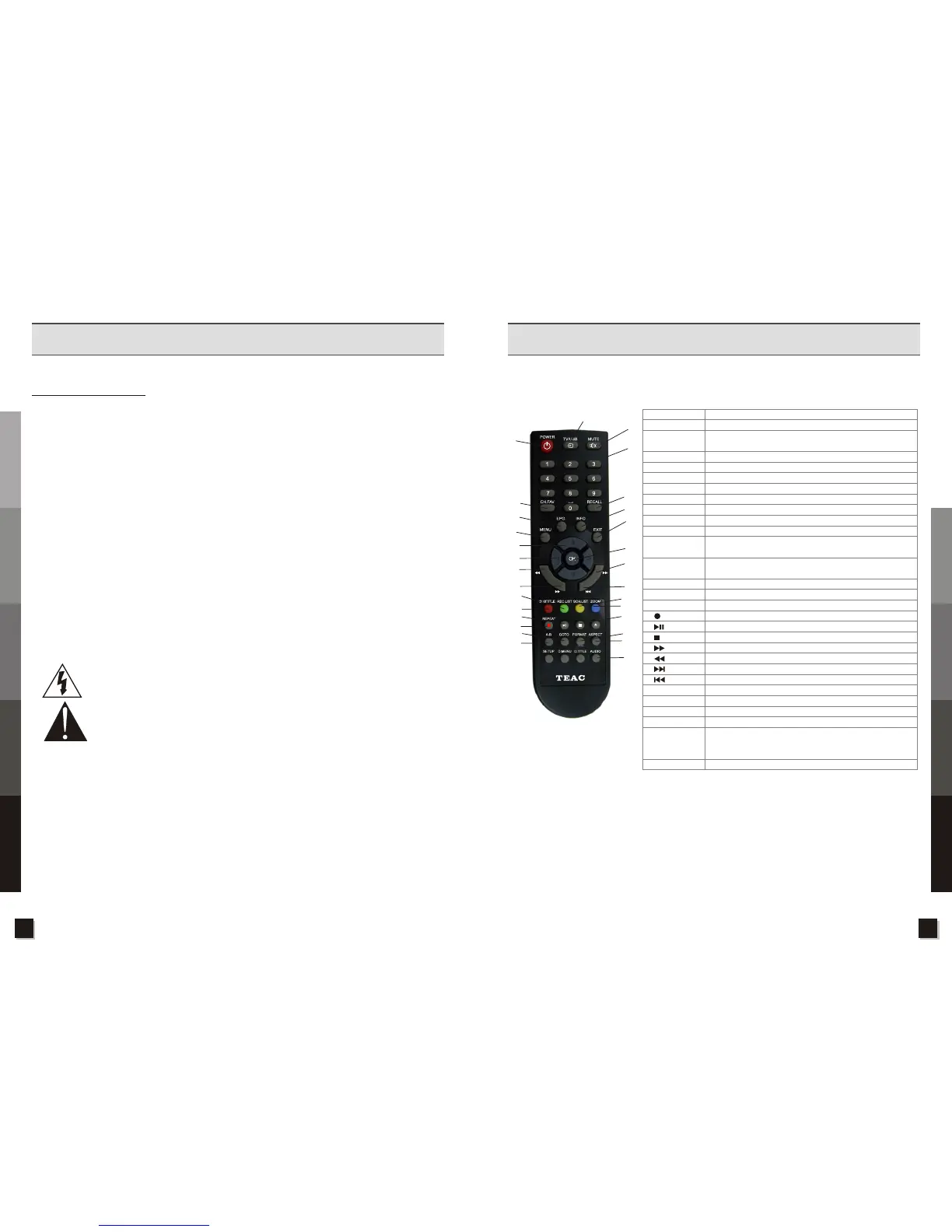
2.1 Remote Control Unit
Turn on/off the STB
Hot key for USB function
Show the main menu on the screen or jump back to previous menu
from sub-menu
Enable or disable the audio output
Select channels or enter programming
Exit from the current menu and stop adjusting settings
Confirm the selected item in the menu screen or show the channel list
Channel change or move cursor up or down
Volume Control or move cursor left or right
Display the TV/Radio programme Guide
Display the favourite list
To set the R/L speaker output and change the Audio Language
(if available)
To display channel status or various program information of
current channel
Switch to the last viewed channel
Zoom in the selected picture
Switch to subtitle mode
Record current channel
Pause or resume play
Stop playback or recording
Fast forward
Fast backward
Switch to next Item
Switch to previous Item
Hot key for PVR file list
To locate a position to play in multimedia playback
To display the schedule plan
Switch between different screen aspects(4:3 and 16:9)
To start A-B looping playback during video playback: Press this button
once to mark Point A. Press again to mark Point B. Points A to B will
be looped until PLAY or STOP is pressed.
Switch between the different resolutions
1.POWER
2.TV/USB
3.MENU
4.MUTE
5.0-9
6.EXIT
7.OK
8.CH+/CH-(▲)(▼)
9.VOL+/VOL-(▶)(◀)
10.EPG
11.CH.FAV
12.AUDIO
13.INFO
14.RECALL
15.ZOOM
16.SUBTITLE
24.REC LIST
25.GOTO
26.SCH.LIST
27.ASPECT
28.A-B
29.FORMAT
17.
18.
19.
20.
21.
22.
23.
1
4
2
3
5
6
7
14
13
22
23
10
8
9
21
20
11
24
16
17
18
28
25
12
27
29
19
26
15
Specifications
Troubleshooting
Unit Operation
Control and Functions
General Information
Specifications
Troubleshooting
Unit Operation
Control and Functions



 To Next Page