2). Scheduled Recordings
Recording Operation
Recording Operation
Scheduled Recording is a function which allows the user to record future programs without physically
being present to initiate the recording. A schedule setup is made to mark recording dates and times of
the broadcasted programs stated on the Electronic Program Guide(EPG). Recording would terminate at
the end of the program.
To access the Electronic Program Guide (EPG), select the EPG button on the remote. This displays the
programs broadcasted by individual broadcasting channels. Select the program to be recorded by
browsing through the programs using the toggle buttons.
Once the program of choice has been highlighted, press the RECORD button on the remote control.
This will bring you to Record Mode, where you can set the start and end time of the recording.
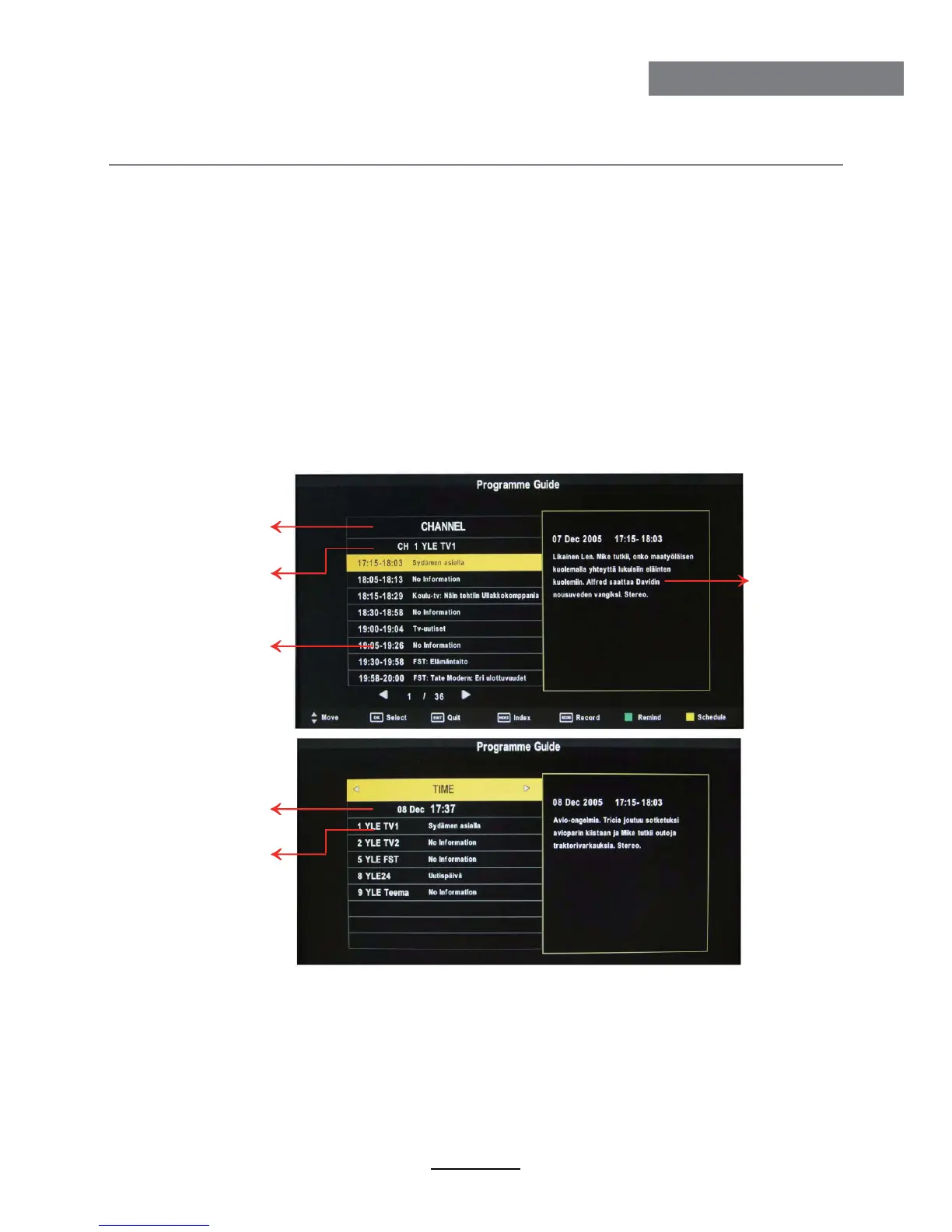
Press the EPG button to display the OSD menu as below:
Electronic Program Guide (EPG)
Press Index button
then press </> button
to choose list type.
CurrHnt channel
press
</> change
channel.
All program
information for
different times of
currHnt channel.
Details information
of selected
program.
CurrHnt time
press
</> change
time.
Information of all
channels (program)
currently playing.
28



 To Next Page