OSD Menu
Country: Select the country.
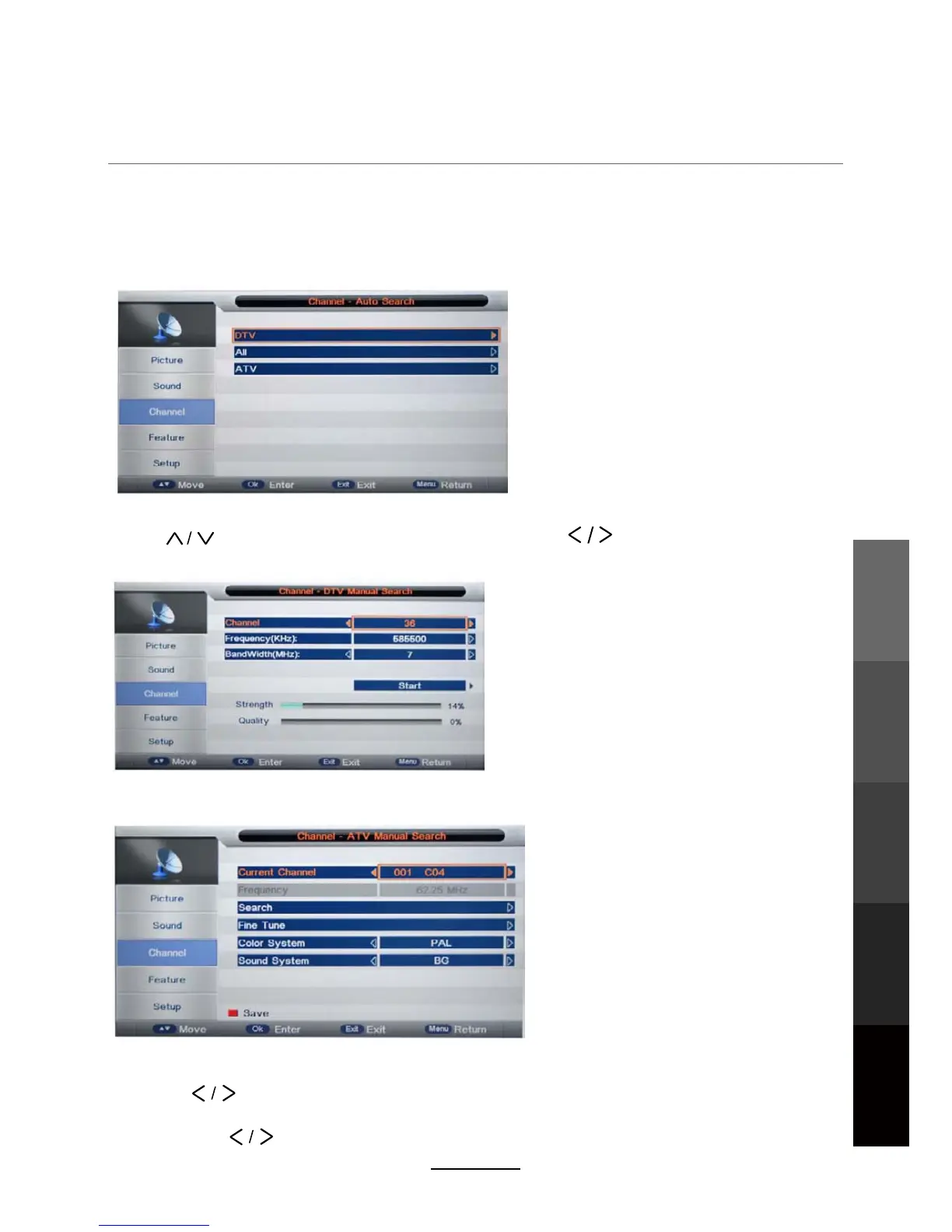
Auto Search
Select the desired search mode, and then press the OK button to start Auto Channel Search.
DTV Manual Search
Press buttons to select the “Channel” field, and the buttons to select the channel.
Select the Start button and press the OK button to start Manual Channel Search.
ATV Manual Search
Fine Tune: Press the OK button to enter the Fine Tune menu, and adjust the frequency
Current Channel: Select the channel for manual searching.
Search: Press the OK button to enter the search menu, and set the frequency with
Color/Sound System: Select the Color/Sound system for the program.
the buttons.
with the buttons.
Note:
1. ALL: Auto search channels for DTV, ATV and
radio.
DTV: Auto search channels for DTV and radio.
ATV: Auto search channels for ATV.
2. During the auto tune process, you can
press the MENU button to stop auto tuning and
return to the previous menu.
NOTE: If Channel Locks has been enabled (Feature>Lock submenus), first enter the
current password (default: 0000) to enter the Auto a
nd Manual Search menus.
DVB-T
17
Maintenance
and Service
OSD Menu
Multimedia
Operation
Recording
Operation
Maintenance
and Service
DVD Operation



 To Next Page