OSD Menu
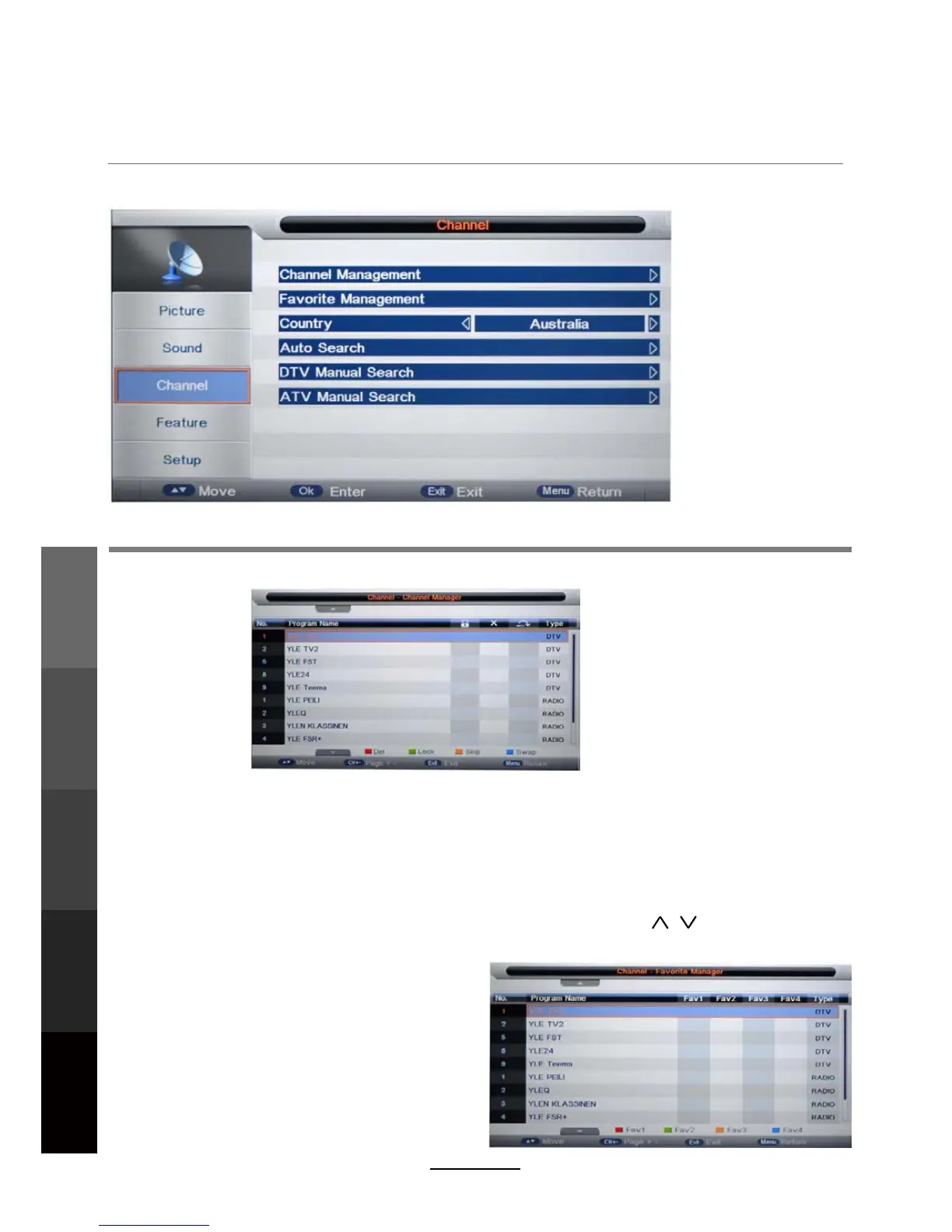
3. Channel menu (In ATV/DTV mode)
Description
Channel Management: Enter the Channel management menu to edit the channels.
16
..
DELETE: Press the RED button to mark the channels you want to delete. You will be prompted to
confirm when you exit this menu.
LOCK: (Reminder - To activate channel locks, “Lock Enable” must be set to “ON” from the FEATURE
submenu.) Press the GREEN button to toggle channels to be locked. While locks are enabled,
these channels will require a 4-digit password (default: 0000) for viewing access.
SKIP: Press the YELLOW button to toggle channels to be skipped when flipping through channels
using the CH+/- buttons. (These channels will still be listed in the EPG.)
SWAP: Press the BLUE button to mark the channel to be moved. Press the / buttons to move it to
its new location in the list. Press the OK button to confirm the move.
Favourite Management: Add or remove favourite
channels to up to 4 Favourite lists using the colour
buttons. Available Favourite lists can be accessed
with the CH.FAV button while watching DTV.
OSD Menu
Multimedia
Operation
Recording
Operation
Maintenance
and Service
DVD Operation



 To Next Page