CD Player, Cassette Tape Deck, etc.
CAUTION:
< Switch off the power to all equipment before making
connections.
< Read the instructions of each component you intend to use
with this unit.
< Be sure to insert each plug securely. To prevent hum and
noise, avoid bundling the signal interconnection cables
together with the AC power cord.
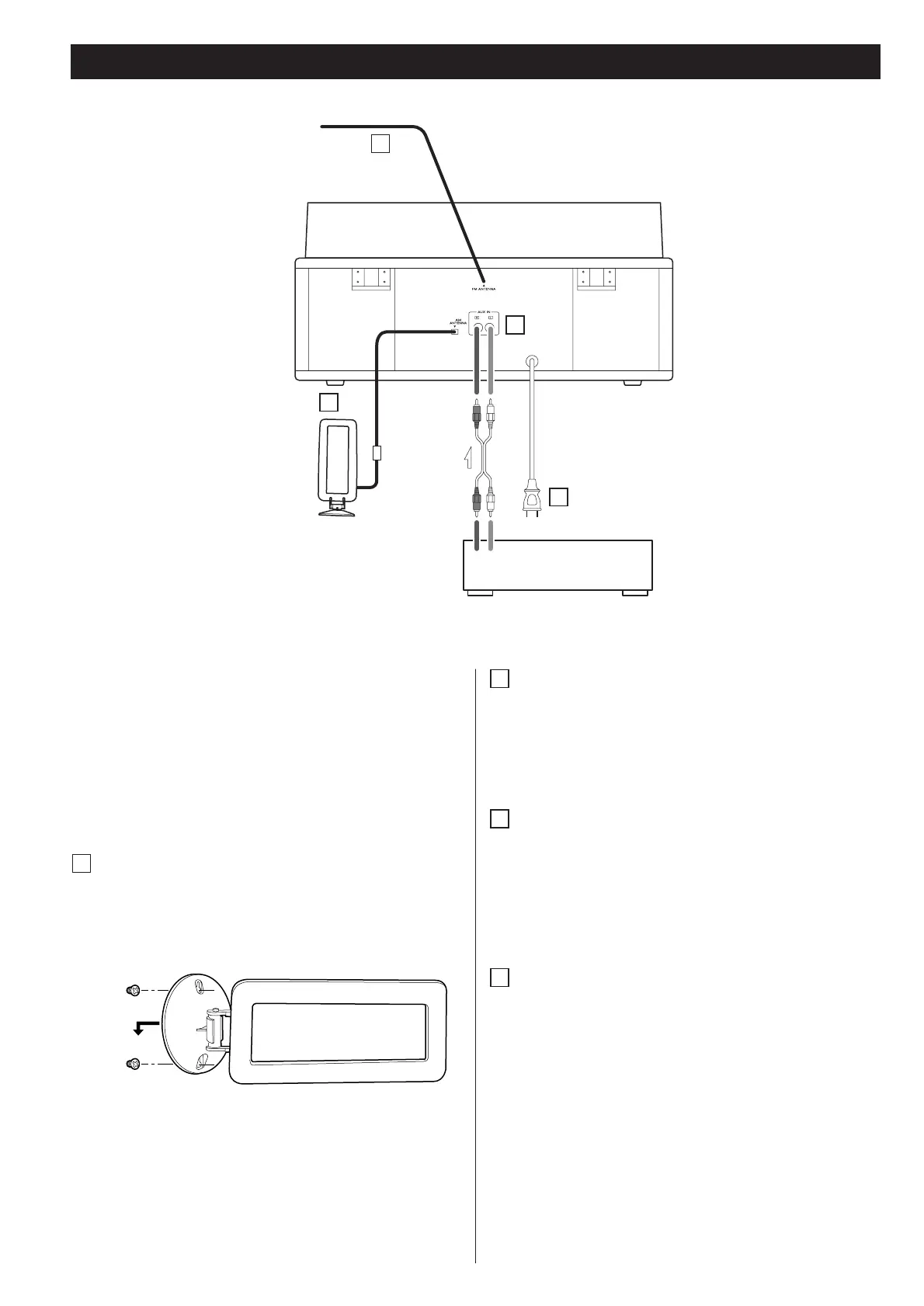
AM loop antenna
Position the antenna for the best sound.
If you want, you can hook the AM antenna on a wall as
shown below:
A
A
B
C
D
FM antenna
While in FM mode, tune in an FM station and extend the
lead to find the best position for the reception. This antenna
may need to be repositioned if you move your unit to a new
location.
AUX IN jacks
You can connect a CD player, cassette tape deck, etc. to this
unit.
Connect the component with RCA pin cords. Make sure to
connect the white plug to the white jacks (Left) and the red
plug to the red jacks (Right).
AC Power Cord
Plug this AC power cord into an AC wall socket.
D
C
B


 To Next Page