7
UNIT PARTS AND CONTROLS
Connections
Part
CAUTION
Switch off the power to all equipment before making connections.
Read the instructions of each component you intend to use with this unit.
Be sure to insert each plug securely.
To prevent hum and noise, avoid bundling the signal interconnection cables
together with the AC power cord.
UNIT PARTS AND CONTROLS
Connections
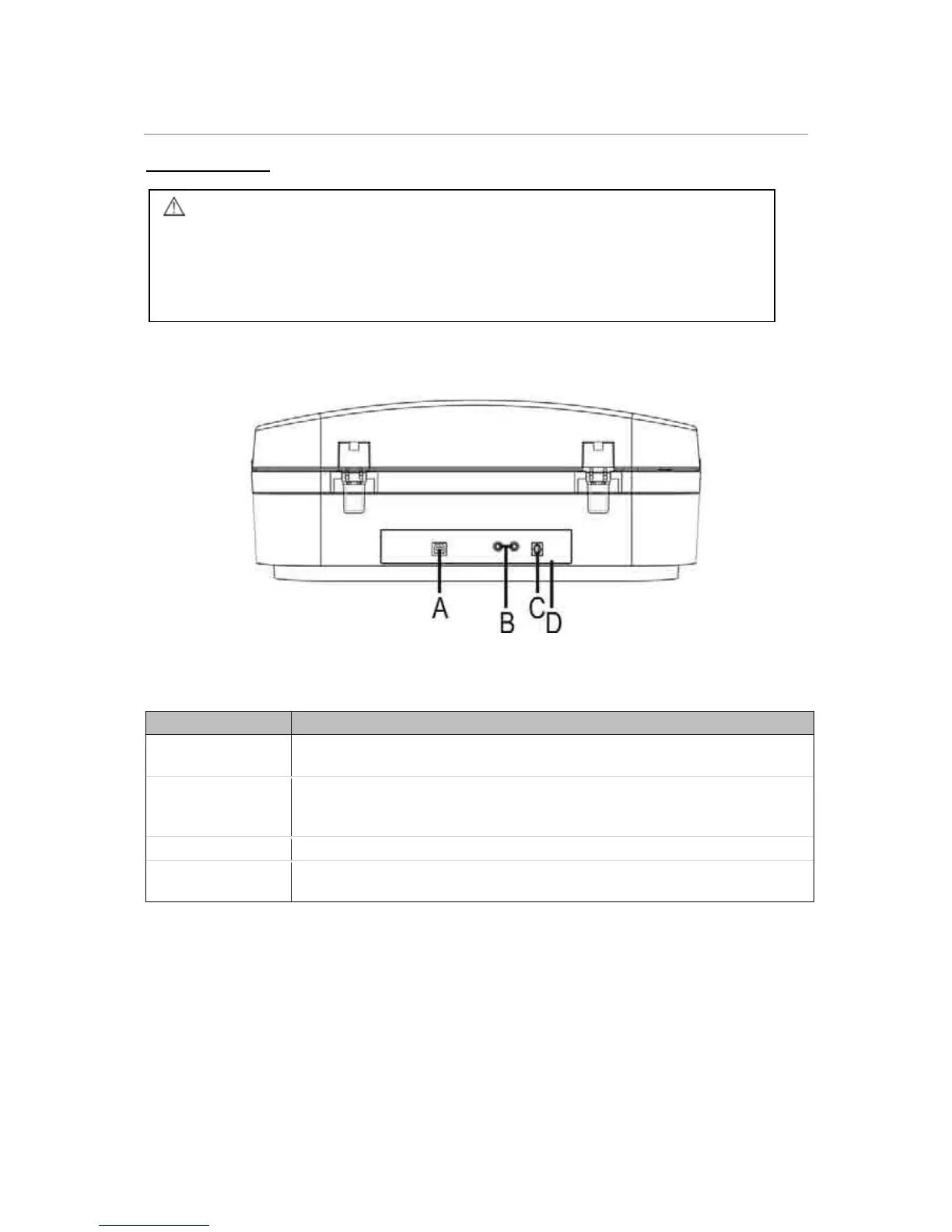
Part Description
A. USB Port
Connect one end of the USB cable to the USB port on the unit and the
other end to the USB port on your computer.
B. LINE OUT
Connect one end of the RCA LINE OUT cable into the LINE OUT
socket, and the other end into the auxiliary input (AUX) socket on your
home amplifier device, matching the plug colours to the sockets.
C. AC Power Cord Plug this power cord into an AC wall socket.
D. FM ANTENNA
Extend the antenna when listening to the radio in FM Mode. Move the
antenna to find the best reception.
CAUTION
Switch off the power to all equipment before making connections.
Read the instructions of each component you intend to use with this unit.
Be sure to insert each plug securely.
To prevent hum and noise, avoid bundling the signal interconnection cables
together with the AC power cord.



 To Next Page