12
Use Auto Channel Search to scan (or re-scan) for available digital TV channels.
1. Press MENU/HOME on the remote control.
2. Press the
◀ / ▶
buttons to find the TV Menu.
3. Press the
▲ / ▼
buttons to select “Terrestrial Search”. The Search Menu will display.
The figure below shows the “Auto search” menu.
4. Choose the frequency and antenna settings with the ARROW buttons, if desired.
Normally, you will not need to c
hange anything.
5. Highlight “Search” with the
buttons, then press OK. Another menu will
pop up to give you more scanning options. Normally, you do not need to change
anything.
6. Highlight “Start below these options, and press OK to start the channel search.
NOTE: Re-scanning channels will erase existing channel settings (favourite channels etc.).
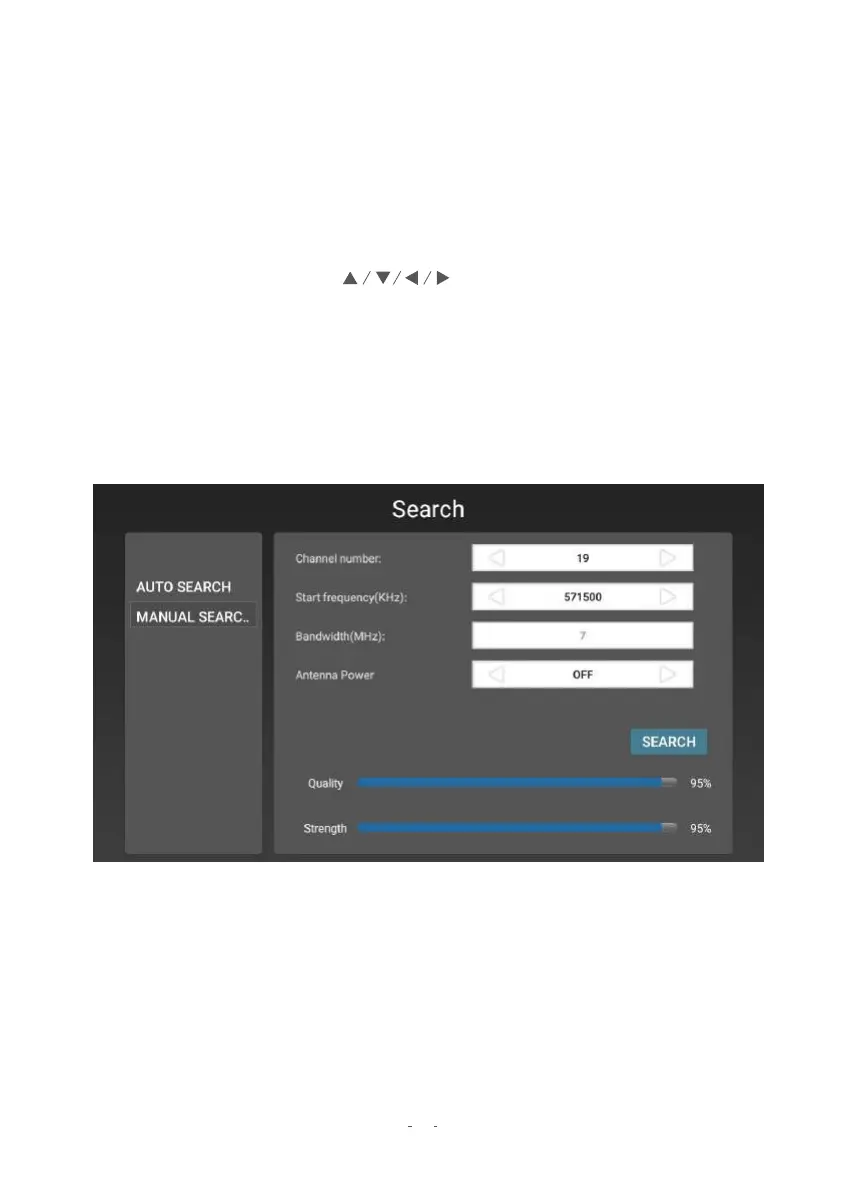
2.2 Manual Search
Use Manual Search to search specifically for certain channels if you know i
ts
frequency and
bandwidth. The Manual Search page is shown below.


 To Next Page