14
3.4 Using the Electronic Program Guide (EPG)
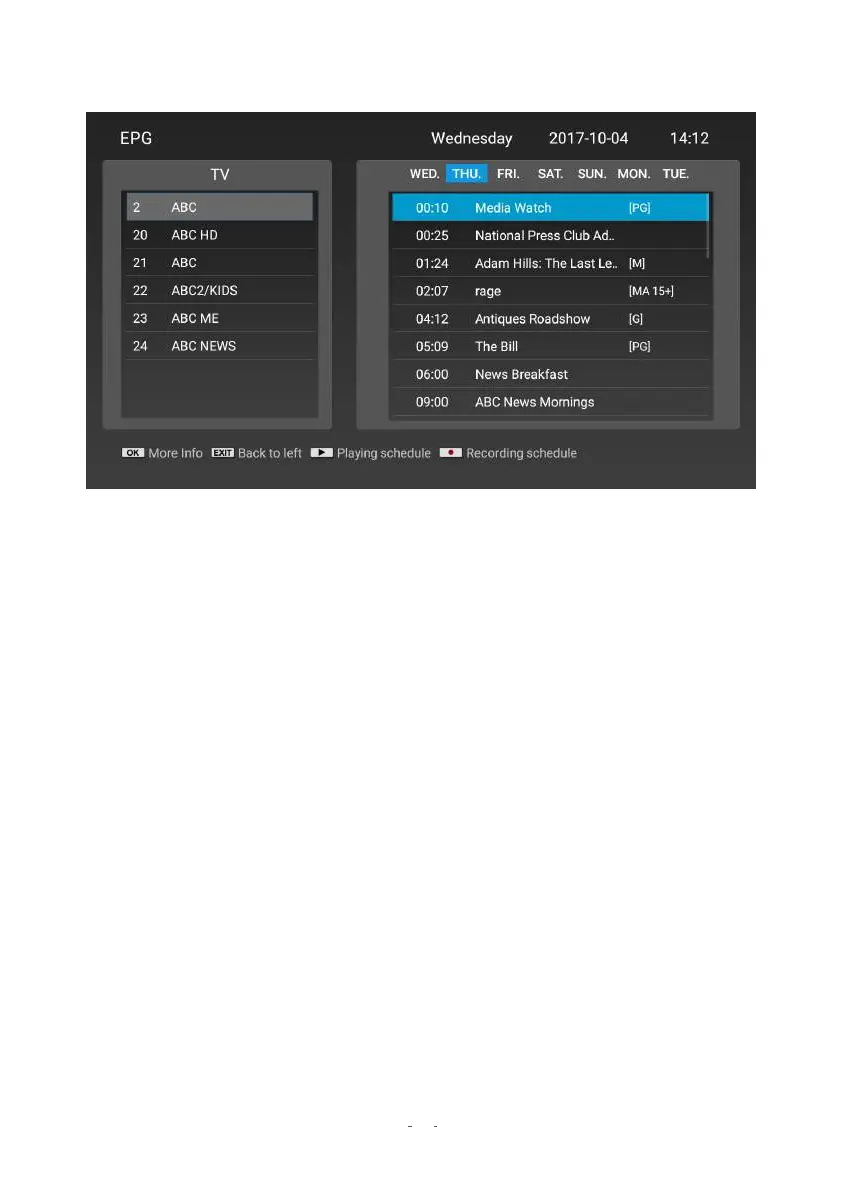
The EPG provides the program schedule for Digital TV for up to 7 days in advance.
● To view the EPG, press the EPG button on the remote control. The list that appears is
the schedule for the current channel.
● To change channels and view their schedules, press
▲ / ▼
.
● To scroll through the list of programs on the current channel, press the
▶
button to
enter the timetable. Press
▲ / ▼
to scroll.
● To view the timetable for different days, press
▶
to advance the day.
● To see detailed information on any program, highlight it and press OK.
● Press
◀ or EXIT to go back.
NOTE: You can schedule recordings or playback timers via the EPG. Follow the button hints
at the bottom of the screen. For full recording (PVR) instructions, please see the “Rec
ording
with PVR” section.


 To Next Page