GB
9
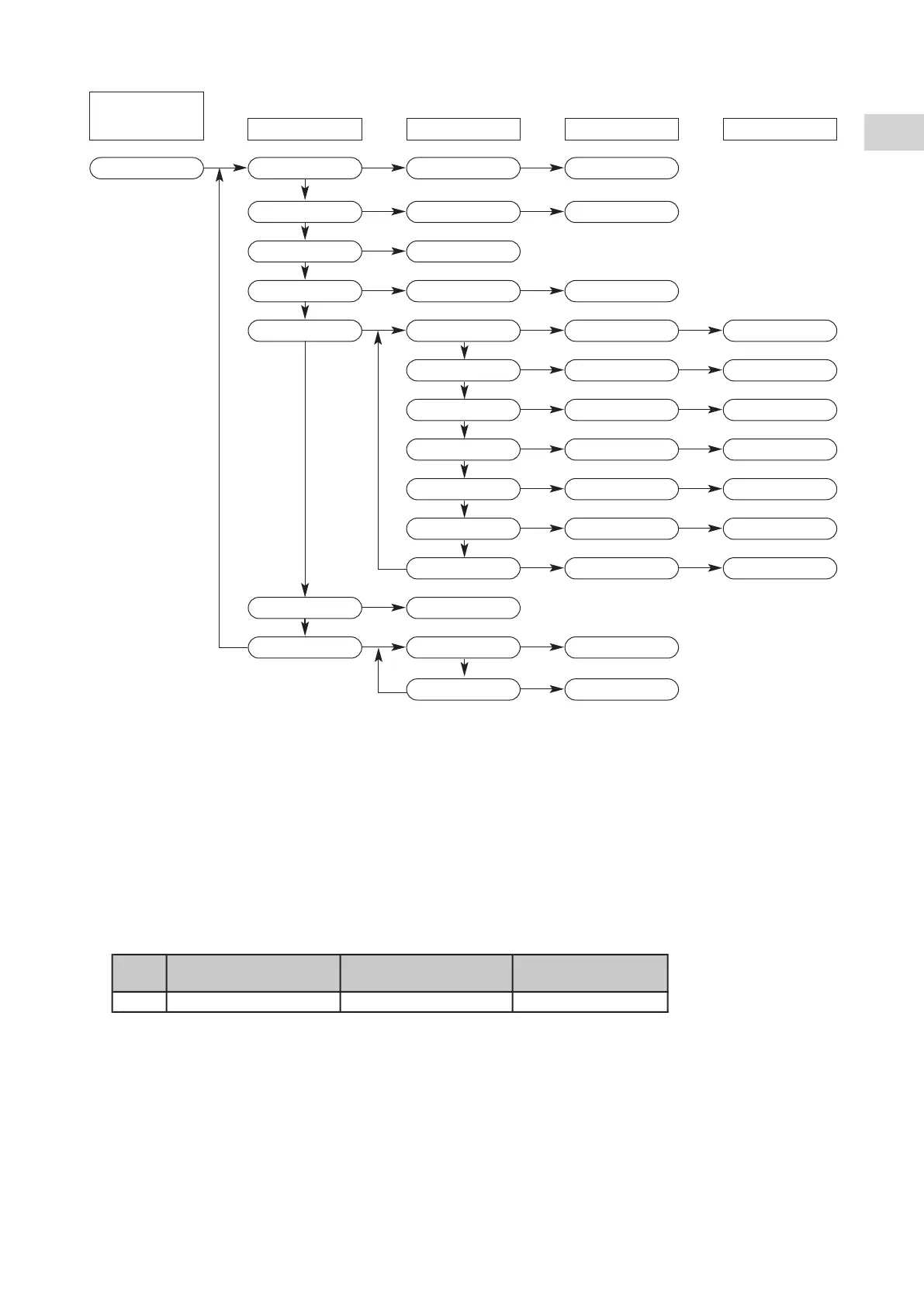
5.6.2 - PARAMETER ACCESS DIAGRAM
(*) Accessible to qualified personnel only after entering the password (PSS).
Note 1:
Indicator lamps (6), (7), (8) flash when levels 1 and above are accessed.
Note 2:
The normal display (level 0) returns automatically after 5 minutes if no buttons are pressed.
5.6.3 - SETPOINT
ADJUSTMENT
• Simultaneously press buttons (1) and (2) for at least 2 seconds, "SET" is displayed.
• Press the 2 buttons again, "Coo" is displayed.
• Simultaneously press the 2 buttons again for 2 seconds. The setpoint value appears. If needed, modify the value with
the buttons.
• Press the 2 buttons simultaneously to validate the setpoint.
• Return to the normal display by simultaneously pressing the 2 buttons for more than 2 seconds.
Reminder: control on the installation return temperature.
Note:
All units are factory configured and parameterized for optimum operation in the terminal unit application.
Factory setting
(terminal units)
Level 0
Normal display
Level 1 Level 2 Level 3 Level 4
Temperature S1
Alarm active
Set value SET
Cooling setpoint
Coo
Setpoint value
Temperature
probes TP
Probe code t01…t04 Temperature value
Alarms Err Alarm code E00...
Digital inputs Id (*) Input code 01… input status
Parameters PAr (*) Config. para. CnF
Parameters codes
H01…
Parameter value
Compressor
parameter CP
Parameters codes
C01…
Parameter value
Fan parameter FAn
Parameters codes
F01…
Parameter value
Alarm parameter
ALL
Parameters codes
A01…
Parameter value
Pump para. PUP
Parameters codes
P01…
Parameter value
Frost. para. Fro
Parameters codes
r01…
Parameter value
Defrost. para. dFr
Parameters codes
d01…
Parameter value
Password PSS Password value
Hour counters OHr Comp. counter 1 OH1 Counter value
Pump counter OHP Counter value



 To Next Page