EasyManua.ls Logo

Technics Quartz SA-R230 - Page 4

Technics Quartz SA-R230
29 pages
Print Icon
To Next Page IconTo Next Page
To Previous Page IconTo Previous Page
Loading...
SA-R230
Sy
AG
4010)
e
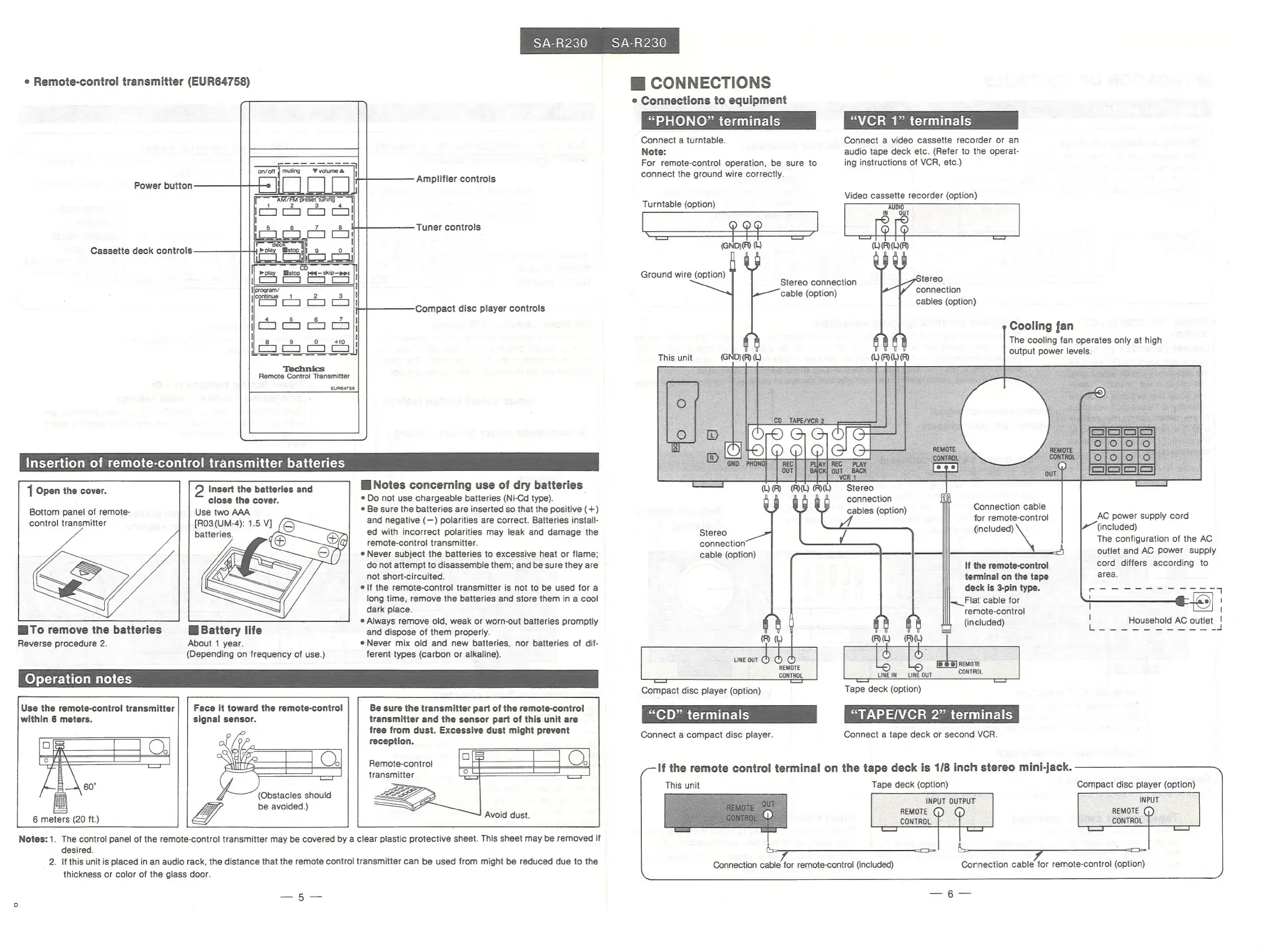
Remote-control
transmitter
(EUR64758)
H@
CONNECTIONS
e
Connections
to
equipment
“PHONO?”
terminals
Connect
a
turntable.
Note:
For
remote-control
operation,
be
sure
to
“VCR
1”
terminals
Connect
a
video
cassette
recorder
or
an
audio
tape
deck
etc.
(Refer
to
the
operat-
ing
instructions
of
VCR,
etc.)
Amplifier
controls
connect
the
ground
wire
correctly.
Power
button
Video
cassette
recorder
(option)
Turntable
(option)
Tuner
controls
Cassette
deck
controls
(GND)(R)
()
Ground
wire
(option)
tereo
connection
cables
(option)
Stereo
connection
cable
(option)
Compact
disc
player
controls
Cooling
fan
The
cooling
fan
operates
only
at
high
output
power
levels.
SSS
SS
SS
This
unit
(GND)
(R)
(L)
Remote
Control
Transmitter
EUR64758
Insertion
of
remote-control
transmitter
batteries
Stereo
connection
cables
(option)
WW
Notes
concerning
use
of
dry
batteries
e
Do
not
use
chargeable
batteries
(Ni-Cd
type).
e
Be
sure
the
batteries
are
inserted
so
that
the
positive
(+)
and
negative
(—)
polarities
are
correct.
Batteries
install-
ed
with
incorrect
polarities
may
leak
and
damage
the
Stereo
remote-control
transmitter.
connection
e
Never
subject
the
batteries
to
excessive
heat
or
flame;
cable
(option)
do
not
attempt
to
disassemble
them;
and
be
sure
they
are
not
short-circuited.
elf
the
remote-control
transmitter
is
not
to
be
used
for
a
long
time,
remove
the
batteries
and
store
them
in
a
cool
dark
place.
e
Always
remove
old,
weak
or
worn-out
batteries
promptly
and
dispose
of
them
properly.
e
Never
mix
old
and
new
batteries,
nor
batteries
of
dif-
ferent
types
(carbon
or
alkaline).
Insert
the
batteries
and
close
the
cover.
Use
two
AAA
[RO3(UM-4):
1.5
V]
batteries.
|
Open
the
cover.
Connection
cable
for
remote-control
AC
power
supply
cord
A
(included)
The
configuration
of
the
AC
outlet
and
AC
power
supply
cord
differs
according
to
area.
Bottom
panel
of
remote-
control
transmitter
(included)
\
ee
|
a,
Seoeees,
If
the
remote-control
terminal
on
the
tape
deck
is
3-pin
type.
~_Flat
cable
for
remote-control
(included)
1)
|
Household
AC
outlet
|
[rede
en
area
sa
ape
aes
al
a
Pee
a
ee
ee
I
|
Bi
Battery
life
About
1
year.
(Depending
on
frequency
of
use.)
WiTo
remove
the
batteries
Reverse
procedure
2.
uneout
©
©
©
REMOTE
CONTROL
[(@
6
@]
REMOTE
CONTROL
©
LINE
INLINE
OUT
Operation
notes
me
Tape
deck
(option)
“TAPE/VCR
2”
terminals
Connect
a
tape
deck
or
second
VCR.
Compact
disc
player
(option)
“CD”
terminals
Connect
a
compact
disc
player.
Be
sure
the
transmitter
part
of
the
remote-control
transmitter
and
the
sensor
part
of
this
unit
are
free
from
dust.
Excessive
dust
might
prevent
reception.
eae
a
Face
it
toward
the
remote-control
signal
sensor.
Use
the
remote-control
transmitter
within
6
meters.
Remote-control
transmitter
If
the
remote
control
terminal
on
the
tape
deck
is
1/8
inch
stereo
mini-jack.
This
unit
Tape
deck
(option)
INPUT
OUTPUT
INPUT
REMOTE
G)
G)
REMOTE
()
CONTROL
CONTROL
ban
J
Compact
disc
player
(option)
(Obstacles
should
be
avoided.)
Avoid
dust.
6
meters
(20
ft.)
Notes:
1.
The
control
panel
of
the
remote-control
transmitter
may
be
covered
by
a
clear
plastic
protective
sheet.
This
sheet
may
be
removed
if
desired.
2.
If
this
unit
is
placed
in
an
audio
rack,
the
distance
that
the
remote
control
transmitter
can
be
used
from
might
be
reduced
due
to
the
thickness
or
color
of
the
glass
door.
Connection
cable
for
remote-control
(included)
5)
=

Related product manuals