EasyManua.ls Logo

Technics RS-M10 - Page 10

Technics RS-M10
14 pages
Print Icon
To Next Page IconTo Next Page
To Previous Page IconTo Previous Page
Loading...
MEASUREMENT
&
ADJUSTMENT
REMARKS
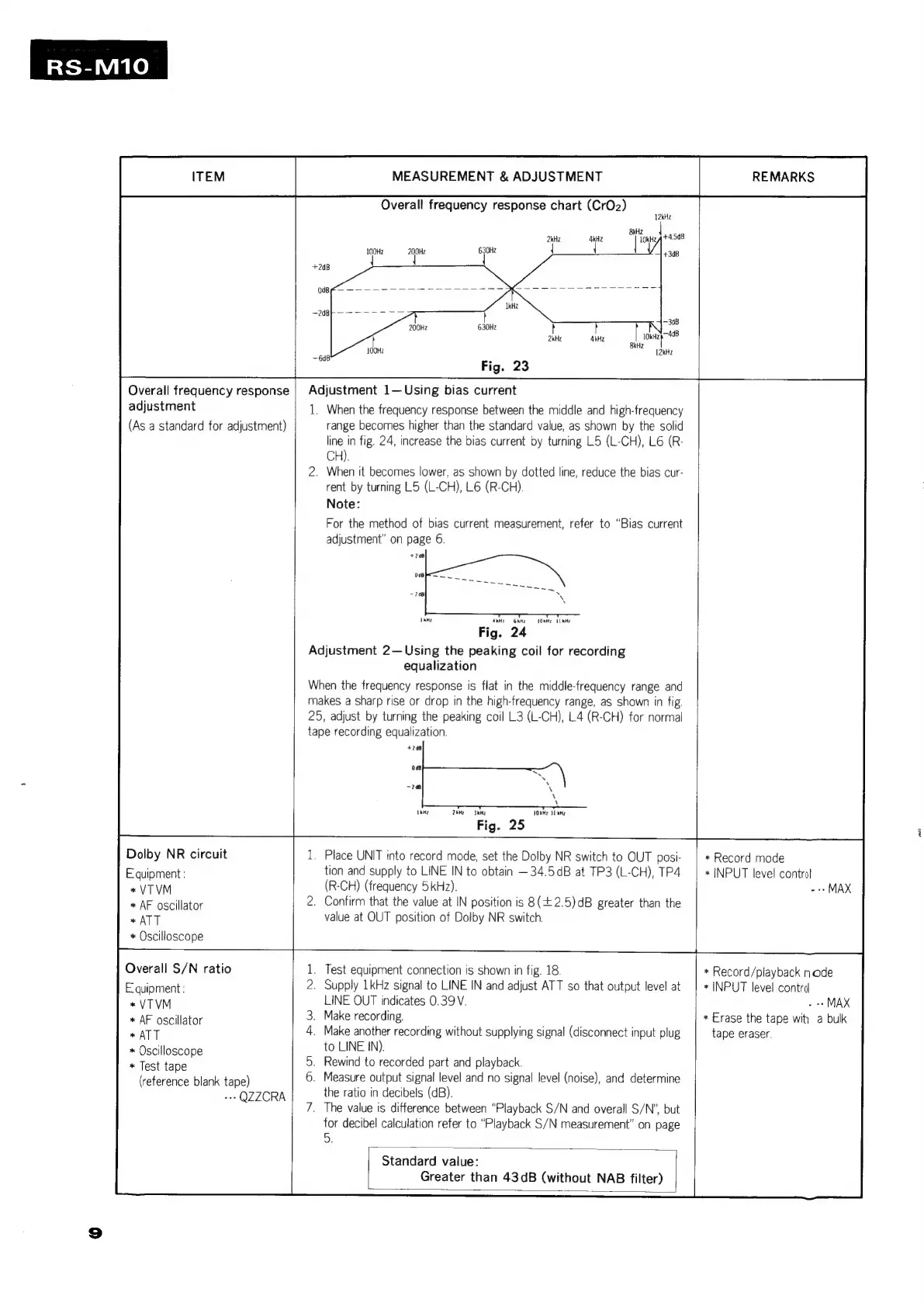
Overall
frequency
response
chart
(CrO2)
2kHz 4kHZ
{
{
Overall
frequency
response
|
Adjustment
1—
Using
bias
current
adjustment
1.
When
the
frequency
response
between
the
middle
and
high-frequency
(As
a
standard
for
adjustment)
range
becomes
higher
than
the
standard
value,
as
shown
by
the
solid
line
in
fig.
24,
increase
the
bias
current
by
turning
L5
(L-CH),
L6
(R-
CH).
.
When
it
becomes
lower,
as
shown
by
dotted
line,
reduce
the
bias
cur-
rent
by
turning
L5
(L-CH),
L6
(R-CH).
Note:
For
the
method
of
bias
current
measurement,
refer
to
“Bias
current
adjustment”
on
page
6.
Fig.
24
Adjustment
2—Using
the
peaking
coil
for
recording
equalization
When
the
frequency
response
is
flat
in
the
middle-frequency
range
and
makes
a
sharp
rise
or
drop
in
the
high-frequency
range,
as
shown
in
fig.
25,
adjust
by
turning
the
peaking
coil
L3
(L-CH),
4
(R-CH)
for
normal
tape
recording
equalization.
2kMe
Skee
1OkHr
1
KH?
Fig.
25
Dolby
NR
circuit
.
Place
UNIT
into
record
mode,
set
the
Dolby
NR
switch
to
OUT
posi-
|
*
Record
mode
Equipment:
tion
and
supply
to
LINE
IN to
obtain
—34.5dB
at
TP3
(L-CH),
TP4
|
*
INPUT
level
control
*
VTVM
(R-CH)
(frequency
5kHz).
+
MAX
*
AF
oscillator
.
Confirm
that
the
value
at
IN
position
is
8(42.5)dB
greater
than
the
*
ATT
value
at
OUT
position
of
Dolby
NR
switch.
*
Oscilloscope
Overall
S/N
ratio
.
Test
equipment
connection
is
shown
in
fig.
18.
*
Record/playback
node
Equipment:
.
Supply
1kHz
signal
to
LINE
IN
and
adjust
ATT
so
that
output
level
at
|
*
INPUT
level
contrd
*
VTVM
LINE
OUT
indicates
0.39
V.
-
+
MAX
*
AF
oscillator
.
Make
recording.
*
Erase
the
tape
wit)
a
bulk
*
ATT
.
Make
another
recording
without
supplying
signal
(disconnect
input
plug
tape
eraser.
*
Oscilloscope
to
LINE
IN),
«
Test
tape
.
Rewind
to
recorded
part
and
playback.
(reference
blank
tape)
.
Measure
output
signal
level
and
no
signal
level
(noise),
and
determine
.-
QZZCRA
the
ratio
in
decibels
(dB).
.
The
value
is
difference
between
“Playback
S/N
and
overall
S/N’,
but
for
decibel
calculation
refer
to
“Playback
S/N
measurement”
on
page
5.
Standard
value:
Greater
than
43dB
(without
NAB
filter)

Related product manuals