displayed, and then after 3 seconds the clock will be displayed
and the power will automatically switch off.
7.3. Display contents
7.3.1. U70 CD/U70 DECK / (displayed automatically)
- Problem or condition
A bus-line communications error has occurred as a result of the
flat cables being inserted incorrectly, thus preventing the system
from operating.
- If U70 is displayed on the tuner/amplifier, the tape deck or CD
Player cannot be operated by remote control.
- Correction Procedure
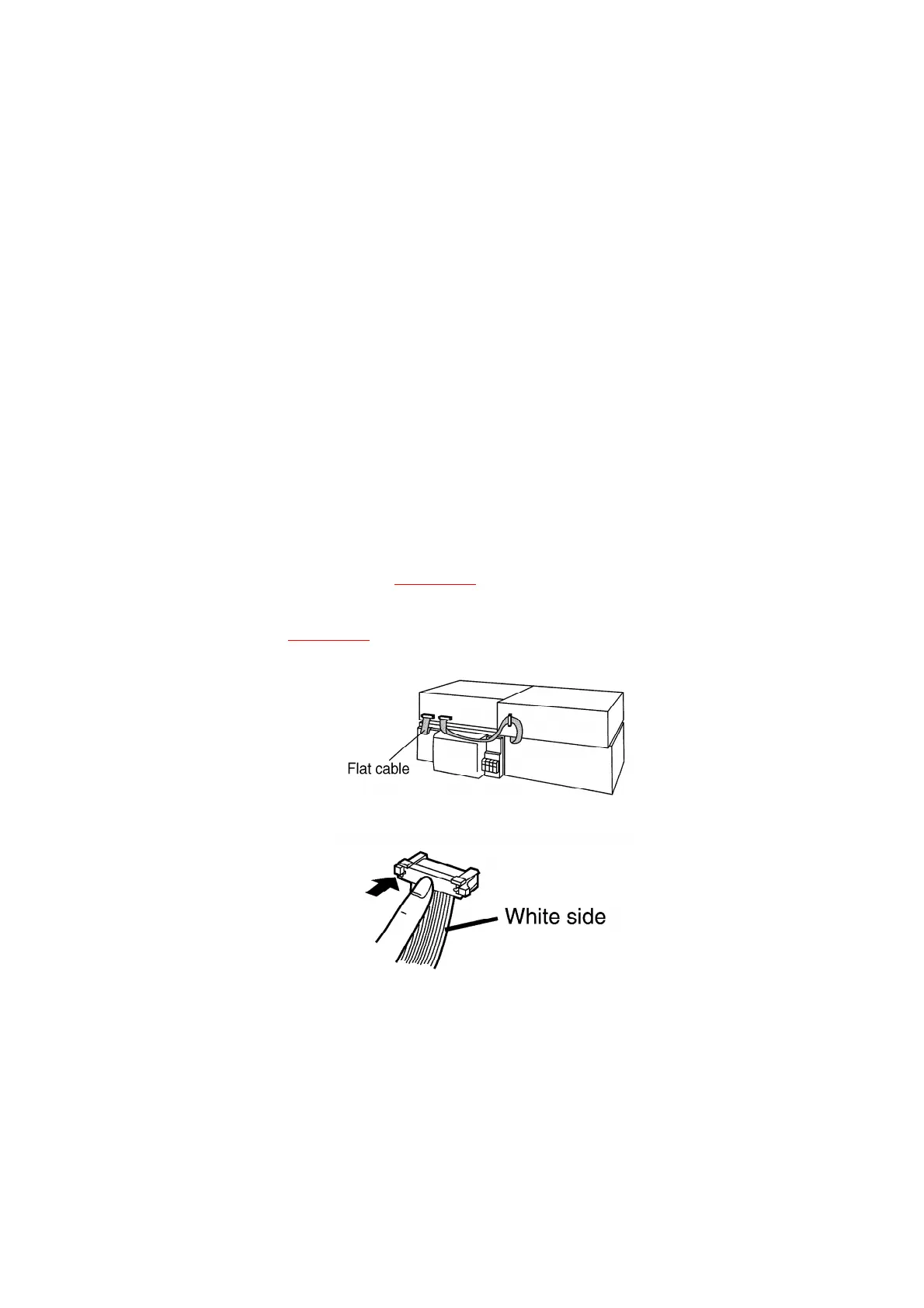
1. To check for correct insertion of flat cables.
- Insert each connectors until you hear a click.
- Insert the flat cables at the back of the unit in the order
indicated. Refer to Fig. 7-2.
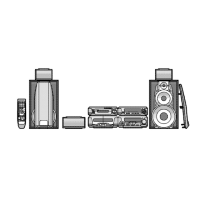
Make sure the white side of the cables is on your right side.
Refer to Fig. 7-3.
Fig. 7-2.
Fig. 7-3.
2. Breakage of flat cables. (Check and replace.)
3. If the problem is not corrected by items 1 and 2 above, this
indicates a faulty IC.
SA-EH670:
IC901 (C2BBFD000317)
SL-EH570:
11



 To Next Page