EasyManua.ls Logo

Technics SA-GX130D - Basic Operation and Adjustments; Standard Operating Procedure

Technics SA-GX130D
28 pages
Print Icon
To Next Page IconTo Next Page
To Previous Page IconTo Previous Page
Loading...
Mutual
Operations
>
r
V
e
3
I
Technics
|
FOiwen
J
STEttD
SYNTHESIZER
RECEIVER
r
t—
-
****.
-—»
TOME
CCNTWOi
\
BAS*
TWei
\
/TN
/T\
_._
lirrr
,
==
1
t=3
J
u
b
ftIMOOC
lOUDNU*
1
1
C
-1
autO'NOno
frr/on
““•“/TV
\^J
REMOTE
CONTROL
L*FT
MOKT
i_i
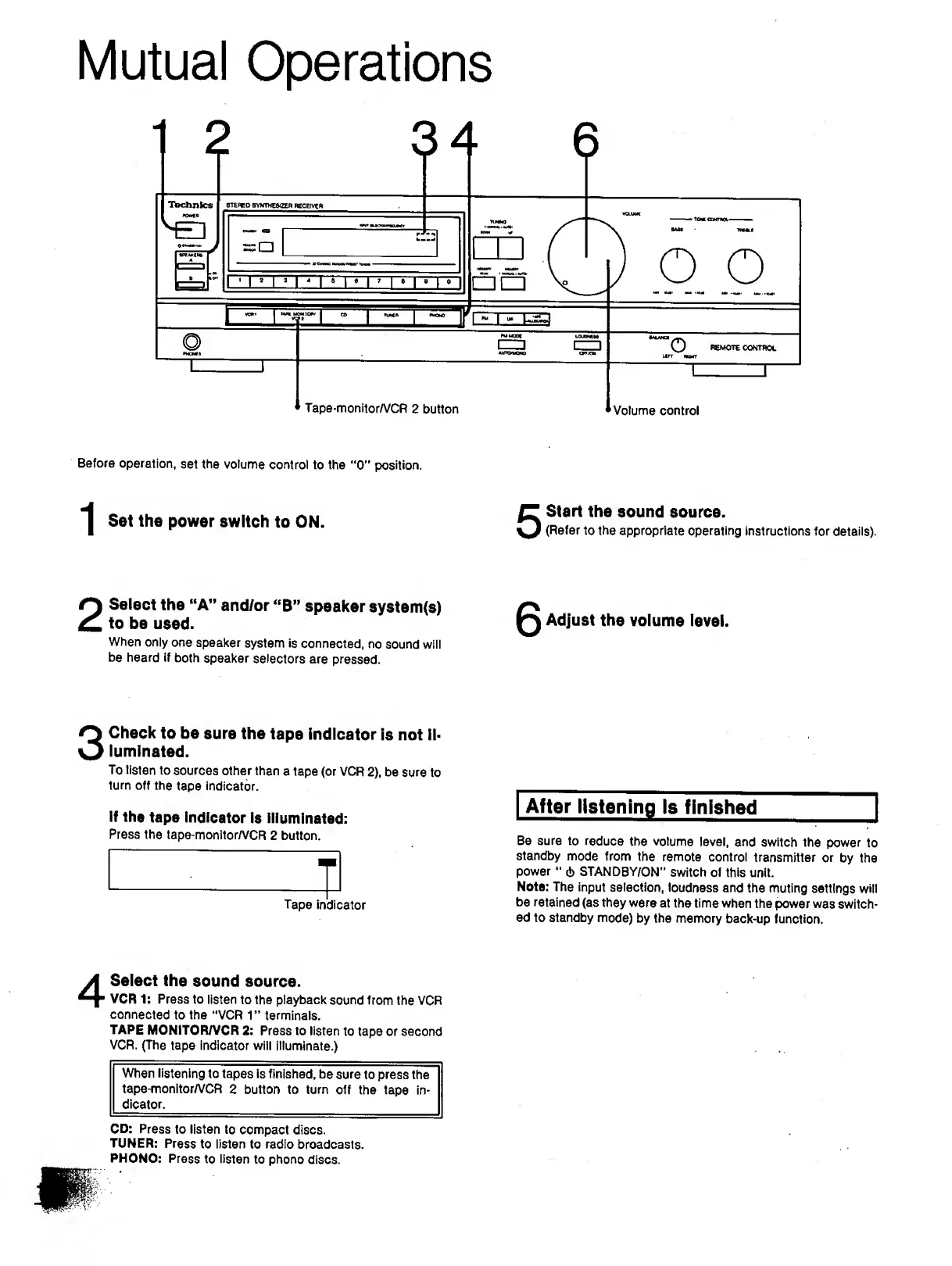
Tape-monitor/VCR
2
button
1—
1-
Volume
control
Before
operation,
set
the
volume
control
to
the
"0”
position.
^
Set
the
power
switch
to
ON.
2
S
elect
the
“A”
and/or
“B”
speaker
system<s)
to
be
used.
When
only
one
speaker
system
is
connected,
no
sound
will
be
heard
if
both
speaker
selectors
are
pressed.
5
6
Start
the
sound
source.
(Refer
to
the
appropriate
operating
instructions
for
details).
Adjust
the
volume
level.
3
C
heck
to
be
sure
the
tape
indicator
is
not
il¬
luminated.
To
listen
to
sources
other
than
a
tape
(or
VCR
2),
be
sure
to
turn
off
the
tape
indicator.
If
the
tape
indicator
is
illuminated:
Press
the
tape-monltor/VCR
2
button.
Tape
indicator
After
listening
Is
finished
_
Be
sure
to
reduce
the
volume
level,
and
switch
the
power
to
standby
mode
from
the
remote
control
transmitter
or
by
the
power
6
STANDBY/ON"
switch
of
this
unit.
Note:
The
input
selection,
loudness
and
the
muting
settings
will
be
retained
(as
they
were
at
the
time
when
the
power
was
switch¬
ed
to
standby
mode)
by
the
memory
back-up
function.
4
S
elect
the
sound
source.
VCR
1:
Press
to
listen
to
the
playback
sound
from
the
VCR
connected
to
the
"VCR
1”
terminals.
TAPE
MONITOR/VCR
2:
Press
to
listen
to
tape
or
second
VCR.
(The
tape
indicator
will
illuminate.)
When
listening
to
tapes
is
finished,
be
sure
to
press
the
tape-monitor/VCR
2
button
to
turn
off
the
tape
in¬
dicator.
CD:
Press
to
listen
to
compact
discs.
TUNER:
Press
to
listen
to
radio
broadcasts.
PHONO:
Press
to
listen
to
phono
discs.

Related product manuals