EasyManua.ls Logo

Technics SC-CH404 - Convenient Audio Functions; Easy Play, Mute, and Headphone Use

Technics SC-CH404
56 pages
Print Icon
To Next Page IconTo Next Page
To Previous Page IconTo Previous Page
Loading...
MUTTNa
a
r
lzt
Qq<5o
o o
o
oooo
oooo
OOOO
cbooo
oooo
(5qoq
o
o
CD
CD
O
o
o
o
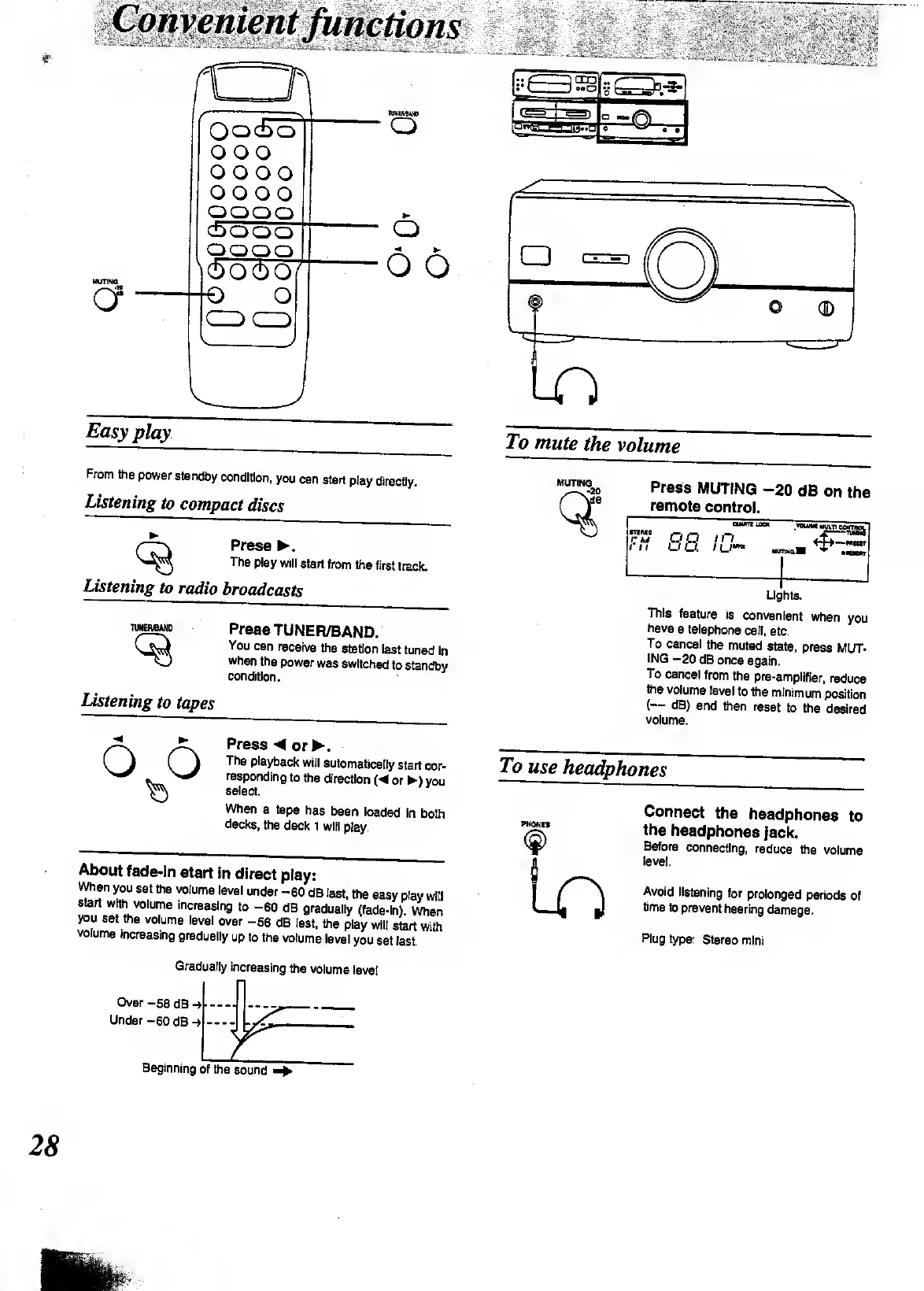
Easy
play
From
the
power
standby
condition,
you
can
start
play
directly.
Listening
to
compact
discs
Press
.
The
play
will
start
from
the
first
track.
Listening
to
radio
broadcasts
TUMEFVBAND
Press
TUNER/BAND.
You
can
receive
the
station
last
tuned
in
when
the
power
was
switched
to
standby
condition.
listening
to
tapes
<
o
o
Press
or
.
The
playback
will
automatically
start
cor¬
responding
to
the
direction
(
or
)
you
select.
When
a
tape
has
been
loaded
in
both
decks,
the
deck
1
will
play.
-—-
——
««
ami
i
iii
uiibvi
pisy;
VVhen
you
set
the
volume
level
under
-60
dB
last,
the
easy
play
will
Start
with
volume
increasing
to
-60
dB
gradually
(fade-in)
When
you
set
the
volume
level
over
-58
dB
last,
the
play
will
start
with
volume
increasing
gradually
up
to
the
volume
level
you
set
last
MUTING
9?
Press
MUTING
-20
dB
on
the
remote
control.
nuo
CM
88.
i
n
in
p--
*
This
feature
is
convenient
when
you
have
a
telephone
call,
etc.
To
cancel
the
muted
state,
press
MUT¬
ING
-20
dB
once
again.
To
cancel
from
the
pre-amplifier,
reduce
the
volume
level
to
the
minimum
position
(—
dB)
and
then
reset
to
the
desired
volume.
To
use
headphones
PHONtS
(f>
Ln
Connect
the
headphones
to
the
headphones
jack.
Before
connecting,
reduce
the
volume
level.
Avoid
listening
for
prolonged
periods
Of
time
to
prevent
hearing
damage.
Plug
type:
Stereo
mini
Gradually
increasing
the
volume
level
Over
-58
dB
Under
-60
dB
Beginning
of
the
sound

Other manuals for Technics SC-CH404

Related product manuals