Basic operations
RQT5471
18
2
11
22
ENTER
RETURN
3D AI EQ/
M.EQ BAND
AV EFFECT
H
ANGLE
SLEEP
MARKER
TOP MENU
SUBTITLE
1 2 3
4 5 6
7 8 9 0
j/-/--
DISC
PLAY MODE
CANCEL
AUDIO
U
PRO LOGIC
CH SELECT
TEST
DIGITAL
S.WOOFER
SUPER SRND
⁄/g ¤»
∂ VOLUME µ
VCR(EXT)/
VDP(AUX)
TAPE/
DECK 1/2
TUNER/
BAND
DVD
SLOW/SEARCH
MUTING
SKIP
SHIFT
MENU
EQ
SETUP
DISPLAY
MIX 2CH
22
11
2
1
CANCEL
SHIFT
ENTER
MARKER
ENTER
¢ ¢ ¢ ¢ ¢¢ ¢ ¢ ¢ ¢
1
¢ ¢ ¢ ¢¢ ¢ ¢ ¢
1 2 3 4
¢¢
CINEMA
B
A
1
CINEMA
C
Î
DIGITAL
DVD
CINEMA
Discs
»
A
Changing the picture quality for
movie viewing
[DVD] [V-CD]
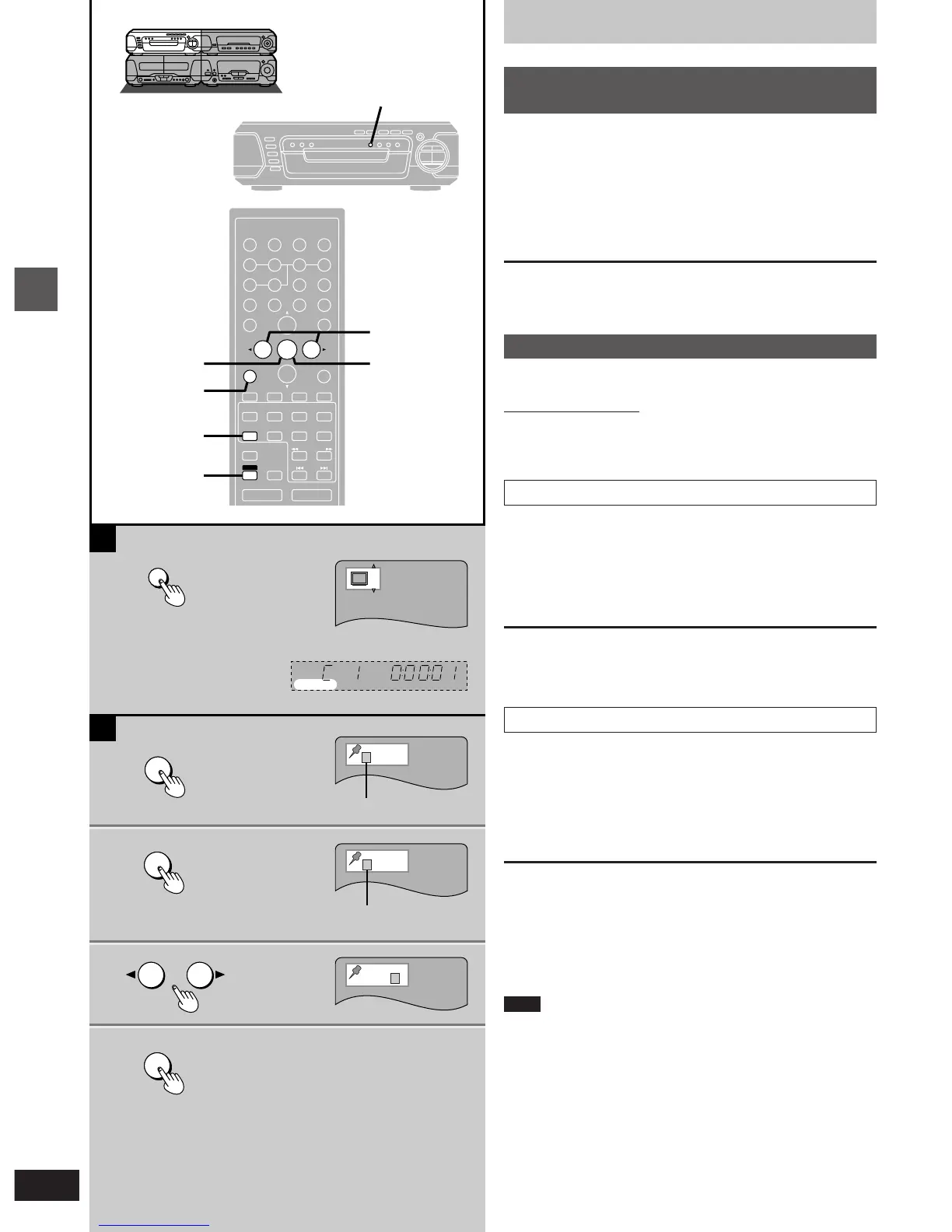
You can enjoy better pictures by changing the picture quality.
Press [CINEMA].
The CINEMA display appears on the TV screen.
Each time you press the button:
C (CINEMA is on)bN (CINEMA is off)
To cancel
Press [CINEMA] to display “N”.
»
B
Marking a position
[DVD] [V-CD] [CD]
Remote control only
This feature allows you to mark up to 5 points on a disc so you can
return to them easily at a later time.
Marking a position
1 Press [MARKER] during play.
The marker display appears on the TV screen.
2 Press [ENTER] at the point you want
to mark.
To mark another position
While the marker display is on the screen, press the cursor button
[2] or [1] to select another “¢” and press [ENTER].
Recalling a marked position
1 While the marker display is on the screen
Press the cursor button [2] or [1] to
highlight the required marker.
2 Press [ENTER] to recall the position.
To clear a marker
While the marker display is on the screen
Press the cursor button [2] or [1] to highlight the marker you want to
clear and press [SHIFT] i [CANCEL].
To clear the marker display
Press [MARKER].
Note
³This feature cannot be used if the play time for the disc is not
displayed on the tuner/amplifier.
³Some subtitles may not appear around the marker (DVD).
³Markers clear in the following situations:
³The unit is turned off.
³The disc is changed or removed.
³A source other than “DVD” is selected.
a (On the TV screen)
c No marker
d Marker 1
b (On the tuner/amplifier)


 To Next Page