EasyManua.ls Logo

Technics SL-MC7 - Disc Grouping Play; Creating and Checking Disc Groups

Technics SL-MC7
24 pages
Print Icon
To Next Page IconTo Next Page
To Previous Page IconTo Previous Page
Loading...
Operations
GROUP
O
(Soup)
o'
<"'f
'V
use
VA
2/B
3C
ooo
M>
5.1
oo
(enthr
(ENT^i
DISC
'f
kIDI
il
1
l
7
{
U
i
H
...
_>
)
Disc
grou
ping
pfay
___j
(Only
available
from
the
remote
control.)
You
can
put
discs
into
5
groups
(A-E).
You
can
then
play
the
discs
in
those
groups.
Each
disc
can
belong
to
more
than
one
group.
(SL-MC7]
Each
group
can
include
up
to
110
discs.
[SL-MC4]
Each
group
can
include
up
to
60
discs.
Each
group
can
be
named.
Tq
make
groups
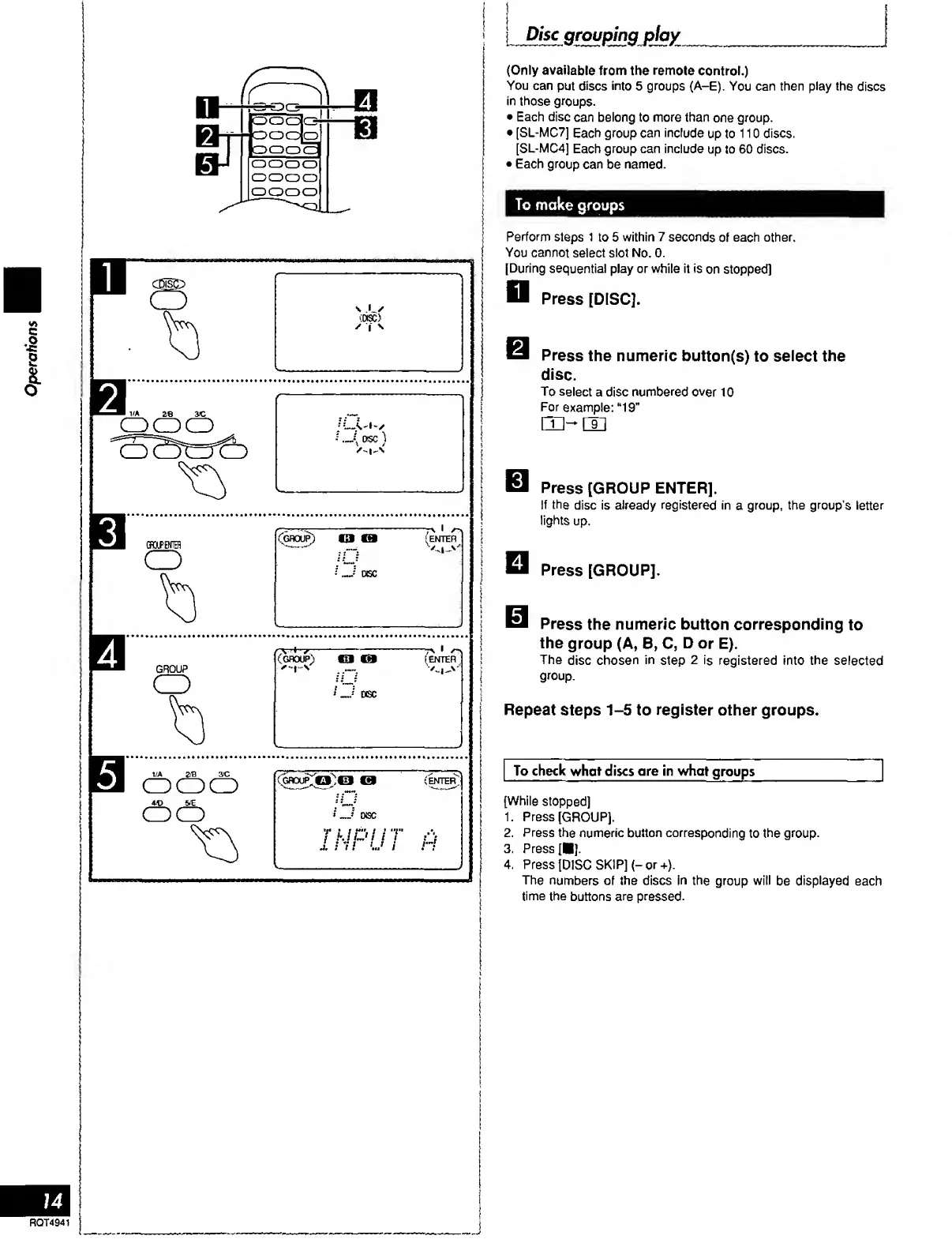
Perform
steps
1
to
5
within
7
seconds
of
each
other.
You
cannot
select
slot
No.
0.
[During
sequential
play
or
while
it
is
on
stopped)
D
Press
[DISC].
Press
the
numeric
button(s)
to
select
the
disc.
To
select
a
disc
numbered
over
10
For
example:
“19”
B
Press
[GROUP
ENTER].
If
the
disc
is
already
registered
in
a
group,
the
group's
letter
lights
up.
Press
[GROUP].
Press
the
numeric
button
corresponding
to
the
group
(A,
B,
C,
D
or
E).
The
disc
chosen
in
step
2
is
registered
into
the
selected
group.
Repeat
steps
1-5
to
register
other
groups.
To
check
what
discs
are
in
what
groups
(While
stopped]
1.
Press
(GROUP).
2.
Press
the
numeric
button
corresponding
to
the
group.
3.
Press
[
].
4.
Press
(DISC
SKIP)
(-
or
+).
The
numbers
of
the
discs
in
the
group
will
be
displayed
each
time
the
buttons
are
pressed.
!
14
RQT4941
I
j

Related product manuals