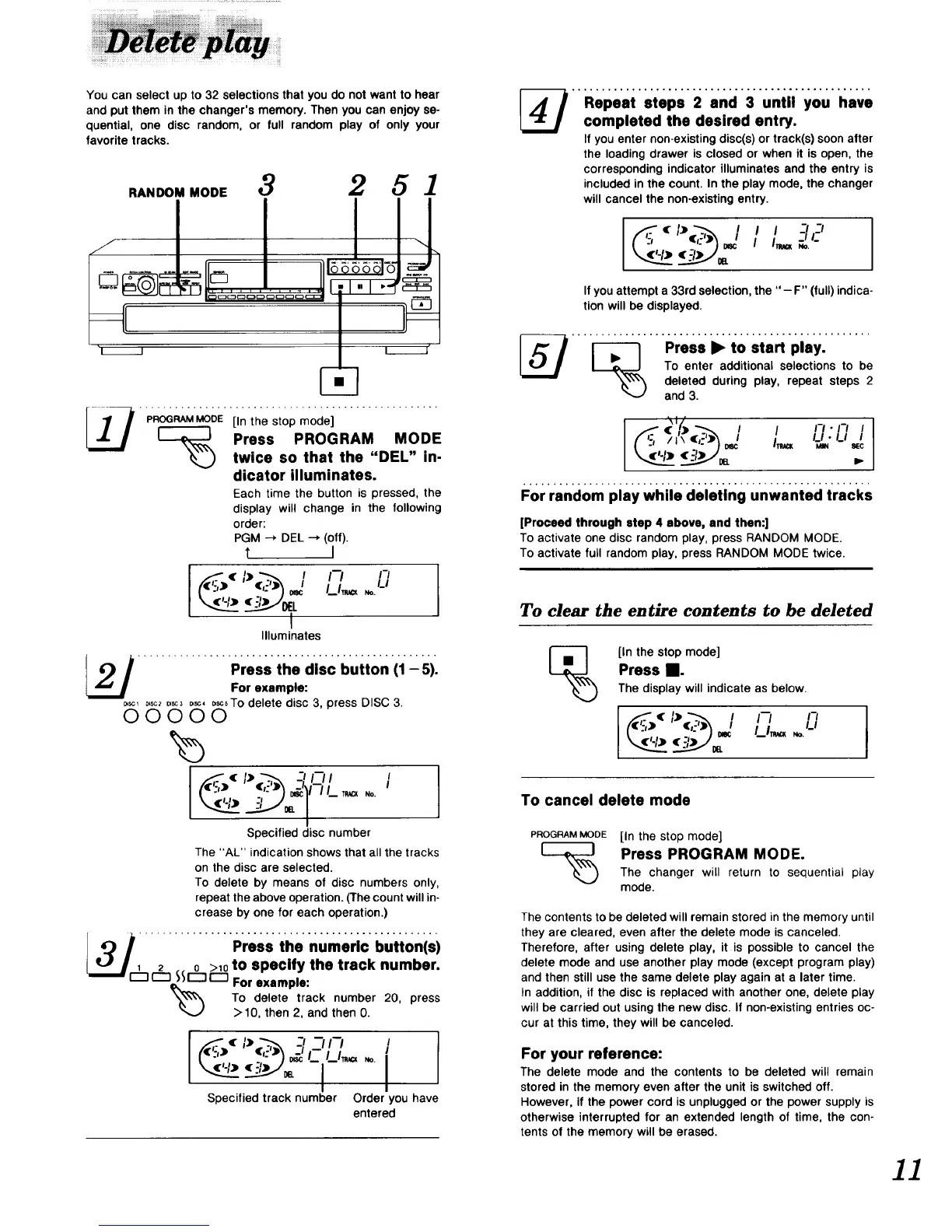
Youcan select up to 32 selections that you do not want to hear
and put them in the changer's memory. Then you can enjoy so-
quential, one disc random, or full random play of only your
favorite tracks.
..oo..oo, 3 2 5 1
'1 I I _"
PROGRAMMODE [In the stop mode]
Press PROGRAM MODE
twice so that the "DEL" in-
dicator illuminates.
Each time the button is pressed, the
display will change in the following
order:
PGM --_ DEL --_ (off).
t I
I-'/ /-_
/_1_ ,o.LI
_EL
I
Illuminates
................ Press ihe discbutton (1_ 5).
For example:
_ _,_c2o,sc3_, _scsTo delete disc 3, press DISC 3.
00000
((':,) ",:')__'_n l ,_
I.I _.1 _ NO.
Specified disc number
The "AL" indication shows that all the tracks
on the disc are selected.
To delete by means of disc numbers only,
repeat the above operation. (The count will in-
crease by one for each operation.)
_Jr_ ............... Press the numeri¢ buttonis)
1 2 0 >10to specify the track number.
(:::3 _IZ:]I'-7 For example:
To delete track number 20, press
>10, then 2, and then 0.
[ _)(%:,_) 37/-; [
Specified track number Order you have
entered
[_ _Op.ai.t,,_,.2.,_ci3,._iilyo,.i,*
completed the desired entry.
If you enter non-existing disc(s) or track(s) soon after
the loading drawer is closed or when it is open, the
corresponding indicator illuminates and the entry is
included in the count. In the play mode, the changer
will cancel the non-existing entry.
I q I I -_1-_1
If you attempt a 33rd selection, the "- F" (full) indica-
tion will be displayed.
.... ....P;.,,=;t0,,,. ,i,. .......
To enter additional selections to be
_L,_\\'_ deleted during play, repeat steps 2
and 3.
[S , , ,-,,-,,
LI
II \ _c
IT,,=
For random play while deleting unwanted tracks
]Proceed through step 4 above, and then:]
To activate one disc random play, press RANDOM MODE.
To activate full random play, press RANDOM MODE twice.
To clear the entire contents to be deleted
[_ [In the stop mode]
Press n.
The display will indicate as below.
,_'_'.-;)(%_-,':_)I !-/ L]
To cancel delete mode
PROGRAMMODE [In the stop mode]
[_ Press PROGRAM MODE.
The changer will return to sequential play
mode.
The contents to be deleted will remain stored in the memory until
they are cleared, even after the delete mode is canceled.
Therefore, after using delete play, it is possible to cancel the
delete mode and use another play mode (except program play)
and then still use the same delete play again at a later time.
In addition, if the disc is replaced with another one, delete play
will be carried out using the new disc. If non-existing entries oc-
cur at this time, they will be canceled.
For your reference:
The delete mode and the contents to be deleted will remain
stored in the memory even after the unit is switched off.
However, if the power cord is unplugged or the power supply is
otherwise interrupted for an extended length of time, the con-
tents of the memory will be erased.
]]


 To Next Page