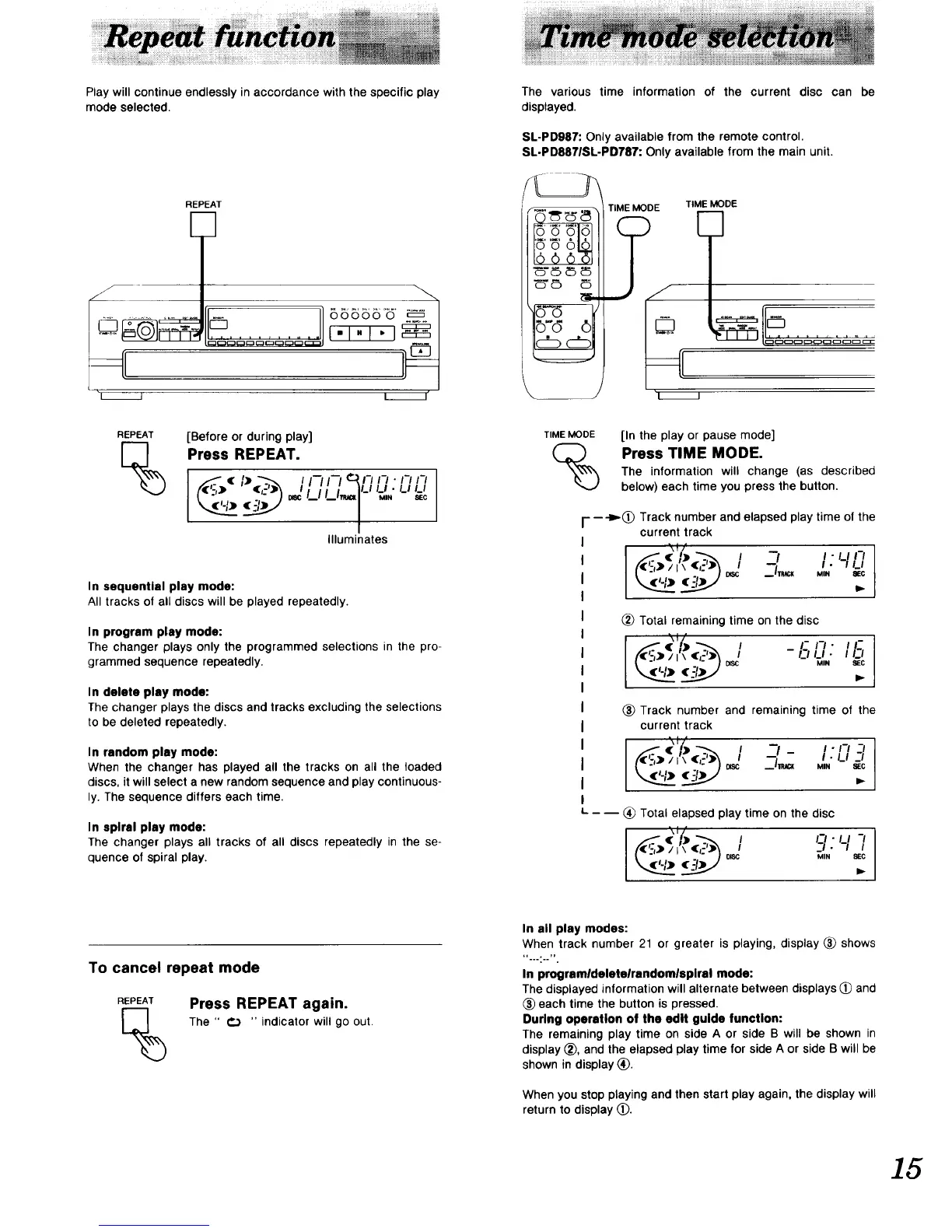
Play will continue endlessly in accordance with the specific play
mode selected.
i_J
REPEAT
00000 0
I"1"1 "1
I I'
REPEAT
%
[Before or during play]
Press REPEAT.
(,,:,,- ('-')_ _'/._1/._lm,_l'-'u,,,.u _cU
/
Illuminates
In sequential play mode:
All tracks of all discs will be played repeatedly.
In program play mode:
The changer plays only the programmed selections in the pro-
grammed sequence repeatedly.
In delete play mode:
The changer plays the discs and tracks excluding the selections
to be deleted repeatedly.
In random play mode:
When the changer has played all the tracks on all the loaded
discs, it will select a new random sequence and play continuous-
ly. The sequence differs each time.
In spiral play mode:
The changer plays all tracks of all discs repeatedly in the se-
quence of spiral play.
To cancel repeat mode
REPEAT
%
Press REPEAT again.
The " €) " indicator will go out.
The various time information of the current disc can be
displayed.
SL-PD987: Only available from the remote control.
SL-PD8871SL-PD787: Only available from the main unit.
_'_
_-d (5
c_c_
TIME MODE TIME MODE
"1 I
TIME MODE
%
[In the play or pause mode]
Press TIME MODE.
The information will change (as described
below) each time you press the button.
- ---I_(_ Track number and elapsed play time of the
current track
I t
- (I) -, / "-t I-IIn
,., %,,
_) Total remaining time on the disc
- (e) - i -I-..11_1. Ii-I
/ I \ _sc MIN _C
(_ Track number and remaining time of the
current track
• ,> ., / -I- I.n -I
/ l\ "-I_ I • U -..t
_ "L,,_ .,_ #DISC -- MIN _EG
- -- (_ Total elapsed play time on the disc
. • i) ._ I I-I •
, :,'-I-/
In all play modes:
When track number 21 or greater is playing, display _ shows
-......-
In programldeletelrandomlsplral mode:
The displayed information will alternate between displays (_ and
_) each time the button is pressed.
During operation of the edit guide function:
The remaining play time on side A or side B will be shown in
display _), and the elapsed play time for side A or side B will be
shown in display (_).
When you stop playing and then start play again, the display will
return to display (_).
15


 To Next Page