[oP_d[/JKo]AM
8
ii;ii;iii_iiiiiiii_iiiiiiiiiiii_iiiiiiiii_iiii;iiii;_iiilili_ili:iiiii_iliiiii;iiilii;iiiiiiiiiiiiiii_illiiilliiiiiil;i_ii_i;i¸i i_i_;iliiiiiTi;i_ii!i_iii!iiiiiiiii!_i;i_i;!_i_iTi__i_i_iiiif:i_ii_ii_ii:i_i:iiliiiiii!ii;!_iii_;_iilil;il_71_71i_i_ii_ii_i__¸¸_i_ii_iiiliiiiii_iii_i_iii_!ii
_i _i_i_iiiiiiii_iiiiiiiiiiiiiiiiiiiiiiiiiiiililiiiiill¸I_I_iili;iii_i_;i!_i;i_iii_iiiii_iiii7i_ii_iiiii_iiiiiiiii_iii_i_i;i_iiiiiii_iii_iiiiiiiii_i__r_i_;iii;iii;i;i;i;iii;i;iii;_;iii;iil;iii!iiiiiriii_;i_ii!_ii_
!:, !i!_!i ii:
OPENICLOSE
1 2 0 >10
r---Ir--I _r_ll--'t DISC SKIP
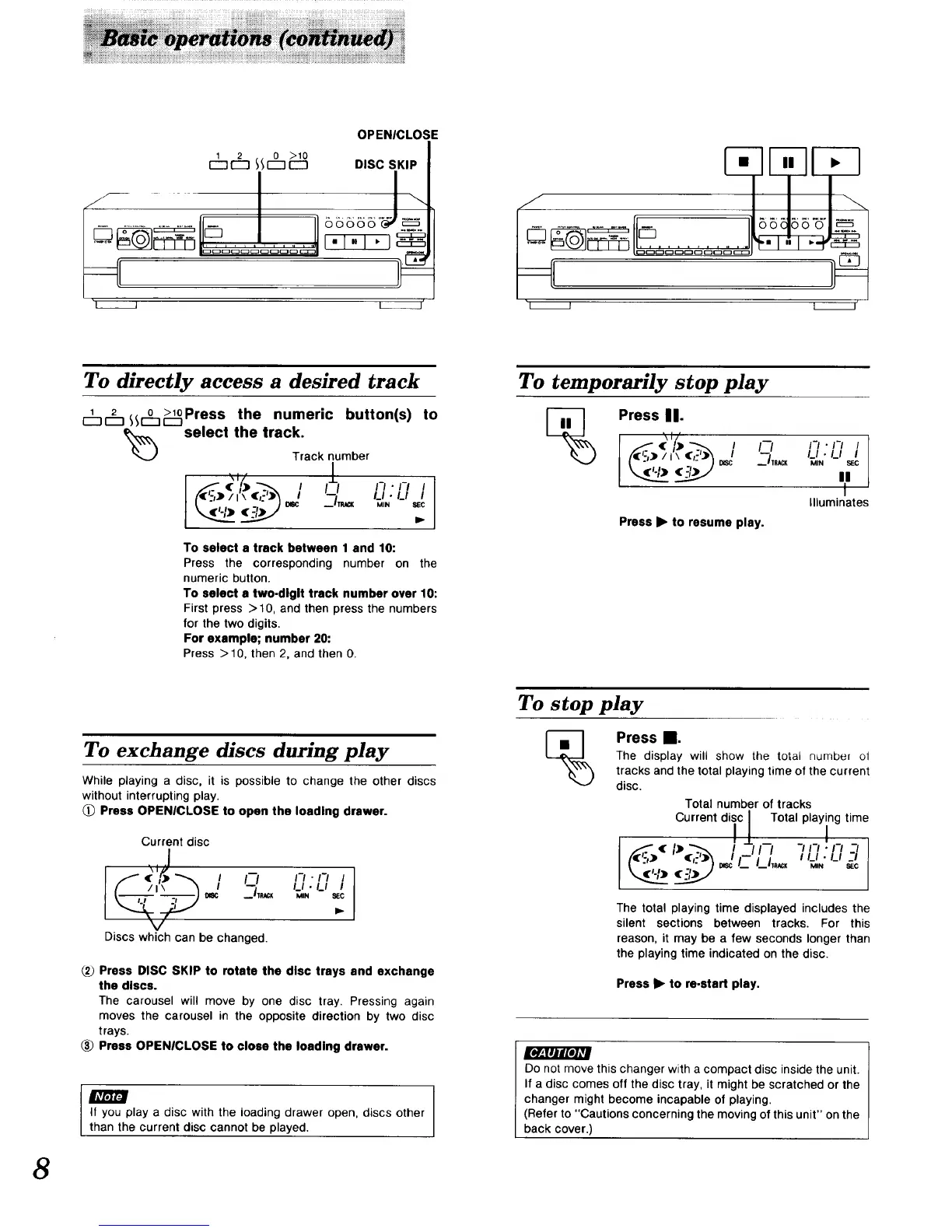
To directly access a desired track
2 .. 0_L>loPress the numeric button(s) to
r--]l:_ _LJselect the track.
Track number
I " '-''-' '
To select a track between 1 and 10:
Press the corresponding number on the
numeric button.
To select • two-digit track number over 10:
First press > 10, and then press the numbers
for the two digits.
For example; number 20:
Press > 10, then 2, and then O.
To exchange discs during play
While playing a disc, it is possible to change the other discs
without interrupting play.
Press OPENICLOSE to open the loading drawer.
Current disc
2.
Discs which can be changed.
t-t • 1-1 J
LI • LI I
MIN _IEC
2_ Press DISC SKIP to rotate the disc trays and exchange
the discs.
The carousel will move by one disc tray, Pressing again
moves the carousel in the opposite direction by two disc
trays.
_) Press OPENICLOSE to close the loading drawer.
I I
It you play a disc with the loading drawer open, discs other
than the current disc cannot be played.
55_5"_,
I I'
To temporarily stop play
Press II.
(_) . / i--/ n • n
Illuminates
Press I_ to resume play.
To stop play
Press _.
The display will show the total numbe_ ol
tracks and the total playing time of the current
disc.
Total number of tracks
Current diic / Total playlng time
I _L _ -I I-I I-I -_I
,,-'II, ,,_,:,_,-,
The total playing time displayed includes the
silent sections between tracks. For this
reason, it may be a few seconds longer than
the playing time indicated on the disc.
Press I_ to re.start play.
Do not move this changer with a compact disc inside the unit.
If a disc comes off the disc tray, it might be scratched or the
changer might become incapable of playing.
(Refer to "Cautions concerning the moving of this unit" on the
back cover.)


 To Next Page