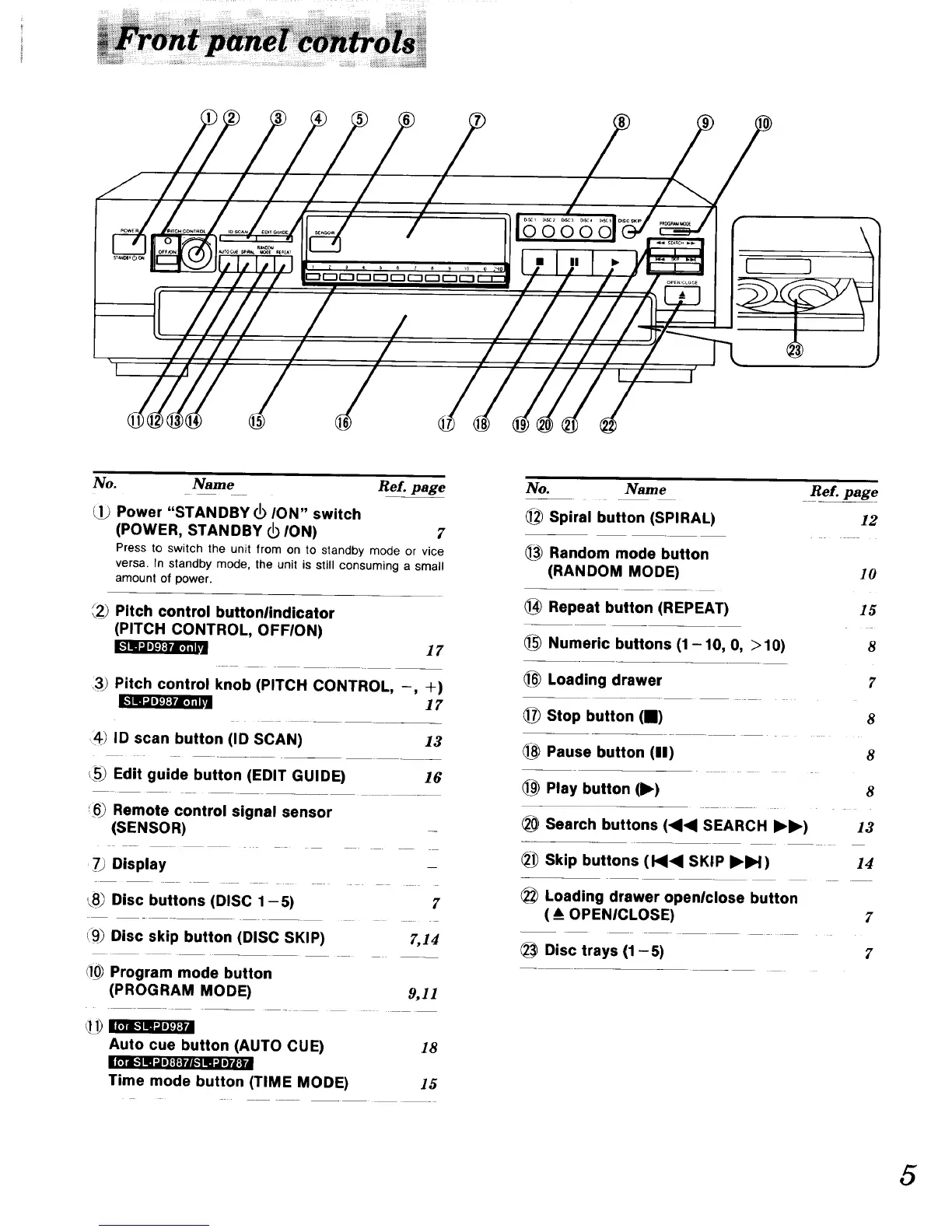
No. Name Re[. page
Power "STANDBY _ ION" switch
(POWER, STANDBY I_ ION) 2'
Press to switch the unit from on to standby mode or vice
versa. In standby mode, the unit is still consuming a small
amount of power.
{2_ Pitch control buttonlindicator
(PITCH CONTROL, OFFION)
17
3) Pitch control knob (PITCH CONTROL, -
_ra_l
_) ID scan button (ID SCAN)
c_5_Edit guide button (EDIT GUIDE)
_.6_Remote control signal sensor
(SENSOR)
'79 Display
, +)
17
13
16
Disc buttons (DISC 1 -5) 7
Disc skip button (DISC SKIP) 7,14
Program mode button
(PROGRAM MODE)
Auto cue button (AUTO CUE)
ilI'I!,.'! I! ".iil:t:llK'! IIl Iltll
Time mode button (TIME MODE)
9,11
18
15
No. Name Re?. page
]_ Spiral button (SPIRAL) 12
1_ Random mode button
(RANDOM MODE)
Repeat button (REPEAT)
Numeric buttons (1-10, O, >10)
10
15
8
Loading drawer
1_ Stop button (I)
Pause button (11)
Play button (1_)
___Search buttons (<1<1 SEARCH I_1_)
7
8
8
8
13
Skip buttons (1<1<I SKIP I_IH)
14
Loading drawer openlclose button
( A_OPENICLOSE)
Disc trays (1 -5)
7
7
5


 To Next Page