ACTIVE WTV: Machine configuration
Page 6
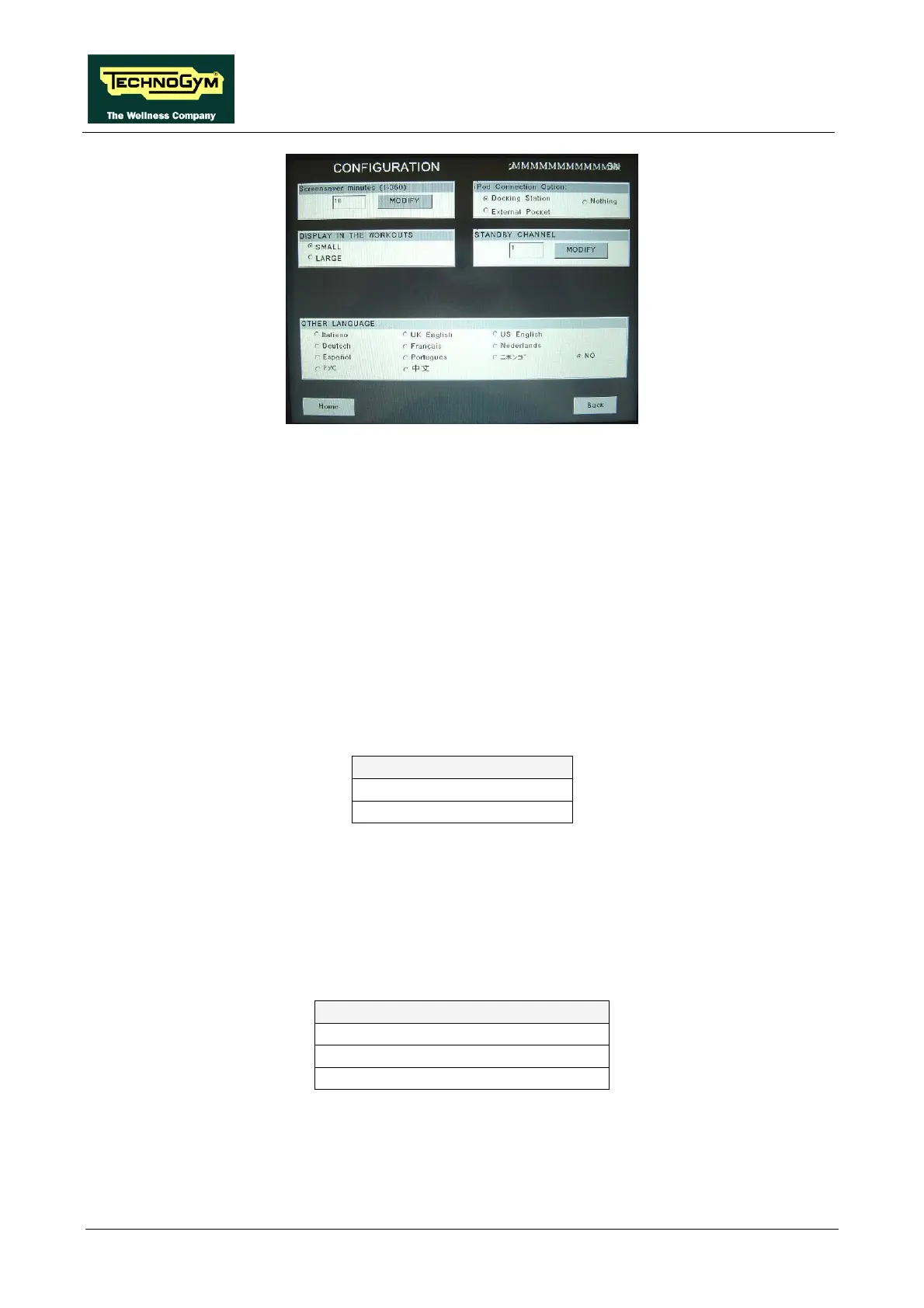
1.1.16. SCREEN SAVER MINUTES
It is possible to configure the amount of time, in minutes, the machine will wait before activating
the screen saver, with values ranging from 10 to 360.
To change the setting, press the MODIFY key and insert the value using the numeric keyboard.
Press ENTER key to confirm or BACK key to back forward.
The default value of this parameter is 10.
Press HOME to confirm and save, FORWARD or BACK to scroll the pages.
1.1.17. DISPLAY IN THE WORKOUT
It is possible to configure the size of the exercise data during the workout. To change the selection,
select the desired option among the ones in the list, directly touching on the Touch Screen.
DISPLAY IN THE WORKOUT
SMALL <default>
LARGE
Press HOME to confirm and save, FORWARD or BACK to scroll the pages.
1.1.18. IPOD CONNECTION OPTION
It is possible to set the machine for controlling the iPod through the display. To change the
selection, select the desired option among the ones in the list, directly touching on the Touch
Screen.
IPOD CONNECTION OPTION
DOCKING STATION <default>
NOTHING
External Pocket -not used-
Press HOME to confirm and save, FORWARD or BACK to scroll the pages.



 To Next Page