ACTIVE WTV: Machine configuration
1.2.1. LOW KIT PARAMETER
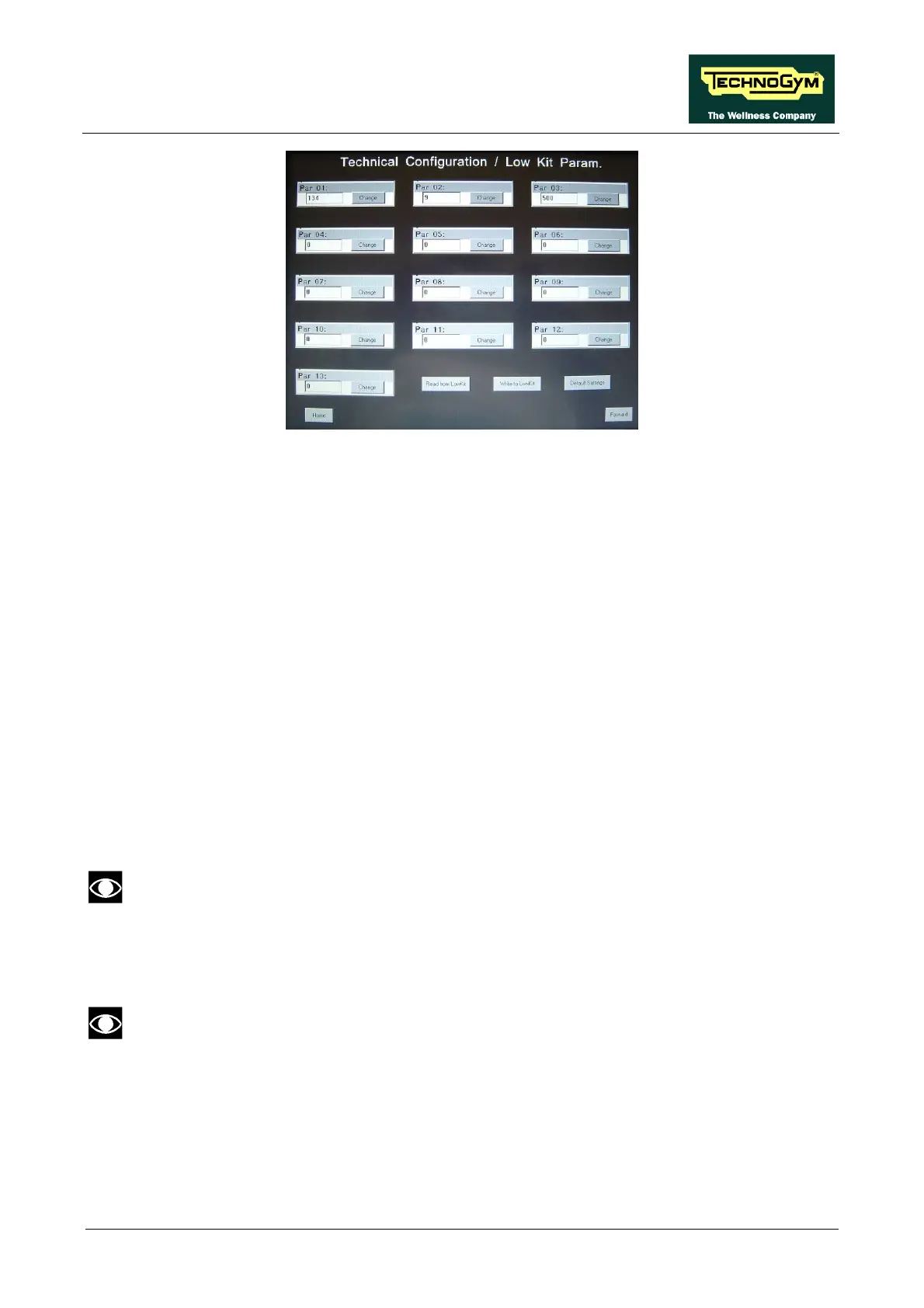
This function provides access to parameters used for modifying certain settings of the lower
assembly. To access this menu, when the display shows:
In addition to the 13 configuration parameters, this function also includes the 3 sub-functions
described below:
1.2.1.1. Read from low kit
To read the parameter values from the low kit memory and view them on the display, press READ
FROM LOW KIT key.
1.2.1.2. Write to low kit
To write the values of the currently displayed parameters to the low kit, press WRITE TO LOW
KIT key.
1.2.1.3. Default Setting
To load the default parameter values, press DEFAULT SETTING key.
1.2.1.4. Table of configuration parameters
To correctly display the parameter values, you need to load them from the low kit, using
the “Read from low kit” function.
To change the setting, press the CHANGE key and insert the value using the numeric keyboard.
Press ENTER key to confirm or BACK key to back forward.
After any changes to the parameter values, you need to load them in the low kit using
the “Write to low kit” function.
Press HOME to confirm and save, FORWARD or BACK to scroll the pages.
Page 9



 To Next Page