42
Instruction and maintenance manual
ENGLISH
3.4.4 ST200 CH-ENABLE
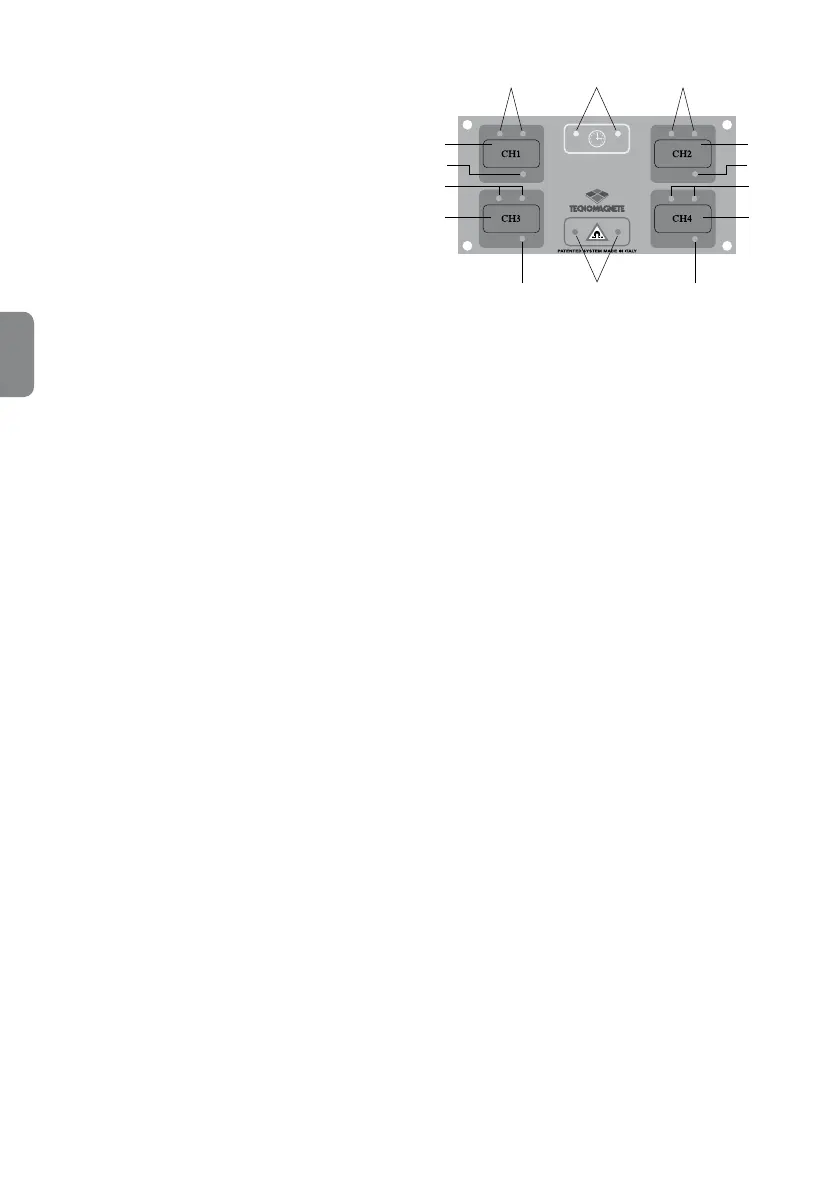
This push-button panel can be used when you need
to select different discharge levels for the magnetic
chucks, i.e. enable or disable the desired discharge.
The push-button panel can be used in combination
with a push-button and LED to manage selections.
It has four buttons that enable to select/deselect the
desired discharge channel. The status of the channel
is shown by the corresponding LED.
After you have selected the discharge sequence,
you can also specify which discharges have to be
carried out with a full or partial magnetization and/or
select them with the appropriate buttons (CH1, CH2,
CH3 and CH4).
The status LEDs are off when the corresponding
magnetic chuck is in DEMAG mode, are on (though
not ashing) in FULL-MAG mode and ashing when
the partial magnetization mode is selected.
The cycle LEDs shall be on (though not ashing)
when a cycle is in progress and off when no cycle is
in progress.
Alarm LEDs are on (though not ashing) during all
alarm conditions, except for communication alarms.
M
I
J
N
D
H
E
F
A
B
C
L
G
K
PUSH-BUTTON PANEL
A
➜ CH1 selection button
B
➜ CH2 selection button
C
➜ CH3 selection button
D
➜ CH4 selection button
E
➜ FULL-MAG Led (xed) of MAG Led for partial
magnetization (ashing), discharge 1
F
➜ FULL-MAG Led (xed) of MAG Led for partial
magnetization (ashing), discharge 2
G
➜ FULL-MAG Led (xed) of MAG Led for partial
magnetization (ashing), discharge 3
H
➜ FULL-MAG Led (xed) of MAG Led for partial
magnetization (ashing), discharge 4
I
➜ Cycle Led
J
➜ Alarm status Led
K
➜ CH1 selection Led
L
➜ CH2 selection Led
M
➜ CH3 selection Led
N
➜ CH4 selection Led



 To Next Page