51
Instruction and maintenance manual
ENGLISH
9
ORDINARY USE
9.1 ST100
To start the ST100 controller, follow this procedure:
1) Connect the discharge cable to
TECNOMAGNETE’s module.
2) Connect the plug of the power cable to the 230V
electric socket and connect the connector to
the magnetic chuck, where available.
3) Switch the ST100 controller on using the switch
on the rear of the controller.
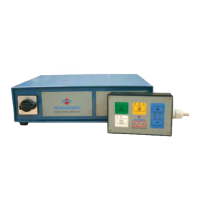
4) Verify that the LEDs on the push-button panel
turn on.
5) Press the demagnetization button (DEMAG).
Note: for ST100 (base) and ST100 (version with
2 levels) simultaneously press buttons ENABLE
and DEMAG.
6) Verify that the LED above the DEMAG button
turns on.
7) Press the magnetization button (MAG).
Note: for ST100 (base) and ST100 (version with
2 levels) simultaneously press buttons ENABLE
and FULL-MAG.
8) Verify that the LED above the MAG button
switches on.
9) Verify that the module is magnetized.
10) Start working remembering to close the con-
nector and check the status of the chuck after
every magnetization/demagnetization cycle.
9.2 ST200
To start ST200 controllers, follow this procedure:
1) Connect the discharge cable to
TECNOMAGNETE’s module.
2) Connect the plug of the power cable to the elec-
tric socket and connect the connector to the
magnetic chuck, where available.
3) Switch the ST200X controller on using the
switch on the front of the controller.
4) Verify that the LEDs on the push-button panel
turn on.
5) Press the demagnetization button (DEMAG).
Note: for ST200 (base), ST200 (version with 2
levels) and ST200 (version with 7 levels) simulta-
neously press buttons ENABLE and DEMAG.
6) Verify that the LED above the DEMAG button
turns on.
7) Press the magnetization button (MAG).
Note: for ST200 (base) and ST200 (version. with
2 levels) simultaneously press buttons ENABLE
and FULL-MAG. For ST200 (version with 7 lev-
els) simultaneously press buttons ENABLE and
MAG.
8) Verify that the LED above the MAG button
switches on.
9) Verify that the module is magnetized.
10) If the discharge cable has been removed, start
the working cycle remembering to close the
connector and check the status of the chuck at
the end of each magnetization and demagneti-
zation cycle.
WARNING
Do not place the discharge connector near or in
the presence of liquids, flammable material or
any other hazardous material.



 To Next Page