Application rate
Application rate displays or give access to:
►Application rate – while application is active, displays the
actual application rate
►Target application rate – while application is inactive, displays
the target rate of product to apply.
◄Automatic regulation mode – Target application rate symbol
will be active
Use the Boost/step percent increase/decrease
buttons
5%
/
5%
to adjust the target application rate
◄Manual regulation mode – manual regulation symbol will
remain active
►Preset target application rates options menu – denes the
target rate of product to apply for the selected number. These
settings will be the same for all active jobs. Range is 0 to
6,554 litres/hectare.
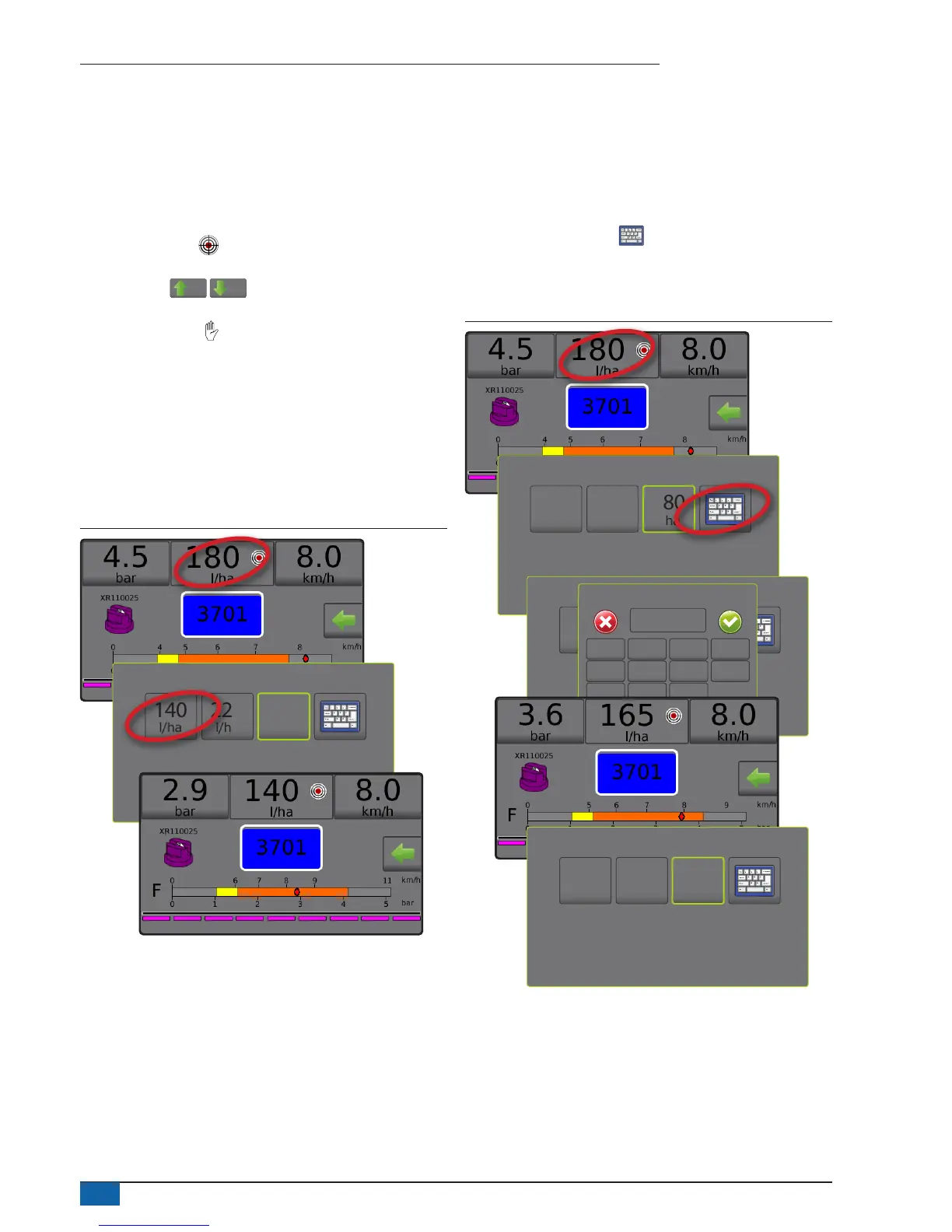
Select target application rate
1. Press the Application rate section.
2. Select one (1) of up to three (3) preset application rates.
Figure 39: Select target application rate
140
l/ha
225
l/ha
180
l/ha
Change preset target application rate
The selected target rate can be changed either on the Operation
screen or in Settings->Job parameters.
Operation
1. Press the Application rate section.
2. Select the target application rate to be changed.
3. Press KEYBOARD button .
4. Select an application rate.
NOTE: Value must be between 0 and 6,554 litres/hectare.
Figure 40: Application rate number
140
l/ha
225
l/ha
180
l/ha
140
l/ha
225
l/ha
180
l/ha
Application rate (l/ha)
1 2 3
165
Clear
4 5 6 <--
7 8 9
0 . +/-
140
l/ha
225
l/ha
165
l/ha



 To Next Page