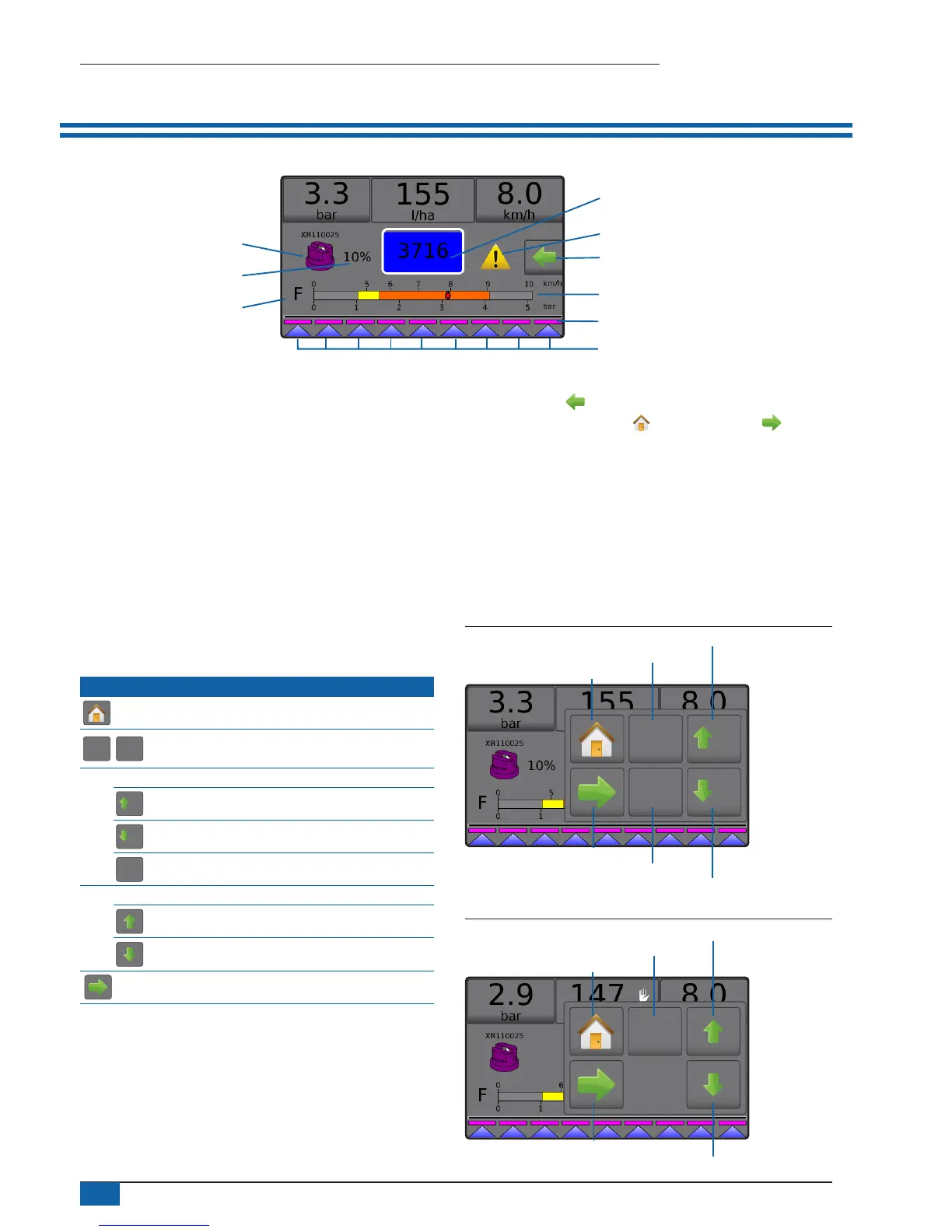
NO.2 OPERATION SCREEN
Boom sections
Spray status
Pressure gauge
Current nozzle
Information bar
Current droplet size
Tank contents / lling options
Alarm warning
Options tab
Application rate change
►Information bar – displays application rates and selectable
information
►Current nozzle – displays current nozzle and accesses ve (5)
preset nozzle types
►Application rate change – displays rate changes (if in
Automatic regulation mode)
►Tank – displays remaining tank contents and accesses lling
options
◄Filling – establishes actual/desired tank material/density
►Alarm warning – displays active alarm conditions
►Options tab – accesses the Operation menu
◄Displays Home button , Close Menu button ,
regulation modes and target rate options
►Pressure gauge – displays current pressure range compared
with recommended pressure range
◄Droplet size – displays selected droplet size
►Boom sections – displays congured boom sections
◄Spray status – displays active/inactive for section
Operation menu
The Options tab is always available on the Operation screen. This
tab accesses the Operation menu where the Home button, regulation
modes and target rate options display.
Operation menu buttons
Home
Auto
reg
Man
reg
Change between automatic/manual regulation
modes
Automatic regulation mode
5%
Target rate boost percent increase
5%
Target rate boost percent decrease
0%
Return to target rate
Manual regulation mode
Regulation valve manual open
Regulation valve manual close
Close menu
Figure 2: Options tab – Automatic mode
0%
Man
reg
5%
5%
Regulation mode
Target rate reset
Boost/step percent increase
Boost/step percent decrease
Home
Close menu
Figure 3: Options tab – Manual mode
Auto
reg
Regulation mode
Valve open
Valve close
Home
Close menu



 To Next Page