NO. 3 GO TO HOME
1 SET UP THE LOCAL CULTURAL
SETTINGS
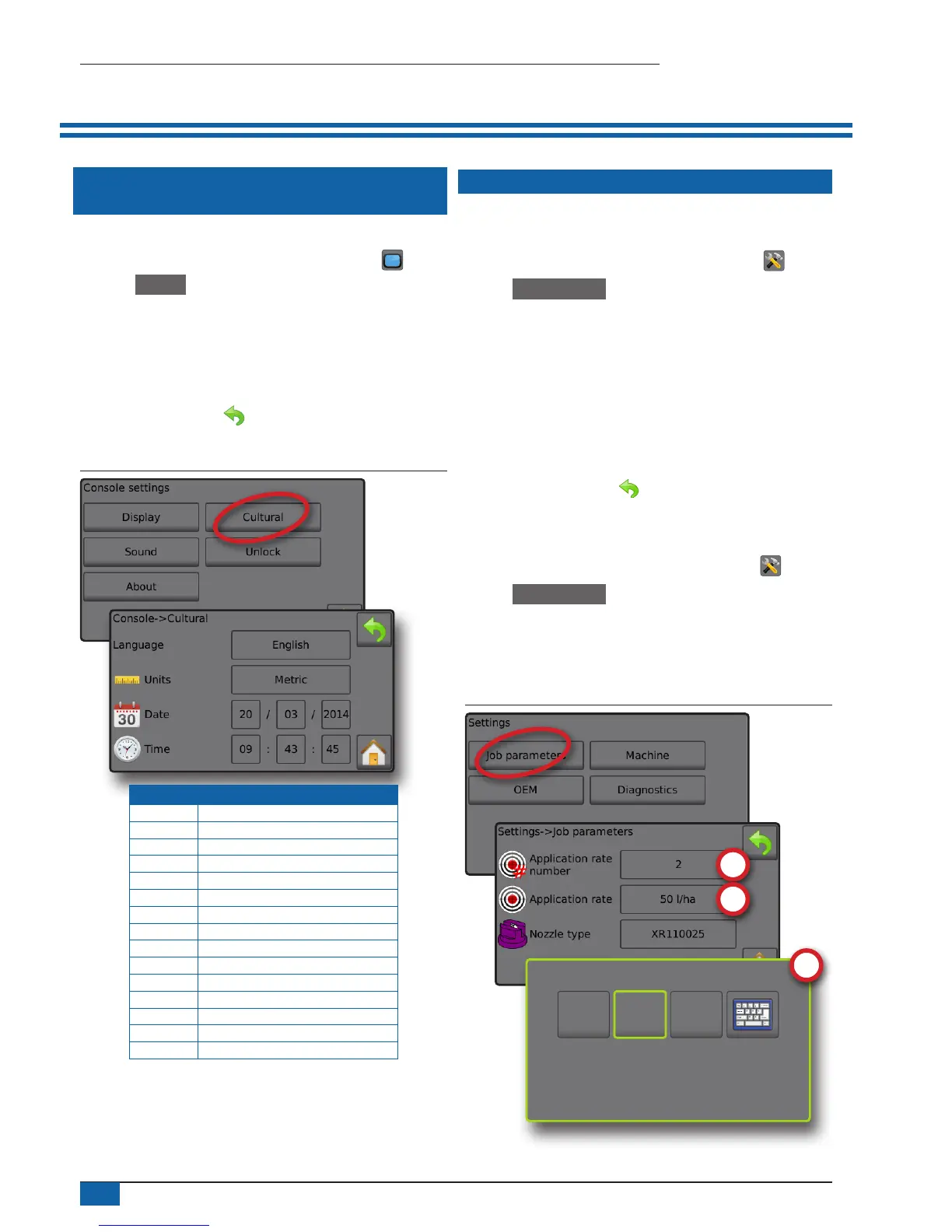
Cultural congures language, units, date and time settings.
1. From the Home screen, press the CONSOLE button .
2. Press Cultural .
3. Select from:
►Language – denes the system language
►Units – denes the system measurements
►Date – establishes the date
►Time – establishes the time
4. Press RETURN arrow to return to the main Console settings
screen.
Figure 7: Cultural options
Code Language
cs Czech
da Danish
de-DE German
en-GB English (international)
en-US English (USA)
es-ES Spanish (Europe)
es Spanish (Central/South America)
fr-FR French
hu Hungarian
it-IT Italian
nl Dutch
pl Polish
pt-BR Portuguese (Brazil)
ru Russian
sk Slovak
NOTE: Some languages listed may not be available on the console.
2 SET UP THE JOB PARAMETERS
Job parameters congures the target application rate settings and
current nozzle. Selections are also active on the Operation screen.
1. From the Home screen, press the SETTINGS button .
2. Press Job parameters .
3. Press a setting value to adjust settings as needed.
◄ Target application rate number – species up to three (3)
target application rate presets from which to select
◄ Target application rate – denes the target rate of product to
apply for the selected number (these settings will be the same
for all active jobs)
◄ Nozzle type – selects the current nozzle type from the ve (5)
nozzle presets
4. Press the RETURN arrow to return to the main Settings
screen.
Establish preset target application rates
1. From the Home screen, press the SETTINGS button .
2. Press Job parameters .
3. Select Application rate number 1 .
4. Select an application rate to be associated with number 1.
5. Repeat steps 3 and 4 for Application rate numbers 2 and 3.
Figure 8: Establish preset target application rate 2
225
l/ha
50
l/ha
100
l/ha



 To Next Page