Adjust Seat: Height
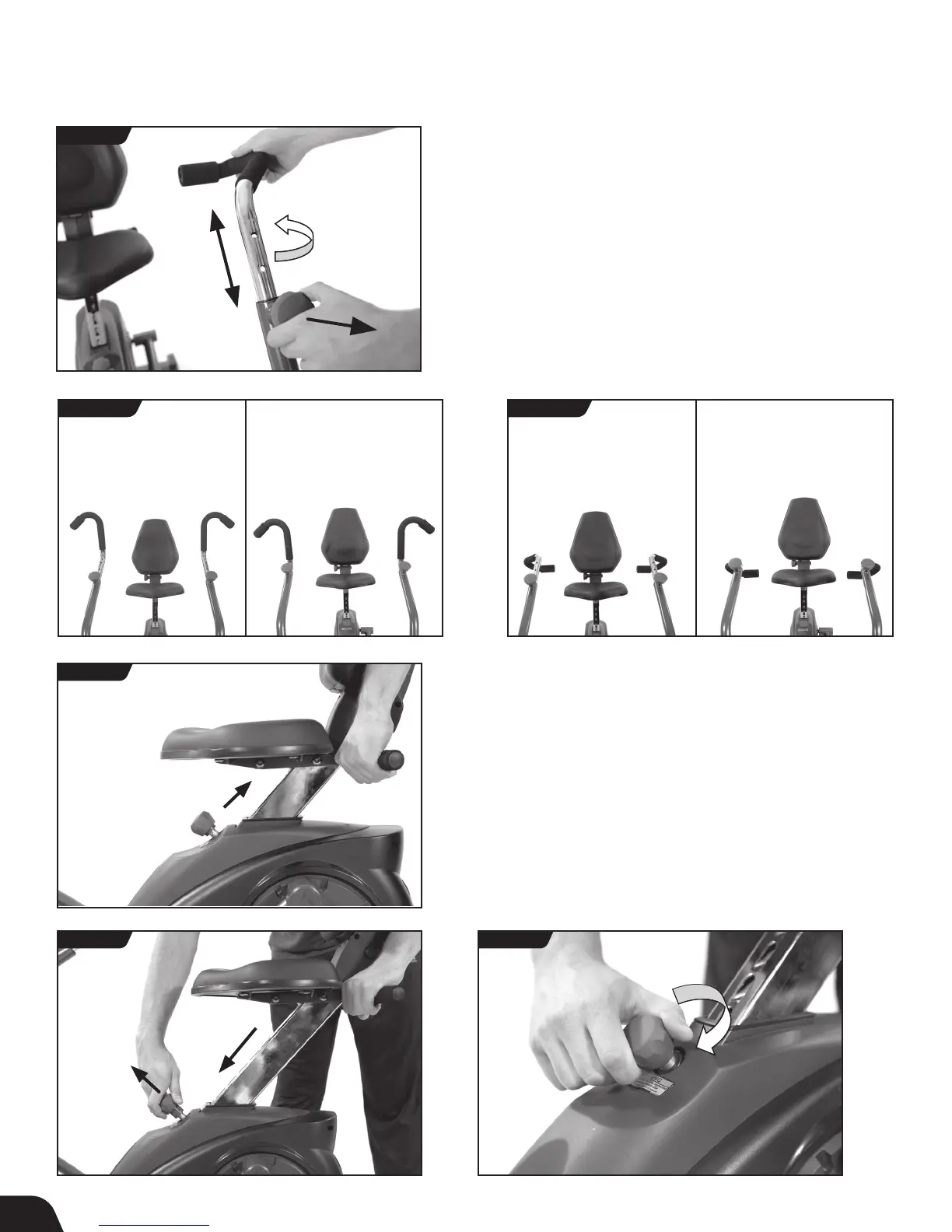
• To raise the Seat height, simply pull up on the Seat Handle
(Figure 29).
• To lower the Seat height, pull out on the Height Adjustment
Knob and push down on the Seat Handle. Release the Knob in
your desired position, then pull or push on the Handle to ensure
the Seat locks into a hole setting (Figure 30).
• To secure the Seat setting, turn the Height Adjustment Knob
clockwise (Figure 31).
User Guide
Adjust Handles: Rotation
• To rotate the Handles, loosen the Handle Adjustment Knob and
release by pulling outward. Rotate the Handle and lock the knob
back into place (Figure 27).
• The Handles can be locked into outward and inward settings
with 4 height adjustments each, allowing up to 8 positions total
(Figure 28a and Figure 28b).
FIGURE 29
FIGURE 30 FIGURE 31
FIGURE 28a
FIGURE 28b
Highest Position Highest Position Lowest PositionLowest Position
FIGURE 27
OUTWARD SETTING INWARD SETTING INWARD SETTING OUTWARD SETTING
13



 To Next Page