Adjust Resistance
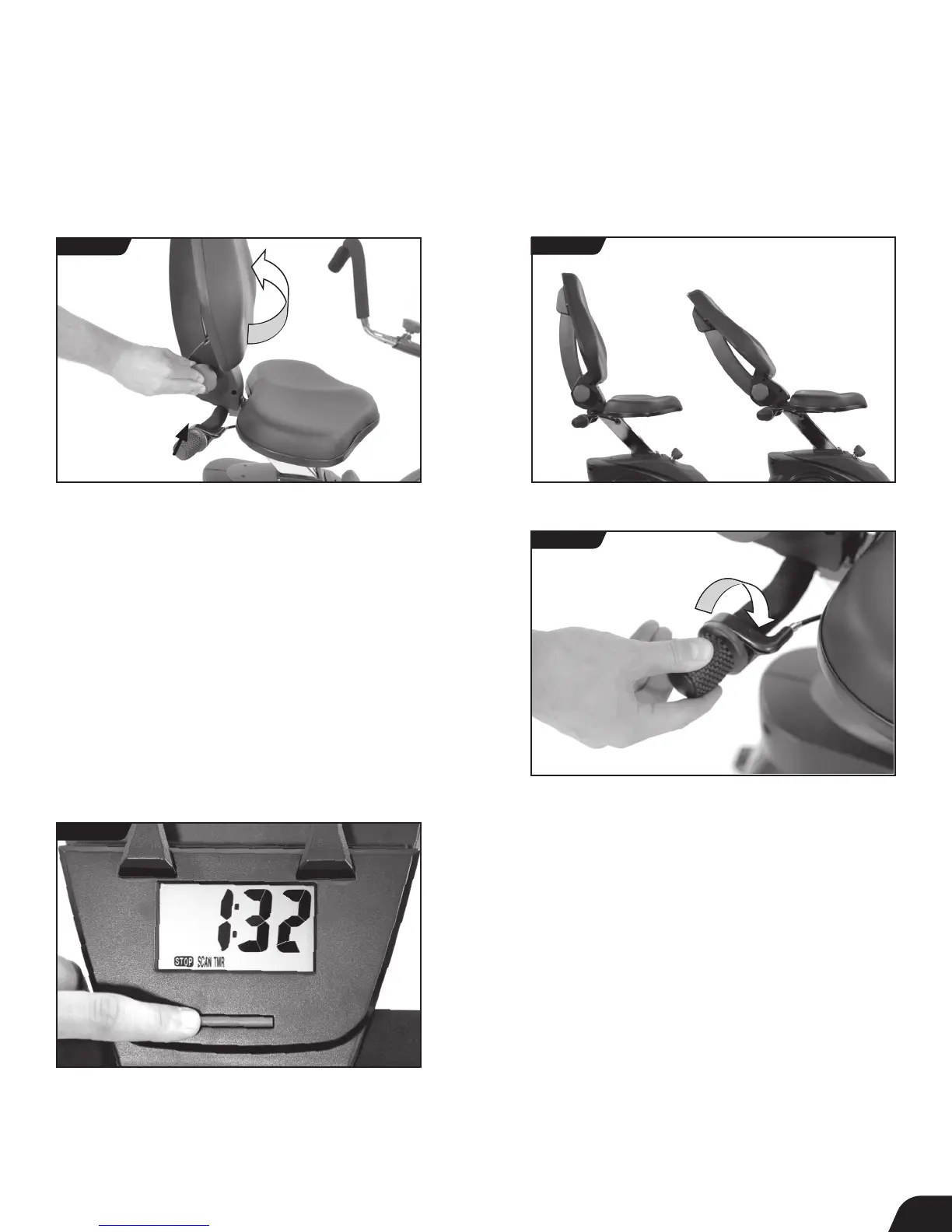
• To increase resistance, rotate the Resistance Adjustment Knob
clockwise, and to decrease resistance, rotate it counter-clockwise
(Figure 34).
Adjust Seat: Rotation
• To recline the Seat, push in on the Seat Back Adjustment Knob
and pull on the Seat Back. Make sure that the Seat Back locks
into a hole setting (Figure 32 and Figure 33).
User Guide
FIGURE 34
FIGURE 33
Fully
Upright
Fully
Reclined
FIGURE 32
14
Using the Console
• When you begin to pedal, the Console will display readings based
on your performance, showing the time in seconds (TMR), calories
burned (CAL), distance in miles (DST), and speed in miles per
hour (SPD) (Figure 35).
• SCAN: While pedaling, the Console will automatically scan
through all the settings. To stop scanning automatically and to
cycle through to the setting you want to see, press the Console
Button. (Figure 35).
• RESET: To start at zero, holding down the Console button will
reset your settings.
• STOP: When you stop pedaling, the STOP will flash until you
begin pedaling again. If you are done with your workout, the
Console will automatically shut off.
FIGURE 35



 To Next Page