Seat Adjustment
10
Seat Adjustment
The height and angle of the Seat can be adjusted to accommodate
sitting or standing. It may also be adjusted closer or farther from the
Desktop to accommodate varying heights and sitting positions.
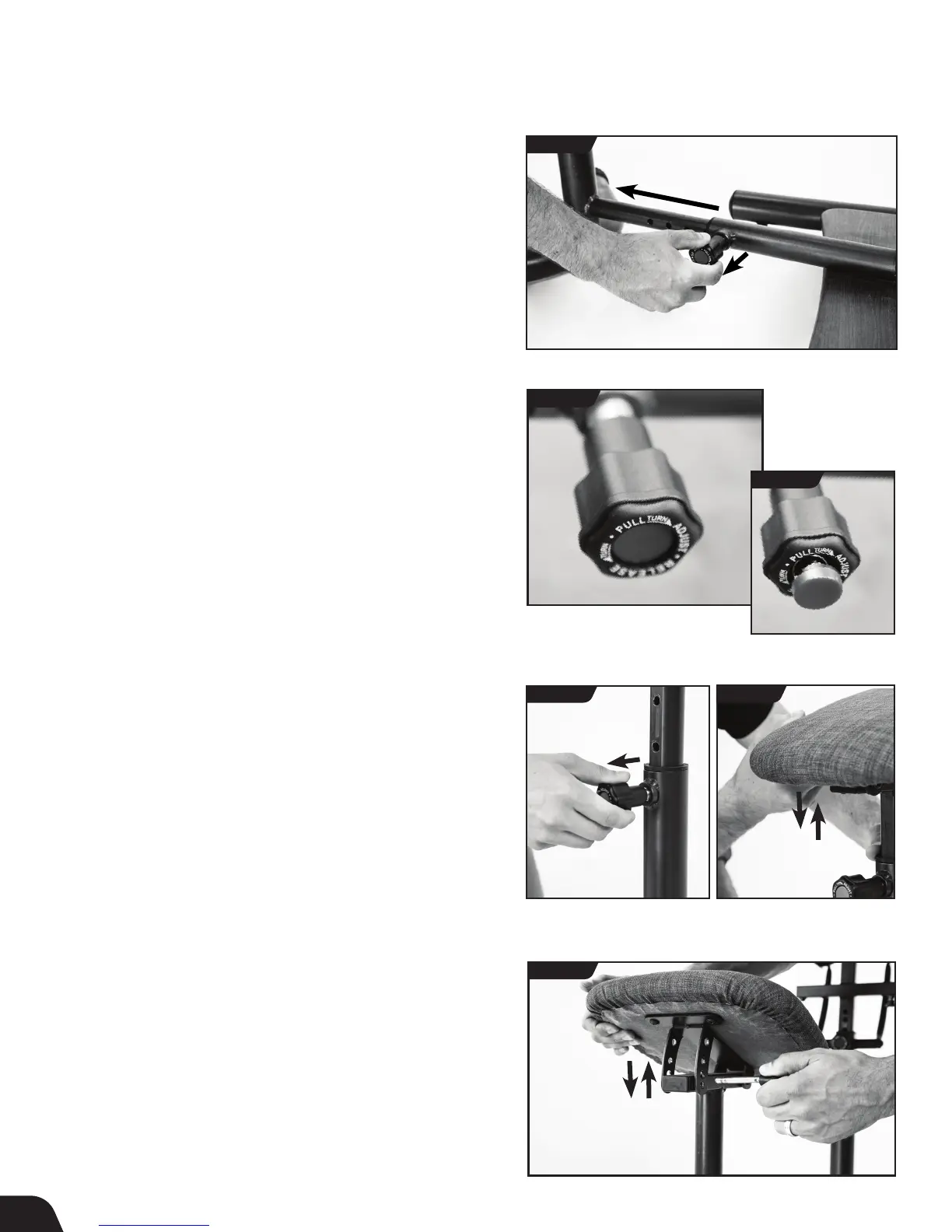
Telescoping Seat Adjustment
• Loosen the Seat Telescoping Auto-Locking Knob.
• Pull the Seat Height Auto-Locking Knob with one hand while
grasping the Seat Support Frame and sliding in or out depending on
the desired setting (Figure 14). Do not extend past the setting labeled
"Max" or the seat will disconnect from the Desktop Base.
• Release Knob then gently slide in or out until the Knob engages in a
hole setting. Once in the desired hole setting, the Auto-Locking
Knob button automatically depresses or "locks" in the setting
(Figures 15a & 15b).
• Retighten the Seat Telescoping Auto-Locking Knob.
Seat Height Adjustment
• Loosen the Seat Height Auto-Locking Knob.
• Pull the Knob with one hand while grasping the Seat Cushion
and sliding up or down depending on the desired setting
(Figures 16 & 17). Do not extend past the setting labeled
"Max" or the seat will disconnect from the Seat Frame Connector.
• Release the Knob, then gently slide in or out until the Knob engages
in a hole setting. Once in the desired hole setting, the Auto-Locking
Knob button automatically depresses or "locks" in the setting
(Figures 15a & 15b).
• Retighten the Seat Height Auto-Locking Knob.
FIGURE 14
FIGURE 16 FIGURE 17
FIGURE 18
Seat Angle Adjustment
• Pull out the Seat Angle Pin
• Adjust the angle of the seat from 0 (horizontal) up to 30
(Figure 18).
• Secure the pin into the desired hole setting (Figure 18).
FIGURE 15b
FIGURE 15a
UNLOCKED
LOCKED



 To Next Page