Storage & Maintenance
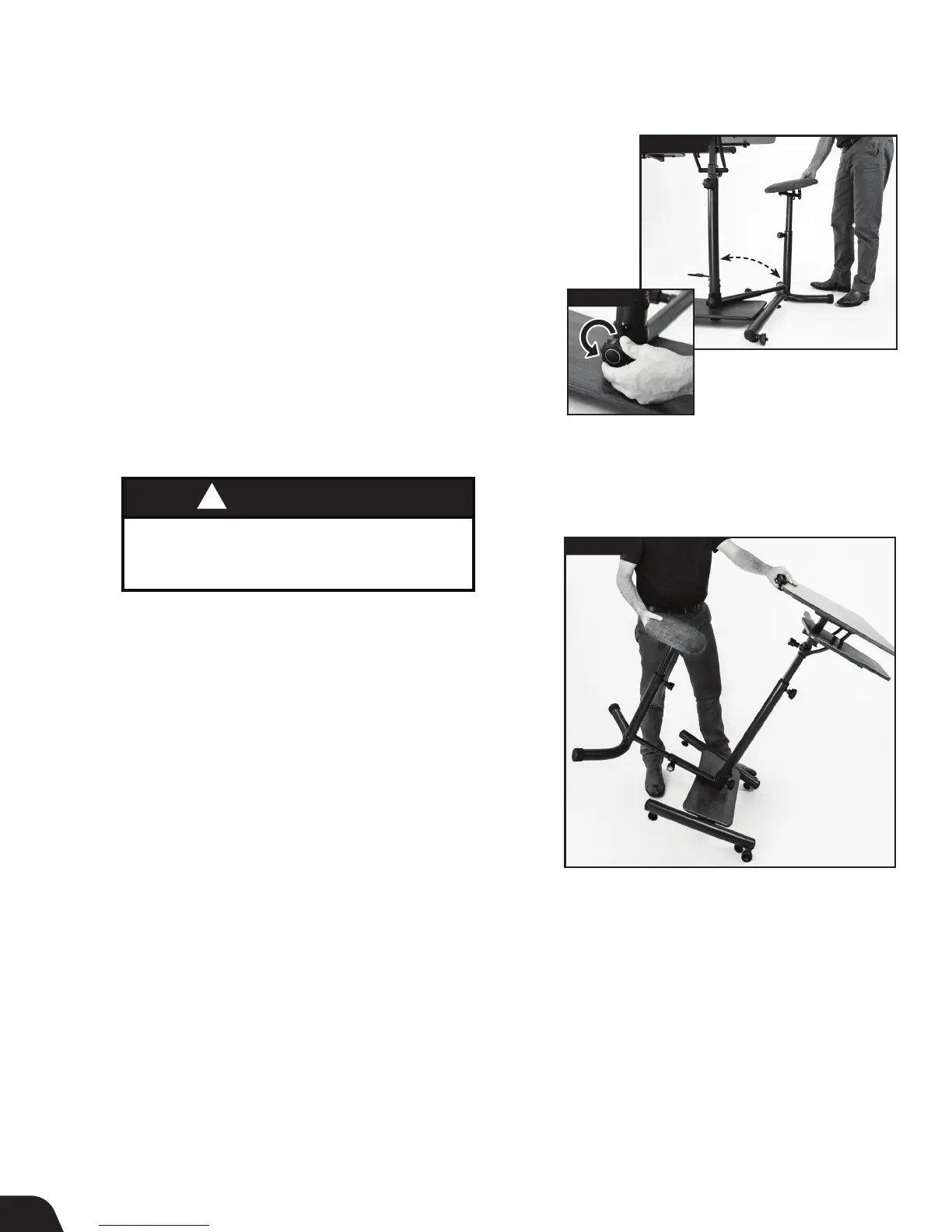
Seat Storage
The Seat may be stored out of the way or disconnected when using the
workstation while standing.
• Loosen the Seat Stabilizer Knob. Grasp each side of the stool and lift to
rotate to one side of the workstation (Figures 22a & 22b).
• Retighten the Seat Stabilizer Knob.
Moving the Workstation
• Grasp the back of the seat cushion with one hand and the back of the
Desktop with the other. Gradually tilt the Workstation forward until the
wheels on the Desktop Base contact the floor, then slowly transport
(Figure 23).
FIGURE 22a
12
FIGURE 22b
Maintenance
It is the responsibility of the user to ensure that regular maintenance
is performed.
• Verify that all nuts and bolts are accounted for and properly tightened.
• Replace worn or damaged parts immediately or keep out of use
until repair.
• To clean, use small amounts of soapy water or cleaner and wipe off
immediately with a dry cloth.
FIGURE 23
WARNING
!
DO NOT attempt to move the workstation until
the desktop and side table have been cleared of
all items. Those unable to lift may require assistance.



 To Next Page