Operating Instructions
2–10
TDS 500B, 600B and TDS 700A Service Manual
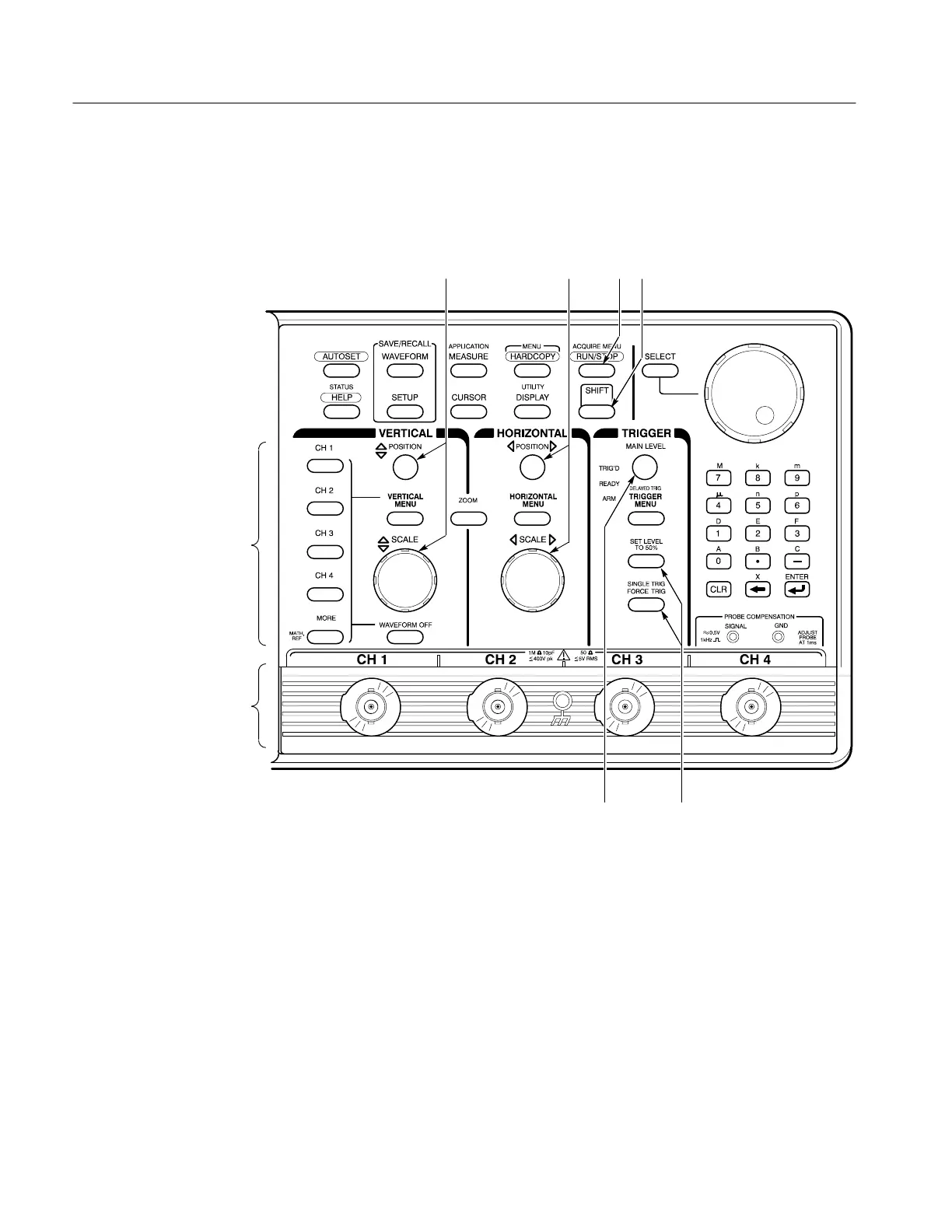
2. Select the waveform source(s). Position, scale, and set trigger level for
waveform source(s) directly from the front panel. The steps that follow
provide examples of possible control selections.
123
65
7
8
4
a. Input waveforms into these channels (7). Example: CH 1.
b. Push any channel’s button (8) to display its waveform. The last channel
turned on determines which waveform is positioned and scaled. The
indicator above the channel last selected is lighted.
Example: Push CH 1; then CH 2.
c. Vertically (1) and horizontally (2) scale and position the waveform(s)
selected. Example: Set the scale to 100 mV/div and center the waveform
on screen.
d. Stop and start acquiring waveforms (3). Example: Push RUN/STOP if
not acquiring.


 To Next Page
 Loading...