Operating Instructions
TDS 500B, 600B and TDS 700A Service Manual
2–11
e. Adjust trigger level (6) to trigger the waveform(s) selected or use these
buttons (5) to either set a trigger level at the mid-amplitude level of the
selected waveform or to force a single trigger. Example: Push SET
LEVEL TO 50%.
3. Set all other functions using menus.
a. Choose the waveform source (8) first if setting a vertical function; else
skip to step b. Example: Push CH 2.
b. Push SHIFT (4) if the function to be set is highlighted in blue; else skip
to step c.
9
11
12
14
13
10
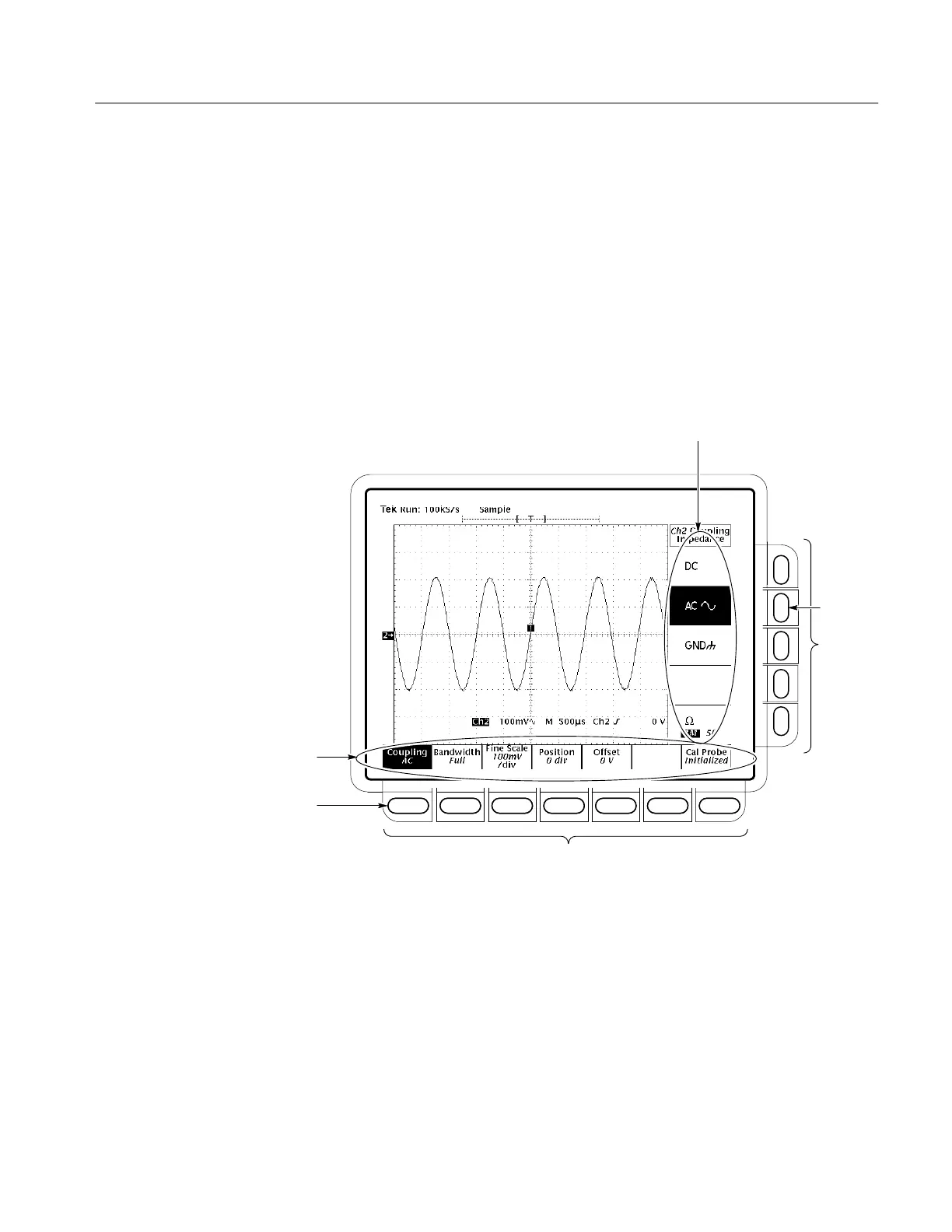
c. Push the front-panel button that corresponds to the menu containing the
function. A main menu (14) for selecting among related functions
appears. Example: Push VERTICAL MENU.
Note the two labels: the top label is a function to choose from; the
bottom label tells you the current setting for that function. Offset is
currently set to 0 V.
d. Select a function from the main menu using the main-menu buttons (12).
A side menu for selecting among that the available settings for that
function appears. Example: Push Coupling (13).


 To Next Page
 Loading...