Optical connection For power measurement of optical signals.
4. DEVICE OVERVIEW
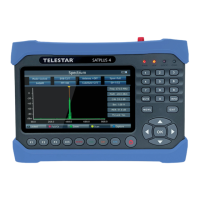
4.1 Control panel and connections
F3 Calls up different functions depending on the operating mode.
AVS Switches to external input source
Function Red
AUDIO
Function
Green TV/R
Calls up various functions in the menu. Calls up
audio parameters.
Calls up various functions in the menu. Switches
between TV and radio mode.
Function Orange
SAT
Calls up various functions in the menu. Calls
up measurement parameters inSat reception.
Blue function Calls up various functions in the menu.
Switches the device on or off.
Antenna connection Satellite reception system
RF connection for measuring DVB-T/T2 or DVB-C signals.
USB connection for updating the device with a new
firmware and to save a station list, to save a channel list, to save a
Screenshots or to record a TV program.
HDMI output for outputting the screen content to an external monitor with
HDMI connection.
AV Out
AV output for outputting the screen content to an external monitor
with an analog AV connection. (Adapter cable included in the scope
of delivery)
DC Out
12 V voltage output for operating external devices with 12 V
power supply. (e.g. surveillance camera)
Voltage
Power supply Connection of the external power supply unit or car power supply unit (included in the
scope of delivery)
EN


 To Next Page