4.1
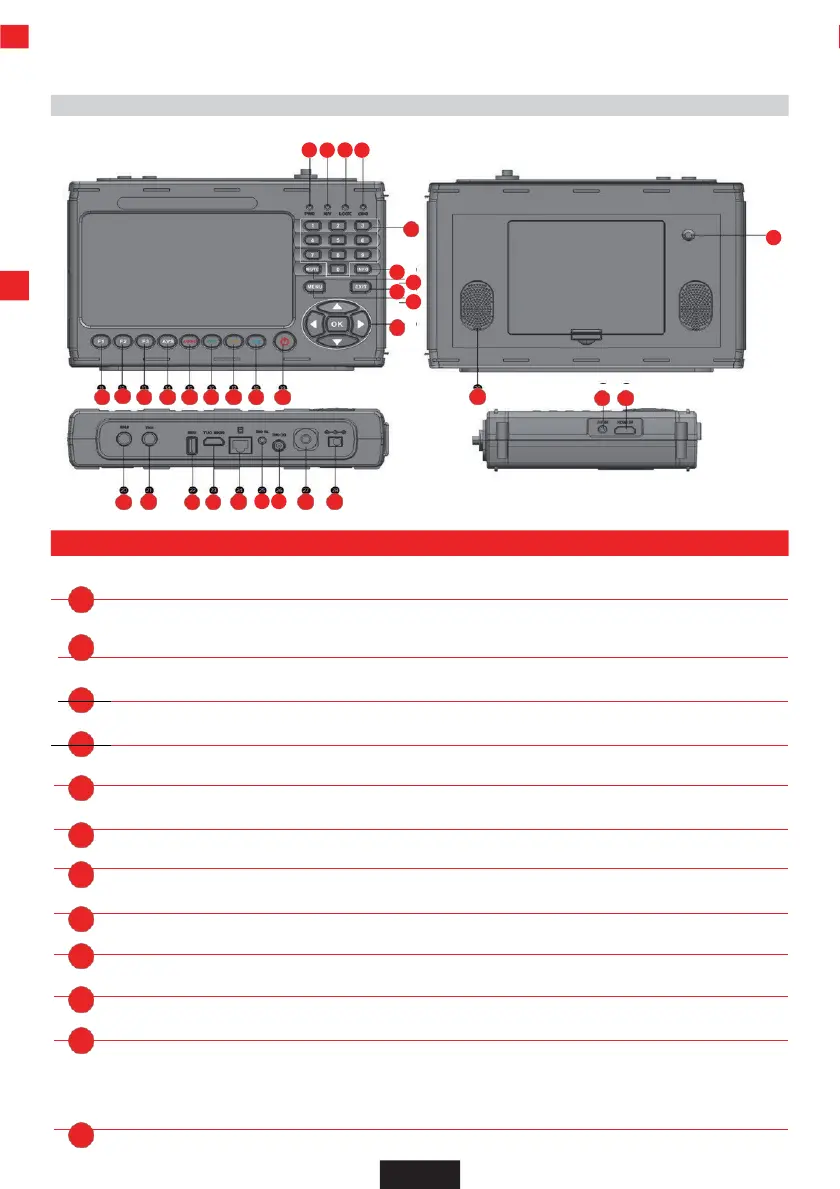
Control panel and connections
EN
1 2 3 4
30 31
20
21 22 23 24 25 26 27 28
11 12 13 14 15 16 17 18 19
4. DEVICE OVERVIEW
PWR Power LED. Lights up red during operation.
LOCK Signal is present. Data stream is being received.
CHG Battery control status Yellow: Battery is charging.
Push-button door For direct input of a value.
INFO Calls up the reception parameters of a set P program.
MUTE Mutes the loudspeaker.
EXIT Exits the selected menu.
MENU Calls up the menu. Pressing again switches back one menu item.
Navigation cross
For navigation in the menu. OK button Confirms a selection
F2 Calls up different functions depending on the operating mode.
s
F
e
1
.
Calls up different functions depending on the operating mode.
Polarization status:
Red-horizontal (18V) / Green-vertical (13V)


 To Next Page