ECLIPSE 8/16/32/99 Series – User Operation Manual
25
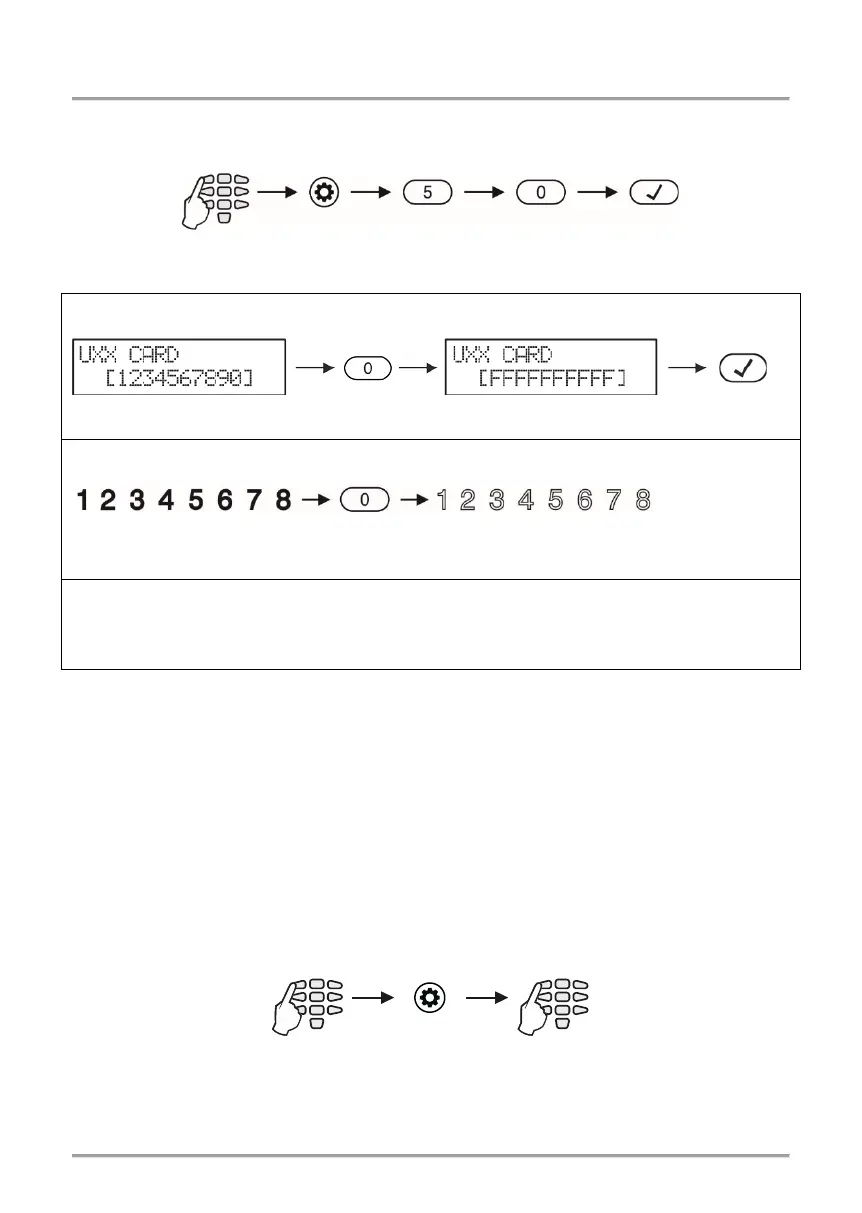
4.6 Deleting Own Proxy Card
To delete his/her own card, the user needs to do in sequence:
Depending on the keyboard used, the visualization on screen is as follows:
LCD 32 and LCD 32 Sensitive
Enter at the address 11 and choose a user number - the LED for zone 1 is blinking on the
display. The registered user card is indicated with digit buttons 1 to 9 lighting on in red.
Press and hold for 2-3 second the button “0”.
Attention: No confirmation is necessary after deleting of a user card. You cannot reject
the operation with pressing the CANCEL button.
5. MANAGERS’ PROGRAMMING MENUS
User 01 is always Chief Manager is the system. The default Chief Manager Code is 0000.
Important Notes: The Chief Manager’s rights cannot be changed.
One Manager cannot change other Manager codes.
The Manager can change only regular User codes associated to common Area number(s)
with him.
To enter manager programming mode, enter in consecutive order:
Text Menu/
2-digit address
address
for 2-3 sec.
for 2-3 sec.
for 2-3 sec.














 To Next Page