ECLIPSE 8/16/32/99 Series – User Operation Manual
39
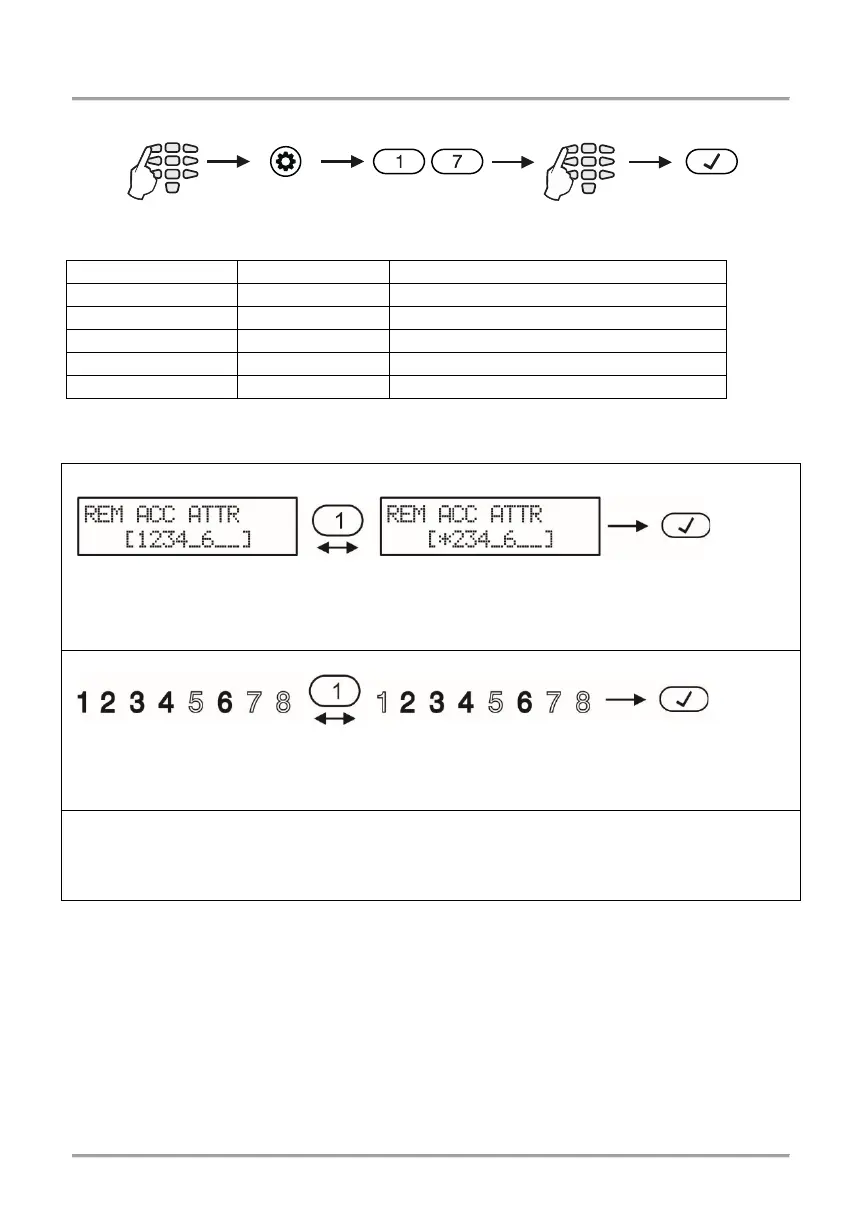
In address menus the attributes are corresponding to the numbers from the table below:
Remote access rights:
Allows remote change of user codes.
Allows remote programming of the system.
Allows remote zone bypass.
By default, all attributes are enabled.
Depending on the keyboard used, the visualization on screen is as follows:
LCD 32 and LCD 32 Sensitive (address menus)
By pressing a digit button with corresponding number of an attribute it is alternatively
enabled or disabled.
The attribute is enabled when the number is visualized on the
screen. The disabled attributes are marked with “
*
By pressing a digit button with corresponding number of an attribute it is alternatively
enabled or disabled. The attribute is enabled when the number is lit on the display. The
disabled attributes are not lit.
Enter at the address 17 the LED for zone 1 is blinking on the display. The digit buttons of
the enabled remote access attributes are lighting on in red, and the digit buttons
corresponding to the disabled attributes are off.
5.21 Sending a “Manual test” Message
In menu “4. SETTINGS – 7. MANUAL TEST REPORT” or Address 18 the Manager can
trigger off sending a “Manual test” message to a monitoring station or test message with a
voice dialer (when such is fitted in the controlled panel).
It is used for testing the communicator without the need to send a technician on site.
After entering in menu, the communicator will start an automatic sending of messages –
firstly towards the monitoring station (if there are phone numbers entered in the digital
communicator) and afterwards via the voice dialer (if there is such fitted and there are
phone numbers entered). The programming menu can be exit by pushing the CANCEL
button.
All attributes are enabled
The remote disarming is disabled
All attributes are enabled
The remote disarming is disabled














 To Next Page