ECLIPSE 8/16/32/99 Series – User Operation Manual
32
5.10 Associating Timeslots to User
Attention: This menu is available for ECLIPSE 32/99 control panel.
From 1 to 8 timeslots for Eclipse 32 and from 1 to 16 timeslot numbers for Eclipse 99 with
working hours can be defined in the system. Their programming is done by Engineer.
Beginning and end of the working hours, active days of the week and possibility for
including holydays are set for every timeslot.
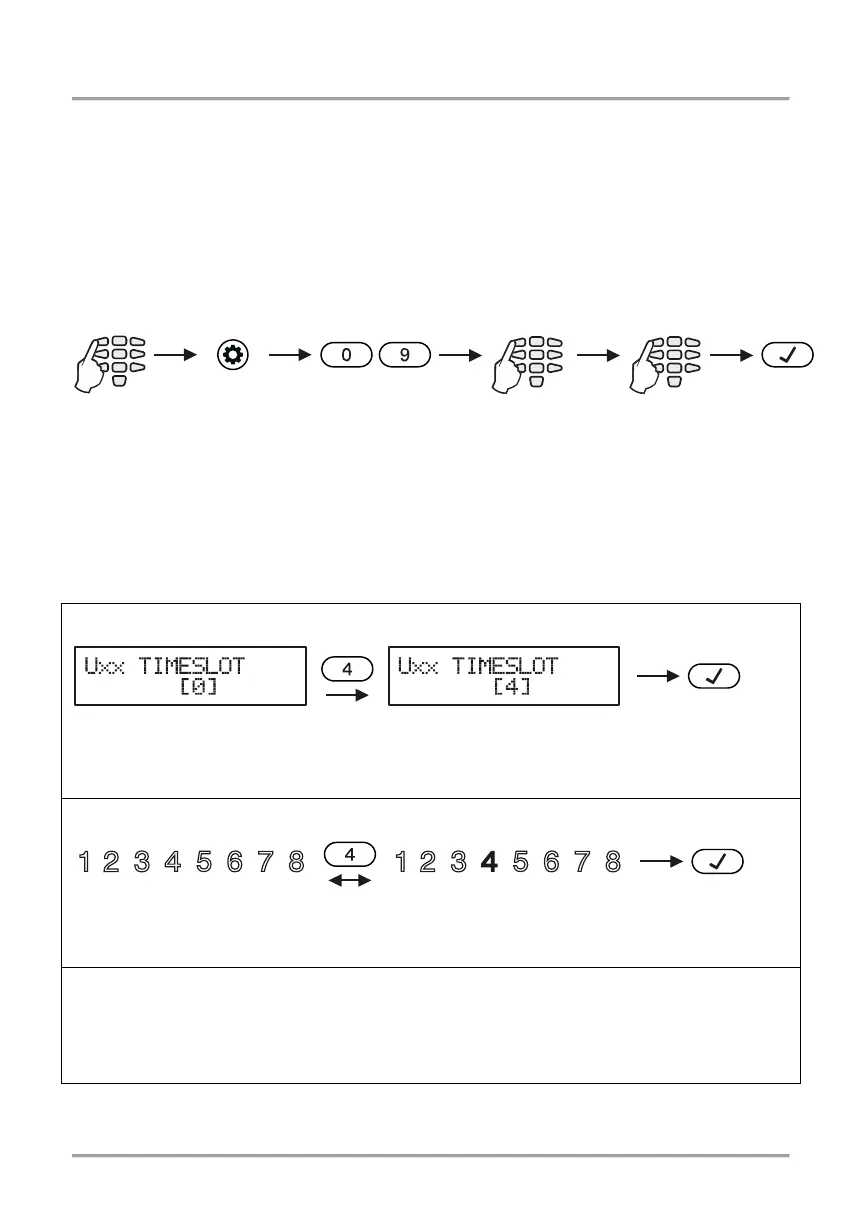
Associating timeslots to user codes is done in menu “1. USERS – xx. User – 05. Timeslot”
or Address 09, after entering manager code:
Timeslot from 1 to 16, according the panel is assigned to the address. Only one timeslot
can be associated to every user code.
Note:
If no timeslot is associated to the code, the digit “0” (Eclipse 32) or “00” (Eclipse 99) is
entered. This is the setting by default.
Depending on the keyboard used, the visualization on screen is as follows:
LCD 32 and LCD 32 Sensitive (address menus, Eclipse 32)
Timeslots are associated by pressing the respective digit number. The number of the
chosen timeslot is visualized on screen.
Timeslots are associated by pressing the respective digit number. The number of the
chosen timeslot is lit permanently.
LED 8/LED 16A (Eclipse 32)
Enter at the address 09 and choose a user number - the LED for zone 1 is blinking on the
display. The digit button corresponding to the associated timeslot is lighting on in red. By
default, the digit button 0 is on. To set another timeslot number you have to press the
corresponding digit button.
The final choice is confirmed by pushing the ENTER button.
1. USERS - xx. User -
05. Timeslot
No timeslot is associated
Timeslot No 4 is associated
No timeslot is associated
Timeslot No 4 is associated














 To Next Page