ECLIPSE 8/16/32/99 Series – User Operation Manual
27
5.1 Creating and Changing User codes
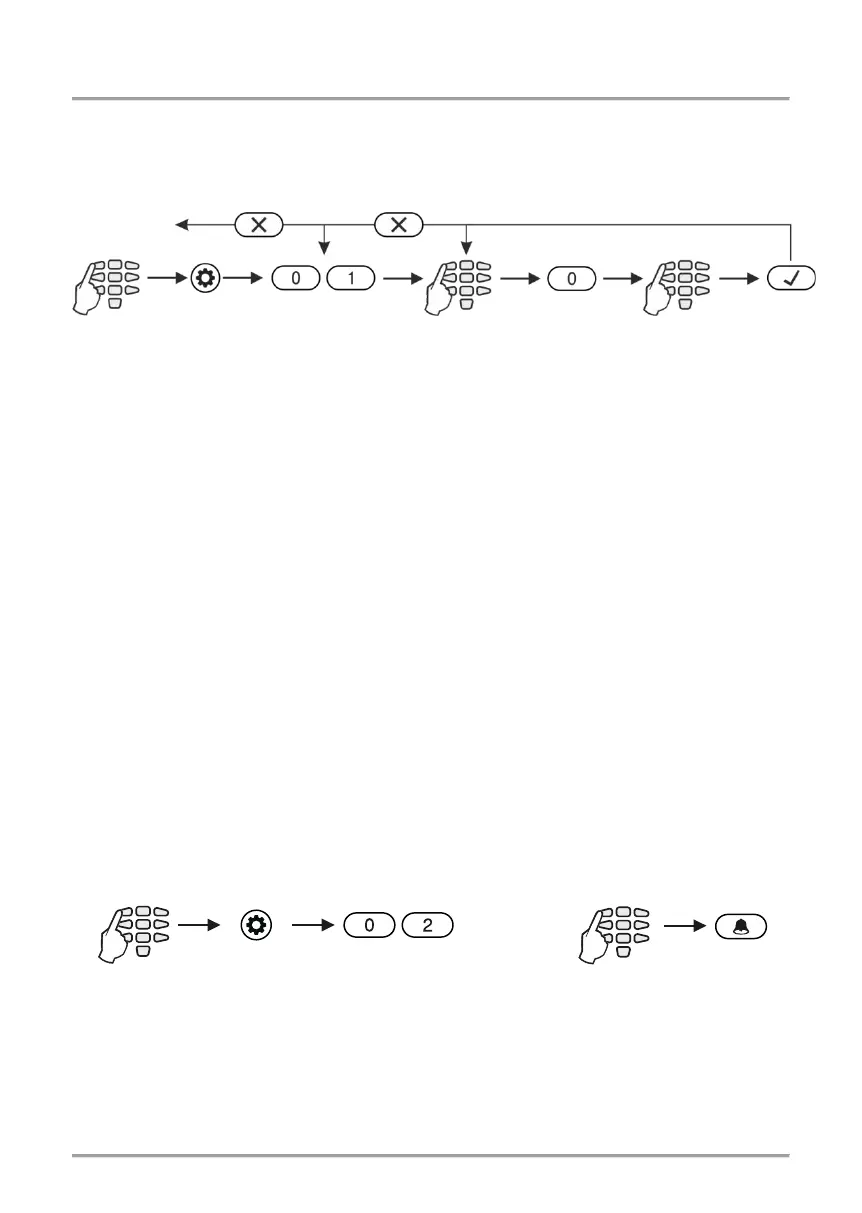
Creating new and changing existing user codes is realized in menu “1. USERS” (Address
01). When operating with text menus you must just follow the order from the quick table.
The operation with addresses is more specific as shown on the diagram below:
Attention: In ECLIPSE 32/99 control panel you cannot create or change other Manager
codes, so before that you have to disable “MANAGER ENB” in menu 1. USERS – xx.
User – 02. Options (Address 06 – option 8).
After confirming the new code with the ENTER button, if the code is accepted, the
keyboard emits a confirmation beep and goes back to the user number screen. If the
entered code is already being used in the system (a valid user or ambush code), the
keyboard emits a rejection beep. For LCD keyboards there is also “Invalid” message on
the screen. The system goes back to address entry screen.
To return to the main screen press the CANCEL button a few times.
5.2 Deleting User codes
The removal of user (or manager) code is done by disabling all its rights “1. USERS –
xx. User – 02. Options (Address 06)” and its associated areas “1. USERS – xx. User –
03. Areas (Address 07)”. If only the rights are disabled, the code will remain active but
with limited functions - it could be used only to check the memory log and faults in the
system and to arm the associated areas in Full arm mode. To remove the code
completely delete also all associated areas to it – see items 5.6 and 5.7. Or you can
delete the code combination for as described in item 5.1. and confirm without entering a
new code.
5.3 Memory LOG review by Manager
Viewing the events in the memory log is realized in menu “3. VIEW LOG” (Address 02) or
by pressing the MEMORY button, after manager code has been entered:
The events are viewed in consecutive order, one by one, from the last to first with the help
of the arrow buttons.
See also the detailed description of item 4.2.
2-3 sec. to delete
the code














 To Next Page