iRIS8 - Addressable Fire Alarm Panel – User & Maintenance Manual
11
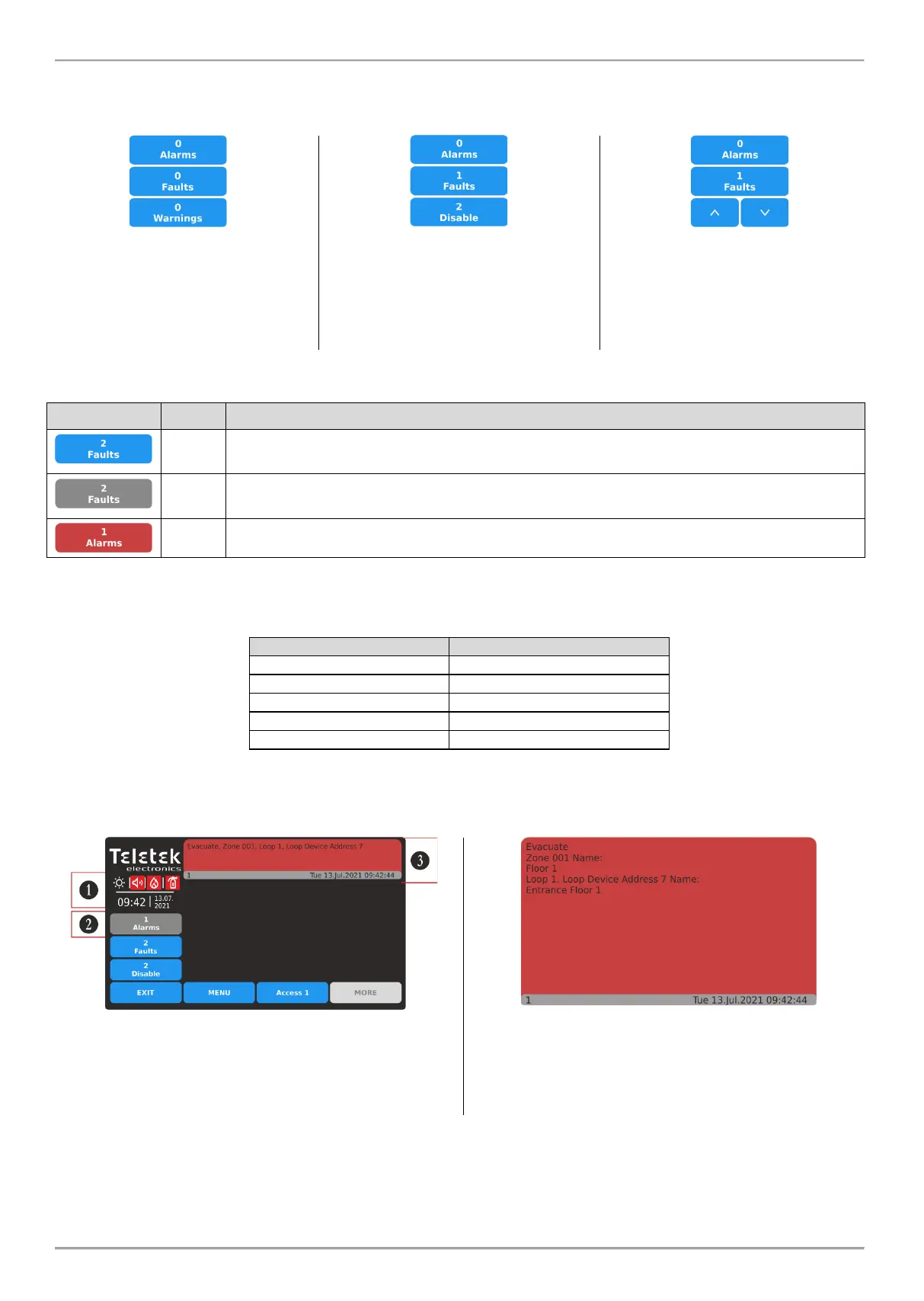
Only three fields for reviewing events can be displayed at the same time on the screen. If there are more type of events
to review, then the User can use the buttons with arrows to scroll up and down the active fields. See the following
examples:
No events in the system
(panel/network).
By default, the buttons for Alarms,
Faults and Warnings are displayed.
Active events for Faults and
Disablements only.
No active Warning events. The
Disablements events are displayed,
because of their higher priority.
Active events for Faults and other type
of events in the network. The other
type of events can be reviewed with up
and down buttons. The order for
displaying is according their priority for
indication.
The buttons are changing their color according the performed action – active Alarm or pressed button.
Active, not pressed button for Faults, Disable, Test and Warnings events.
No active Alarm events.
Active, pressed button for Alarms, Faults, Disable, Test and Warnings events. The list with
messages for events is available on the right side on the screen.
Active, not pressed button for Alarm events.
To review the list with messages, press the respective active button for an event type. The events are displayed with a
color code for easy recognition:
Color for the messages list
In case of incoming Alarm or Fault type messages, the iRIS8 panel will automatically switch on the screen in Events
Reviewing Mode and will show the message contents on the right side of the screen.
1 – Alarm Mode. Activated sounders and fire panel outputs.
The LED GENERAL FIRE is lighting on.
2 – Selected button for reviewing the Alarm messages.
3 – Alarm event message (displayed with number, date and
time). Press the red field to expand the message contents.
In the expanded screen are shown more details for the
Alarm event: Type of the event; Number of the activated
zone and loop; address number of the activated device.
In case the event is generated from other panel in a
network is shown also its Number and Name.














 To Next Page