iRIS8 - Addressable Fire Alarm Panel – User & Maintenance Manual
10
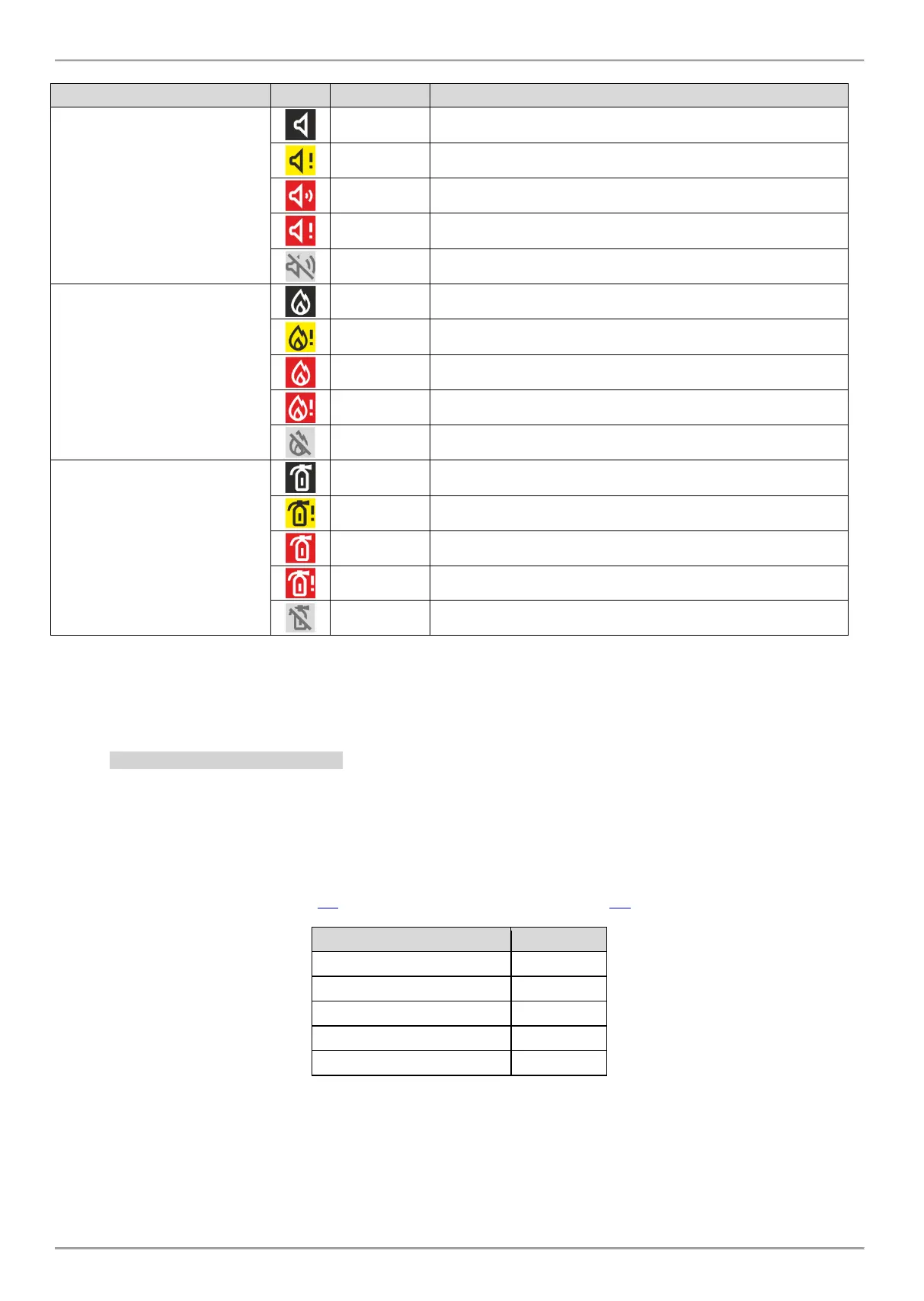
The icons for current status of the panel have the following meaning:
Sounders
(loop devices, panel outputs*)
Not activated Sounder outputs.
Not activated Sounder outputs; fault detected.
Activated Sounder outputs.
Activated Sounder outputs in fault.
Sounder outputs are disabled.
Fire Brigade Output
(panel*)
Standby mode, not activated Fire Brigade output.
Not activated Fire Brigade output; fault detected.
Activated Fire Brigade output.
Activated Fire Brigade output in fault.
The Fire Brigade output is disabled.
Fire Protection
(Extinguishing) Output
(panel*)
Not activated Fire Protection output.
Not activated Fire Protection output; fault detected.
Activated Fire Protection output.
Activated Fire Protection output in fault.
The Fire Protection output is disabled.
* Outputs type Sounder, Fire Brigade and Fire Protection (Extinguishing) of the iRIS8 fire alarm panel or other fire panel in the
network from which the fire event is received.
** Attention: The iRIS8 indication shows that there are one or more fire panels in the network with disabled for operation output. You
can check the DISABLE events menu to review the numbers of these panels.
2.3.2. Section for Events Review
NOTE: iRIS8 can display messages for events from other panels in a network if it is programmed (enabled) to
receive commands from them. The settings for Receiving and Sending commands are programmed at
Installer’s Access Level 3.
The messages for events are displayed on the screen according their priority for indication. They can be reviewed at
any time with no matter of the set Access level. According the type of the event, is activated and the corresponding LED
indication for system status – see item 2.1, and activated zone number – see item 2.2.
When no events are registered in the panel system configuration or network, the screen displays just active buttons for
Alarms, Faults and Warnings.
In case of receiving an event, the panel will show them in a respective priority on the main screen. The number of
events is shown on the top of the button. The button for Alarm events is always active on the top of the list. In case of no
Faults, but active Disablements and Warnings in the network the list will be reordered.














 To Next Page