iRIS8 - Addressable Fire Alarm Panel – User & Maintenance Manual
23
4.1.4. Loop Devices – Quick Review
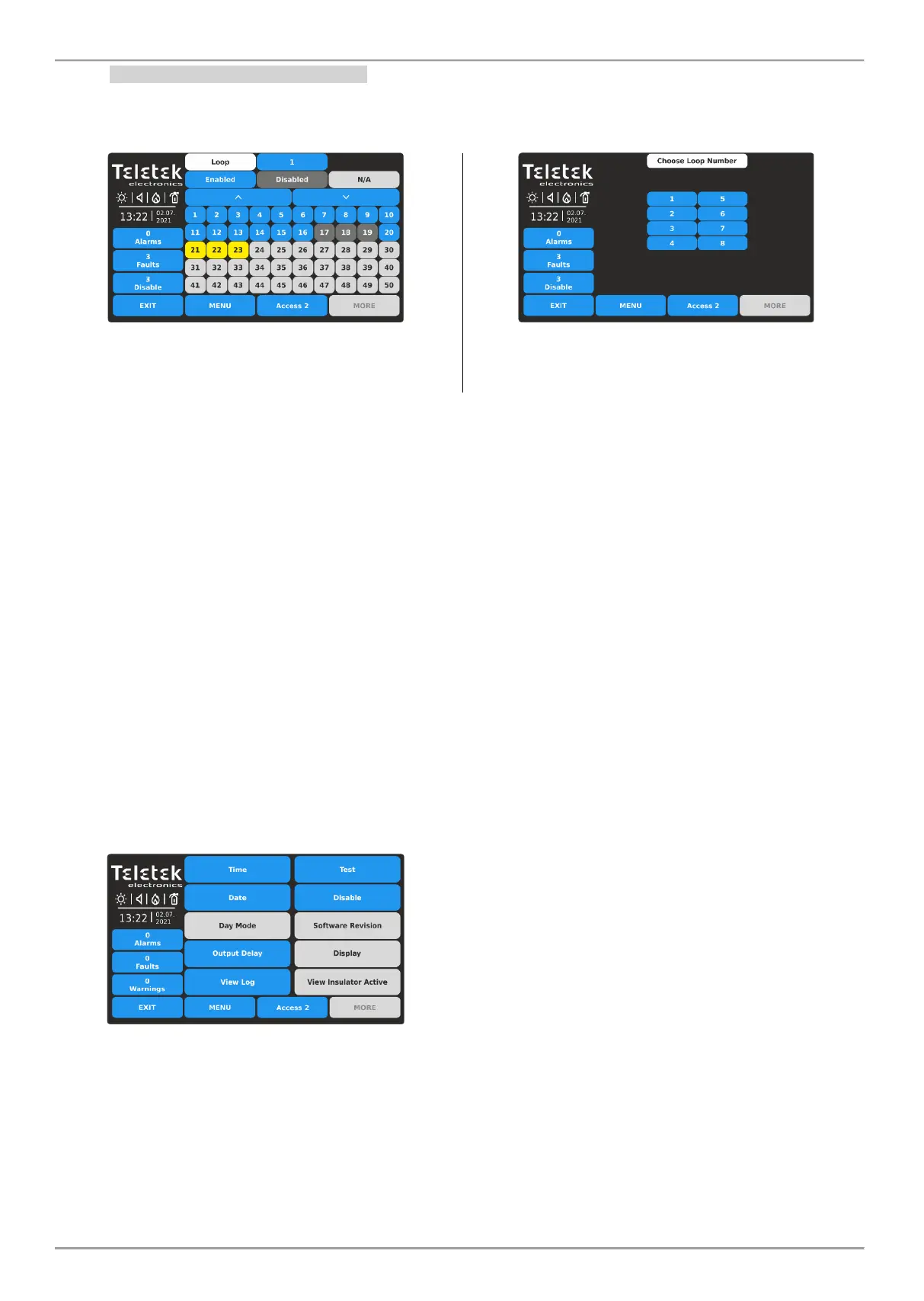
Next to LOOP menu is situated button << GRID VIEW for quick reviewing the operation status of all loop devices. The
devices are reviewed at several screens, as 50 address numbers are displayed at the same time. The devices can be
reviewed also loop by loop.
First are displayed the device address numbers from 1 to
50. The loop number can be changed on the top of the
screen. Press the active digit button next to loop filed.
Press a number of a loop to review the status of the
connected devices. The screen moves automatically back
showing the grid view with device addresses.
To review the device address numbers from 51 to 100, press down arrow button. Press button again to review
addresses from 101 to 150, etc. Press the up arrow button to move back.
The operation and system status of the loop devices is presented with color buttons and address number for easy
recognition:
• Enabled device - active blue button.
• Disabled device - active dark grey button.
• Device in Fault - active yellow button.
• Free Address (N/A) – inactive light grey button.
For quick access to a device address setting menu, press its number. To go back from loop device menu to grid view
menu, press EXIT button.
Every change of the operation or system status of a loop device is updated immediately in the Grid View menu.
To exit from the << GRID VIEW for loop devices menu, press EXIT button.
4.2. Maintenance Menus
In Maintenance menus at Access Level 2, the user can perform some settings for the panel daily operation, including
tests and memory log review.
Enter MAINTENANCE menu. The available for operation submenus are performed with active buttons in blue.
Quick summery of the submenus:
• Time – Setting the current time.
• Date – Setting the current date.
• Output Delay – Setting the delay for activation of
panel outputs.
• View Log – Memory log file review, print and clear.
• Test – Performing tests for zone and sounders
operation, LED indication on the front panel.
• Disable – Perform disablements for zones, loop
devices, including by zones, and panel’s outputs.














 To Next Page