EasyManua.ls Logo

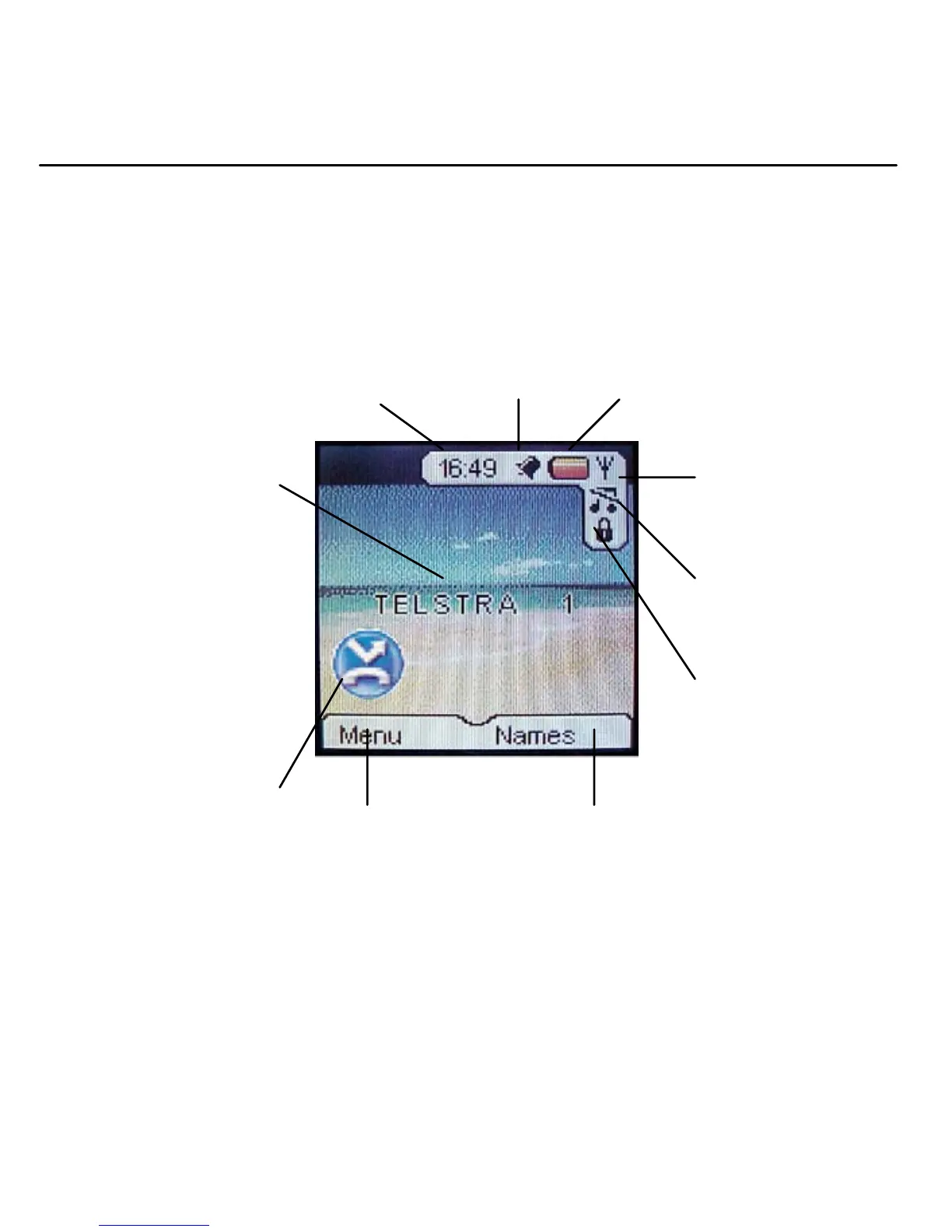
Telstra V1600 SMS - Handset Display Icons

Telstra V1600 SMS
56 pages
Print Icon
To Next Page IconTo Next Page
To Previous Page IconTo Previous Page
Loading...
9 Getting to know your Telstra V1600
Handset display icons
Current time,
page 40
A
larm set,
page 41
Battery
status
Range indicator
Flashes when out
of range
Handset identity
The number of the
handset is displayed at
all times. You can
change the name on
the handsets, e.g.
Michael, Kitchen,
Office etc., page 36.
Handset ringer
off,
p
a
g
e 35
Keypad locked,
page 15
Names option
Press the key below to
open the phonebook,
page 17.
Menu option
Press the key
below to open
the main menu,
page 10.
New Missed Calls*
You have new
(unread) entries in the
Missed Calls list, page
28.
* You need to subscribe to Telstra Calling Number Display in order to receive the number
of your callers. Excludes blocked calls. Monthly charges apply. Available in most areas. For
more information, call 13 2200 for Residential or 13 2000 for Business services.

Table of Contents

Related product manuals