5
3. CAN-CONTROL Configuration
3.1. CAN-CONTROL program number selection
CAN-CONTROL must be set to program number which depends on vehicle model.
Needed program number is always written on CAN-CONTROL mounting scheme. Please
contact Your Teltonika sales manager to get latest supported vehicle list and mounting
scheme for your vehicle, please provide CAR manufacturer, model and year information.
3.1.1 CAN-CONTROL program number configuration via SMS
command
CAN-CONTROL program number can be set remotely, using SMS command.
SMS command: lvcansetprog X or login pass lvcansetprog X
X is new program number value.
Example: lvcansetprog 11434 SMS response: LVCAN ProgNum: 11434
3.1.2. CAN-CONTROL program number configuration via
Configurator
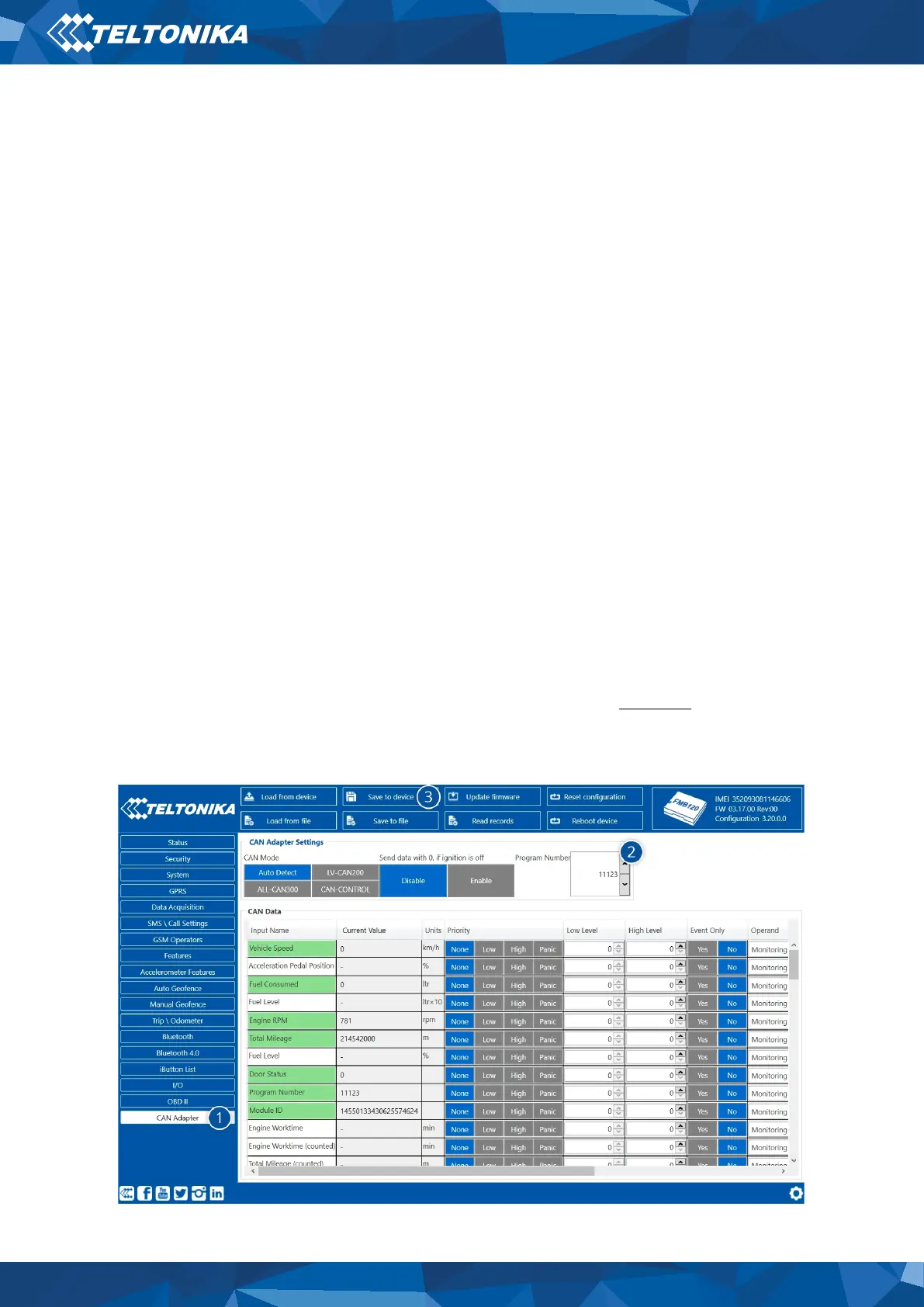
CAN-CONTROL program number can be set via Configurator, see Figure 2. Go to CAN Adapter
(1) → Program Number (2). Enter program number and press Save to device (3) button that
saves the current configuration into FMB1YX.
Figure 2 CAN Adapter Settings in Configurator, 1 – CAN Adapter settings, 3 – Save to
device, 3 – Program number field


 To Next Page