Quick Manual v1.1 // FMC650
6
SET UP YOUR DEVICE
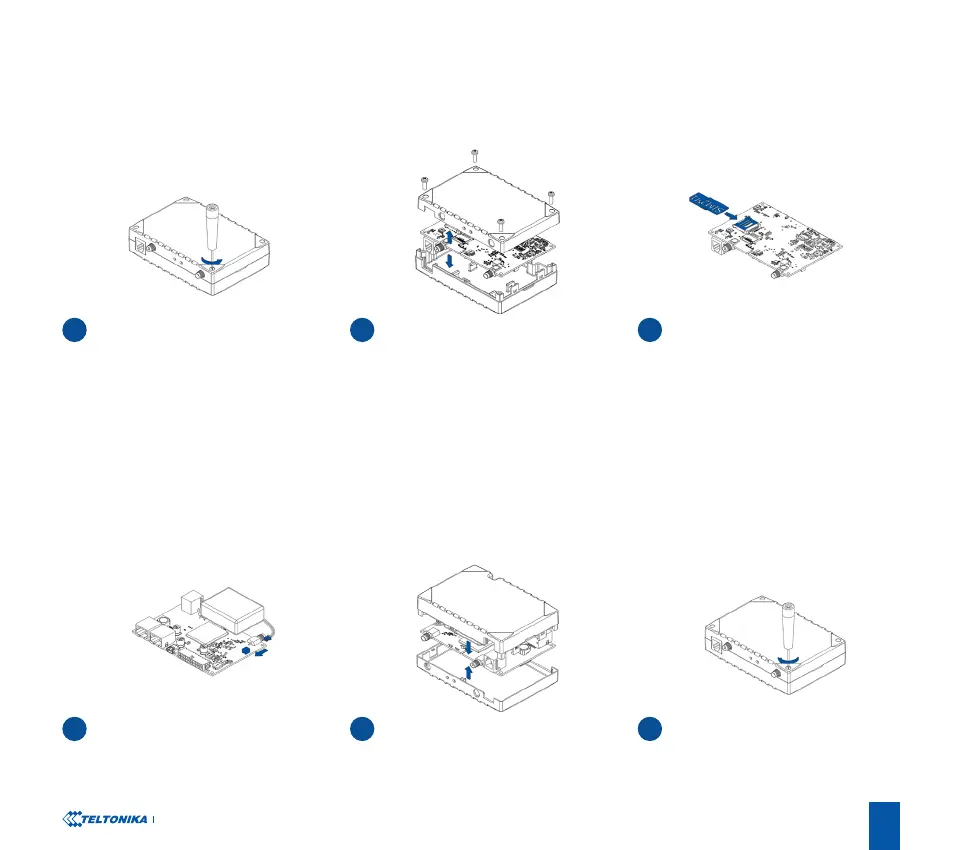
HOW TO INSERT MICRO-SIM CARD AND CONNECT THE BATTERY
1
4
UNSCREW SCREWS
BATTERY CONNECTION
3
6
SIM CARD INSERT
DEVICE IS READY
2
5
COVER REMOVAL
ATTACHING COVER BACK
Unscrew 4 screws counterclockwise that
are located on the bottom of the device.
Connect battery as shown to device.
Remove the cover
After conguration, see “PC Connection
(Windows)”, attach device cover back.
Insert SIM card as shown with PIN
request disabled or read Security
info
1
how to enter it later in Teltonika
Congurator
2
. Make sure that SIM card
cut-o corner is pointing forward to slot.
SIM slot 1 is closer to PCB, SIM slot 2 is
the upper one.
1
wiki.teltonika.lt/view/FMC650_Security_info
2
wiki.teltonika.lt/view/Teltonika_Congurator
Screw in all screws. Device is ready to be
mounted.




 To Next Page